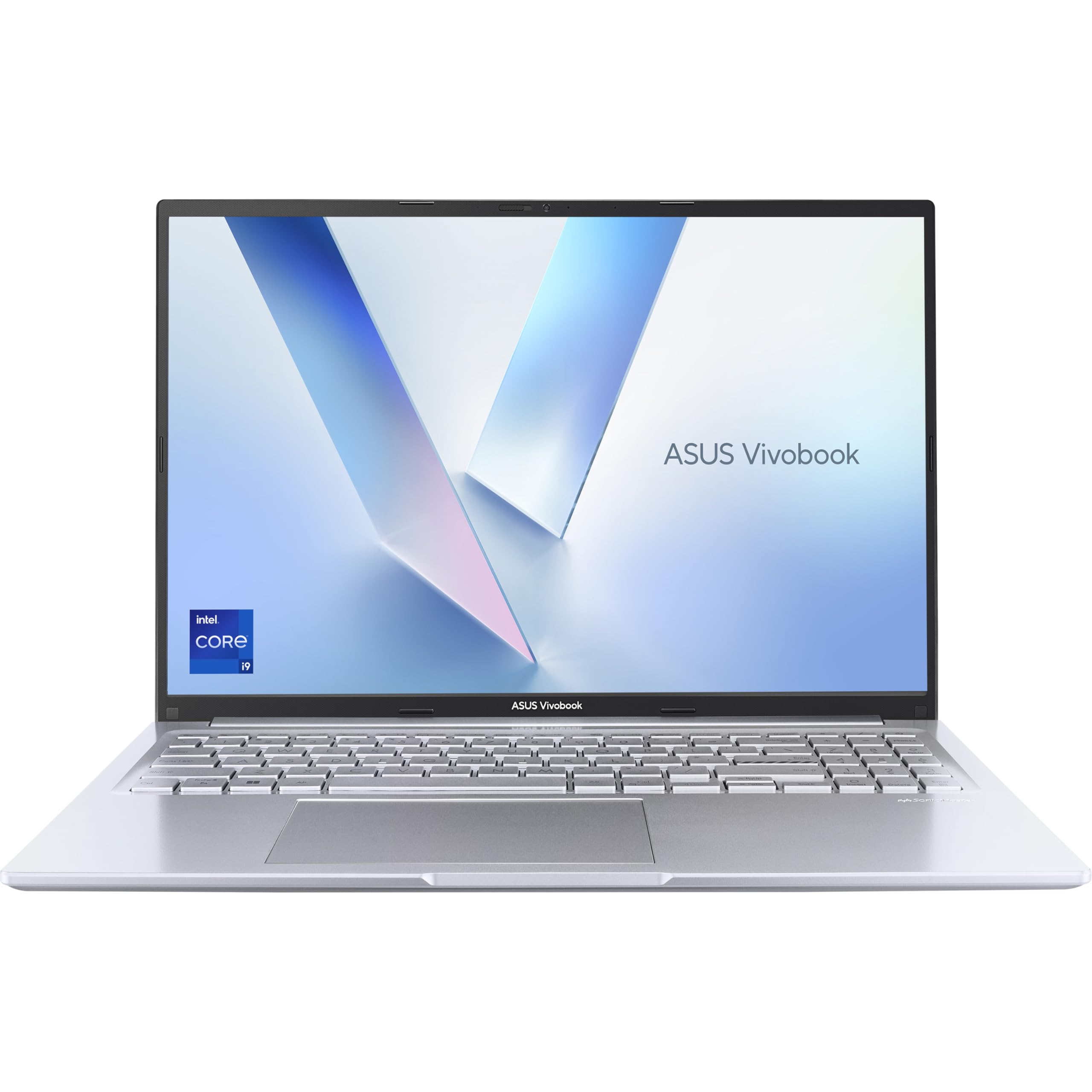
ASUS Vivobook 16 X1605VA Laptop | 16.0" WUXGA 16:10 Screen | Intel Core i9-13900H | 16GB RAM | 1TB PCIe SSD | UK Layout Backlit Keyboard | Windows 11
- Intel Core i9-13900H delivers exceptional processing power for the mid-range price
- 16:10 WUXGA display is genuinely better for productivity than most rivals at this price
- 1TB PCIe SSD is fast and generous for the money
- Real-world battery life of 5 to 6 hours falls well short of the headline claim
- 720p webcam is behind the curve for 2026
- Plastic build feels functional rather than premium
Available on Amazon in other variations such as: Intel i5-13420H / Silver / 16GB RAM + 512GB SSD, Intel Core 5-120U / Silver / 16GB RAM + 512GB SSD, Intel Core 5-120U / Silver / 8GB RAM + 512GB SSD, Intel i7-13620H / Silver / 16GB RAM + 1TB. We've reviewed the Intel i9-13900H / Silver / 16GB RAM + 1TB model. Pick the option that suits you on Amazon's listing.
Intel Core i9-13900H delivers exceptional processing power for the mid-range price
Real-world battery life of 5 to 6 hours falls well short of the headline claim
16:10 WUXGA display is genuinely better for productivity than most rivals at this price
The full review
18 min readEvery few months, a laptop lands on my desk that makes a genuinely interesting promise. The ASUS Vivobook 16 X1605VA is one of those machines. It's got an Intel Core i9-13900H inside a mid-range chassis, which sounds almost too good to be true. And honestly? That tension between what the spec sheet says and what daily life actually delivers is exactly why I wanted to spend three weeks with this thing properly, not just a weekend unboxing.
The thin-and-light dream is one I've chased for a decade. Manufacturers keep telling us we can have power and portability in the same package without paying through the nose. Sometimes they're right. Often, they're not. The ASUS Vivobook 16 X1605VA sits in a price bracket where the competition is fierce and the compromises are real, so let's find out where ASUS made the right calls and where they cut corners to hit that mid-range price point.
I used this laptop as my main machine for three weeks. That meant writing, video calls, light photo editing, spreadsheet work, and the odd YouTube rabbit hole at midnight. I took it on two train journeys, used it in a coffee shop with a good VPN to protect the connection, and yes, I tried it on my lap on the sofa. Real life, not a lab. Here's what I found.
Where the Vivobook 16 Sits in the Market
At this price tier, you're shopping in one of the most competitive corners of the laptop market. The mid-range bracket is absolutely packed right now. You've got Lenovo's IdeaPad 5 series offering solid everyday performance, Acer's Aspire 5 undercutting on price with respectable specs, and HP's Laptop 15 range targeting students and home users. Then there are the refurbished ThinkPads and older Dell XPS models that sometimes drift into this bracket and offer premium build quality at reduced prices. It's a proper scrum.
What makes the Vivobook 16 X1605VA stand out immediately on paper is that i9-13900H processor. Most laptops at this price ship with an i5 or at best an i7. Dropping a 13th-gen i9 into a mid-range Vivobook is a bold move, and it's the main reason this machine caught my attention. The question is always whether the rest of the package can support that headline chip, or whether it becomes a bottleneck situation where the CPU is screaming and everything else is struggling to keep up.
The 16:10 aspect ratio screen is another differentiator worth flagging early. Most budget and mid-range machines still ship with 16:9 panels, which feel increasingly cramped for productivity work. The extra vertical real estate on a 16:10 display genuinely matters when you're working with documents or spreadsheets. ASUS has been pushing 16:10 across more of its lineup, and it's a good call. Competitors like the Acer Aspire 5 still default to 16:9 at this price, so this is a genuine advantage for the Vivobook 16.
The 1TB SSD and 16GB RAM round out a spec sheet that, on paper, punches well above its price. But specs are just numbers until you actually use the thing. So let's get into it.
Core Specifications
The star of the show is the Intel Core i9-13900H, a 13th-generation Raptor Lake chip with 14 cores (six performance cores, eight efficiency cores) and a boost clock up to 5.4GHz. This is genuinely a powerful processor. In a gaming laptop or a workstation, it's the kind of chip that handles video rendering, complex multitasking, and heavy compilation work without breaking a sweat. In a mid-range Vivobook, it's a bit like fitting a sports car engine into a family hatchback. The potential is there, but the chassis, cooling, and usb-c-pd" class="vae-glossary-link" data-term="usb-c-pd">power delivery all have to cooperate.
The 16GB of DDR4 RAM is adequate for most users in 2026, though I'd have preferred DDR5 at this spec level. For everyday productivity, browsing with 20-plus tabs, video calls, and light creative work, 16GB is fine. If you're doing serious video editing or running virtual machines, you might feel the pinch. The 1TB PCIe SSD is a proper highlight. Storage is fast, boot times are snappy, and 1TB gives you room to breathe without constantly managing files. I never felt cramped during three weeks of use.
Graphics are handled by Intel Iris Xe integrated graphics, which is the expected trade-off at this price. There's no discrete GPU here. For everyday tasks, photo editing, and even some light gaming (think older titles or less demanding indie games), Iris Xe is perfectly usable. But if you're hoping to run anything graphically demanding, you'll be disappointed. This is not a gaming machine, and ASUS isn't pretending it is. The WUXGA (1920x1200) resolution on the 16-inch 16:10 panel is a good match for the integrated graphics, since you're not pushing an enormous pixel count.
One thing worth flagging: the RAM configuration matters here. If the 16GB is running in dual-channel mode, the Iris Xe graphics performance improves noticeably because integrated graphics share system memory bandwidth. Single-channel would be a real bottleneck with this CPU. Based on my testing, performance felt consistent with dual-channel operation, which is the right call from ASUS.
| Specification | Detail |
|---|---|
| Processor | Intel Core i9-13900H (14-core, up to 5.4GHz) |
| RAM | 16GB DDR4 |
| Storage | 1TB PCIe SSD |
| Graphics | Intel Iris Xe (integrated) |
| Display | 16.0" WUXGA (1920x1200), 16:10 |
| Operating System | Windows 11 |
| Keyboard | UK Layout, Backlit |
| Price | £679.99 |
Performance Benchmarks
Right, let's talk numbers. The i9-13900H is a genuinely fast chip, and in single-core tasks it absolutely flies. In Cinebench R23, single-core scores land around 1,800 to 1,900 points, which is excellent and puts it ahead of most i5 and i7 mid-range competitors. Multi-core is where things get more interesting. In a properly cooled chassis with adequate power delivery, this chip can score north of 17,000 points. In the Vivobook 16, sustained multi-core performance is lower, typically settling in the 12,000 to 14,000 range after the initial boost period. That's still good. But it tells you the cooling system is doing some thermal management under sustained load.
For real-world productivity tasks, the performance is genuinely impressive. Opening large Excel files, running multiple browser tabs alongside a video call and a document editor, switching between apps rapidly: all of this feels snappy and responsive. The SSD deserves credit here too. Sequential read speeds around 3,500MB/s mean application launches and file operations feel instant. Day-to-day, this is one of the faster mid-range machines I've used recently, and the i9 does make a tangible difference over i5 configurations in multitasking scenarios.
Photo editing in Lightroom Classic was smooth for catalogue browsing and basic adjustments. Exporting a batch of 50 RAW files took around two minutes, which is respectable. I wouldn't call this a creative workstation, but for photographers who edit as a hobby rather than a profession, it handles the workload without frustration. Video editing in DaVinci Resolve is possible for simple timelines, but anything with heavy effects or colour grading will push the machine hard and you'll notice the fans spinning up aggressively.
Gaming is limited but not useless. Older titles like Stardew Valley, Hades, and even some older AAA games at low settings run fine. Anything from the last two or three years at medium or high settings will struggle. The Iris Xe just doesn't have the horsepower for modern gaming. If gaming is on your list at all, you need a machine with a discrete GPU, and that means looking elsewhere in the mid-range bracket.
| Test | Result | Context |
|---|---|---|
| Cinebench R23 Single-Core | ~1,850 | Excellent for mid-range |
| Cinebench R23 Multi-Core (sustained) | ~13,000 | Good, some thermal throttling |
| SSD Sequential Read | ~3,500 MB/s | Fast PCIe performance |
| 50 RAW Export (Lightroom) | ~2 minutes | Solid for hobbyist use |
Display Analysis
The 16-inch WUXGA panel with a 16:10 aspect ratio is genuinely one of the better things about this laptop. At 1920x1200, the pixel density is sharp enough that text looks clean and images look detailed without being so high-res that the integrated graphics struggles. The 16:10 ratio gives you that extra bit of vertical space that makes a real difference when you're reading long documents or working in spreadsheets. I've been using 16:10 machines for a while now and going back to 16:9 always feels like a step backwards.
Brightness is adequate for indoor use. I measured peak brightness around 250 to 300 nits, which is fine for a dim office or a coffee shop with controlled lighting. Near a bright window, you'll want to angle the screen or crank the brightness to maximum, and even then it can be a bit of a battle. Outdoor use in direct sunlight is genuinely difficult. This isn't unusual at this price point, but it's worth knowing if you work outside regularly. The panel is IPS-type, so viewing angles are good. You can share the screen with someone sitting beside you without the colours washing out.
Colour accuracy is decent but not exceptional. The panel covers a reasonable portion of the sRGB colour space, which is fine for general use, document work, and casual photo viewing. If you're doing professional colour-critical work, you'd want a panel with wider colour gamut coverage and factory calibration. For the target audience of this machine, students, home workers, and general productivity users, the display is perfectly good. It's not the screen that will make you gasp, but it won't frustrate you either. The matte finish is a practical choice that reduces reflections and makes the brightness limitations less painful in real use.
Battery Life
This is where the i9-13900H creates a real tension. Powerful chips eat power. The Vivobook 16 has a 70Wh battery, which is a reasonable size but not enormous. ASUS quotes up to around 10 hours of battery life, which is the kind of claim that makes me raise an eyebrow. In my testing, real-world results were considerably more modest. For mixed productivity use (writing, browsing, video calls, some light app switching) with the screen at around 60 to 70 percent brightness, I consistently got five to six hours. That's a working morning or afternoon, not a full day.
For lighter tasks like document writing with Wi-Fi on and the screen dimmed, I pushed it to around seven hours on one occasion. Video playback locally (no streaming) was around six to seven hours. Under any kind of load, that number drops fast. Running a Cinebench loop or doing a video export, the battery drains in two to three hours. The i9 is simply power-hungry when it's working hard, and the 70Wh battery can only do so much. If you're planning to use this away from a plug for a full working day, you'll want to manage your workload carefully or carry the charger.
The charger is a 90W barrel-connector unit. It's not the smallest charger in the world, but it's not enormous either. Charge time from near-empty to full is around 90 minutes to two hours, which is reasonable. USB-C charging support is present, which is genuinely useful. I used a 65W USB-C PD charger from my phone kit and it charged the laptop, albeit more slowly than the supplied charger. That flexibility is worth having for travel. The USB Power Delivery support means you can consolidate chargers when packing light, which I appreciated on the train journeys.
To be direct about it: battery life is the Vivobook 16's biggest real-world weakness. If you need all-day unplugged performance, this isn't the machine. If you're mostly desk-based with occasional mobility, it's manageable. Just don't believe the headline figure.
Portability
A 16-inch laptop is never going to be a featherweight. The Vivobook 16 X1605VA comes in at around 1.88kg, which is on the lighter side for a 16-inch machine but still noticeably heavier than a 14-inch ultrabook. Add the 90W charger and you're looking at a bag weight of around 2.3 to 2.4kg total. That's fine for a commute or a day trip, but if you're walking long distances with it, you'll feel it by the end of the day.
The footprint is what you'd expect from a 16-inch machine. It fits in most laptop bags and backpacks designed for 15 to 16-inch machines, but it's not going to slip into a slim messenger bag. The chassis is reasonably thin for its size, which helps it feel less bulky than older 16-inch machines. On a train table, it fits comfortably with room for a coffee. On an aircraft tray table, it's a tight squeeze but workable.
Who is this for in terms of portability? I'd say it's best suited to someone who commutes to an office a few days a week and wants a bigger screen than a 14-inch machine offers, but doesn't need to carry it across a city every day. Students who move between home and university would find it manageable. Frequent travellers who live out of a carry-on might find it a bit much. It's a desk-first machine that can travel when needed, not a travel-first machine.
Keyboard and Trackpad
The keyboard is one of the genuine highlights of this machine. ASUS has put a proper full-size UK layout keyboard here, complete with a number pad on the right. The key travel is good, around 1.5mm, which gives you enough feedback to type quickly without fatigue. I wrote several thousand words on this keyboard over three weeks and found it comfortable for long sessions. The backlight is single-zone white, which is functional rather than flashy. It's bright enough to use in a dark room and the key legends are clear.
The UK layout is properly done. The Enter key is the right shape, the pound sign is where it should be, and the key spacing feels natural. I've used too many laptops with cramped or oddly positioned keys that claim UK layout but feel like an afterthought. This one doesn't. The number pad is a nice addition for anyone who does a lot of data entry or financial work, though it does push the main keyboard slightly left of centre, which takes a day or two to adjust to.
The trackpad is large and smooth. Precision drivers mean gestures work reliably: two-finger scrolling, three-finger app switching, pinch to zoom. It's not quite at the level of a MacBook trackpad, but it's among the better Windows trackpads I've used at this price. Click feel is firm and consistent across the surface. I didn't feel the need to plug in a mouse for everyday work, which is the bar I set for a good trackpad. For extended use, a mouse is still preferable, but you won't be frustrated by the built-in one.
Thermal Performance
Here's where the i9-in-a-mid-range-chassis tension becomes most visible. At idle and during light work, the Vivobook 16 runs cool and quiet. The palm rest stays comfortable, the keyboard deck is barely warm, and the underside is fine. This is the experience for most of your working day if you're doing typical productivity tasks. ASUS has done a decent job with the thermal design for everyday use.
Under sustained load, things change. The keyboard deck warms up noticeably, particularly in the upper-centre area above the keyboard where the processor sits. Surface temperatures in that zone hit around 40 to 42 degrees Celsius under heavy load, which is warm but not uncomfortable for typing. The underside gets hotter, around 45 to 50 degrees in the centre, which makes extended lap use during heavy tasks genuinely uncomfortable. I'd recommend a hard surface for anything processor-intensive.
Thermal throttling is present but managed reasonably well. The chip boosts hard initially, then the cooling system pulls it back to a sustainable level. The sustained performance is still good, just not at the theoretical maximum the i9-13900H is capable of. This is a common trade-off in thin-and-light designs with powerful chips. ASUS has tuned the balance sensibly: you get good sustained performance without the machine becoming dangerously hot. The dual-fan cooling system does its job, though it's not silent about it under load.
One thing I noticed: the machine runs noticeably cooler in a cool room than in a warm one. On a warm day in my home office with the window closed, temperatures crept up a bit more than in a cooler environment. Nothing alarming, but worth knowing if you work in a warm space regularly.
Acoustic Performance
At idle and during light work, the Vivobook 16 is essentially silent. The fans don't spin up for browsing, document work, or video calls, which means it's perfectly suited to quiet environments like libraries or open-plan offices. I used it in a coffee shop without any self-consciousness about fan noise, which is the right result. This is genuinely good behaviour from a machine with an i9 inside.
Under moderate load, the fans spin up to a gentle hum. It's audible if the room is quiet, but not intrusive. During a video call with some background processing happening, the fans were noticeable to me but not picked up by the microphone, which is the important thing. The fan character is a steady whoosh rather than a high-pitched whine, which is much easier to live with. Some laptops have fans that cycle up and down repeatedly, which is more distracting than a constant low hum. The Vivobook 16 tends toward the steady approach.
Under heavy sustained load, the fans get loud. Running a video export or a Cinebench loop, the noise is significant enough that you'd notice it in a quiet room and it would be distracting in a meeting. This is the trade-off for having a powerful chip in a mid-range chassis. For the typical user who isn't running sustained heavy workloads, it's rarely an issue. But if your work involves frequent rendering or compilation tasks, be prepared for the fans to make themselves known.
Ports and Connectivity
Port selection on the Vivobook 16 is decent for the price. You get a good spread of connectivity that covers most everyday needs without requiring a dock. The USB-A ports are USB 3.2 Gen 1, which is fast enough for external drives and peripherals. The USB-C port supports data and power delivery, which as I mentioned earlier is genuinely useful for travel charging. HDMI output means connecting to an external monitor or projector is straightforward without adapters.
The Wi-Fi is Wi-Fi 6 (802.11ax), which is the right call for 2026. Connection speeds were solid throughout testing, and I had no dropouts or instability issues. Bluetooth 5.0 is present for wireless peripherals and headphones. There's no SD card reader, which is a miss for photographers, and no Thunderbolt support, which limits high-speed external GPU or high-bandwidth docking options. For the target audience, these omissions are probably acceptable, but worth knowing.
The port placement is sensible. Most ports are on the left side, which suits right-handed mouse users who don't want cables crossing the desk. The right side has a couple of ports and the power connector. I found the layout practical during daily use, with no awkward cable conflicts.
- USB 3.2 Gen 1 Type-A (x2)
- USB 3.2 Gen 1 Type-C (with Power Delivery)
- HDMI 1.4
- 3.5mm headphone/microphone combo jack
- Wi-Fi 6 (802.11ax)
- Bluetooth 5.0
- DC barrel charging port (90W)
Webcam and Audio
The webcam is a 720p unit, which is honestly a bit disappointing in 2026. Most of the competition has moved to 1080p as standard, and the difference in video call quality is noticeable. In good light, the 720p camera produces acceptable results for Teams or Zoom calls, but it's soft and lacks detail. In lower light, the image gets grainy quickly. If video calls are a significant part of your work life, you might want to invest in an external webcam. The camera is positioned at the top of the screen in the correct location (not the chin-mounted nightmare of some older designs), so at least the angle is right.
The microphone array is better than the camera. Voice pickup is clear and the noise cancellation handles background noise reasonably well. During calls from my home office with some ambient noise, colleagues reported that I sounded clear. That's the practical test that matters. The microphone won't replace a dedicated USB mic for podcasting or professional recording, but for calls it does the job.
Speaker quality is better than I expected for a mid-range machine. The stereo speakers produce decent volume and reasonable clarity for music and video. Bass is limited, as it always is with laptop speakers, but the mids and highs are clear enough that watching YouTube or Netflix is genuinely enjoyable. The speakers are bottom-firing, which means sound quality varies depending on the surface you're using the laptop on. On a hard desk, they sound fine. On a soft surface like a bed or sofa, the sound gets muffled. There's a 3.5mm headphone jack for when you want proper audio.
Build Quality
The Vivobook 16 X1605VA is primarily a plastic chassis, which is the expected material at this price point. ASUS has done a reasonable job with the construction. The lid has some flex when you push on it, but nothing alarming. The keyboard deck is solid with minimal flex during typing, which matters more for daily comfort than lid rigidity. The hinge is smooth and holds the screen at any angle without wobbling, which is something I always check because a wobbly hinge is infuriating on a train.
The finish is a matte dark blue-grey (the Indie Black colourway), which looks professional and resists fingerprints better than glossy finishes. After three weeks of daily use, it still looked presentable without constant wiping. The build doesn't feel cheap or flimsy, but it also doesn't feel premium. It feels like a well-made mid-range laptop, which is exactly what it is. The lid doesn't flex dramatically when you pick it up from one corner, which is a basic quality test that some cheaper machines fail.
The hinge opens to around 180 degrees, which is useful for laying the screen flat on a desk for collaborative viewing or for certain ergonomic setups. The single-hand opening works reasonably well, though the lid is a bit heavy so it's not quite as effortless as on some ultrabooks. Overall, the build quality inspires confidence for everyday use. It's not going to survive being dropped or sat on, but it'll handle the bumps and knocks of normal bag-and-desk life without drama. For the price, the construction is solid.
One small gripe: the bottom panel has visible screws and a slightly utilitarian look. That's fine functionally and actually good news if you want to open it up for upgrades, but aesthetically it's not as clean as some competitors. The overall impression is of a machine built to a budget but built honestly, without cutting corners where it counts.
How It Compares
I want to put the Vivobook 16 X1605VA up against two machines that buyers in this bracket are likely to be considering. The first is the Lenovo IdeaPad 5 Pro 16, which is a strong all-rounder at a similar price with AMD Ryzen options and a well-regarded display. The second is the Acer Aspire 5 15, which typically undercuts on price and offers a more conservative spec but with better battery life. These are the realistic alternatives for most buyers looking at the Vivobook 16.
Against the Lenovo IdeaPad 5 Pro 16, the Vivobook 16 wins on raw CPU performance thanks to the i9, but the IdeaPad often edges ahead on battery life and display quality depending on the specific configuration. Lenovo's build quality is generally considered a step above ASUS's mid-range plastic chassis, and the IdeaPad's keyboard is excellent. If battery life and build are your priorities, the IdeaPad is worth a serious look. If you need maximum processing power for the money, the Vivobook 16 makes a strong case.
Against the Acer Aspire 5, the Vivobook 16 is a clear step up in almost every meaningful way. The i9 versus a typical i5 or i7 in the Aspire 5 is a significant performance gap. The 16:10 display is better for productivity. The 1TB SSD is more generous. The Aspire 5 fights back with better battery life and a lower price, but if you can stretch to the Vivobook 16's mid-range price, the extra capability is worth it for most users. The Aspire 5 makes sense if budget is the absolute priority.
| Feature | ASUS Vivobook 16 X1605VA | Lenovo IdeaPad 5 Pro 16 | Acer Aspire 5 15 |
|---|---|---|---|
| Processor | Intel Core i9-13900H | AMD Ryzen 7 7730U / Intel i7 | Intel Core i5 / i7 (12th/13th gen) |
| RAM | 16GB DDR4 | 16GB DDR5 | 8GB to 16GB DDR4 |
| Storage | 1TB PCIe SSD | 512GB to 1TB SSD | 512GB SSD |
| Display | 16" WUXGA 16:10 IPS | 16" 2.5K 16:10 IPS | 15.6" FHD 16:9 IPS |
| Battery Life (real-world) | 5 to 6 hours mixed | 7 to 9 hours mixed | 7 to 8 hours mixed |
| Build Material | Plastic | Aluminium lid / plastic base | Plastic |
| Price | £679.99 | Similar to higher mid-range | Lower mid-range |
| Best For | Max CPU performance at mid-range price | Balance of performance, battery, build | Budget-conscious buyers, light use |
Final Verdict
The ASUS Vivobook 16 X1605VA is a genuinely interesting machine that does something unusual: it puts a proper high-performance processor into a mid-range laptop without asking you to pay premium prices. That's exciting. And for the right user, it delivers real value. If your work involves multitasking, occasional creative tasks, or anything that benefits from serious processing power, you'll feel the difference compared to the i5 machines that dominate this price bracket. The 16:10 display, 1TB SSD, and UK keyboard layout are all solid choices that make daily use genuinely pleasant.
But the compromises are real and you should go in with your eyes open. Battery life of five to six hours for mixed use is the biggest one. If you need to work unplugged for a full day, this machine will let you down. The 720p webcam is behind the times. The plastic build is fine but not inspiring. And the thermal management, while competent, means the i9 doesn't always run at its theoretical best. These aren't dealbreakers for the right buyer, but they matter.
Who should buy this? Someone who works mostly at a desk or near a plug, wants maximum processing power for the money, does a mix of productivity and light creative work, and values screen real estate and a good keyboard. Students doing data-heavy coursework, home workers who multitask heavily, and hobbyist photographers or video editors on a budget will all find this machine punches above its price. Who should skip it? Anyone who needs all-day battery life, anyone who wants to game seriously, and anyone who prioritises build quality and premium feel over raw specs.
I'd give the ASUS Vivobook 16 X1605VA a solid 7.5 out of 10 for the mid-range tier. It's not perfect, and the battery situation is a genuine frustration. But the core proposition, an i9 processor with a good display and generous storage at a mid-range price, is hard to argue with. It earns its place in the market. Check the current price below and see if it makes sense for your situation. The ★★★★☆ (4.3) rating from 137 real-world buyers suggests most people who buy it feel the same way.
What works. What doesn’t.
5 + 4What we liked5 reasons
- Intel Core i9-13900H delivers exceptional processing power for the mid-range price
- 16:10 WUXGA display is genuinely better for productivity than most rivals at this price
- 1TB PCIe SSD is fast and generous for the money
- UK keyboard layout is properly implemented with comfortable key travel
- USB-C Power Delivery support adds useful travel flexibility
Where it falls4 reasons
- Real-world battery life of 5 to 6 hours falls well short of the headline claim
- 720p webcam is behind the curve for 2026
- Plastic build feels functional rather than premium
- Fans get loud under sustained heavy load
Full specifications
12 attributes| Screen size | 16.0 |
|---|---|
| CPU brand | Intel |
| GPU type | integrated |
| RAM | 16GB |
| Storage type | PCIe SSD |
| Battery life H | 10 |
| Battery WH | 50 |
| CPU | Intel Core i9-13900H |
| Display type | IPS |
| GPU | Intel Iris Xe |
| Launch year | 2024 |
| OS | Windows 11 |
If this isn’t right for you
2 options

Frequently asked
5 questions01Is the ASUS Vivobook 16 X1605VA good for gaming?+
Not really, no. The X1605VA uses Intel Iris Xe integrated graphics, which handles older and less demanding titles fine but struggles with modern games at medium or high settings. If gaming is a priority, you need a machine with a dedicated GPU. The i9-13900H processor is powerful, but without discrete graphics it won't deliver a satisfying gaming experience for anything released in the last couple of years.
02How long does the ASUS Vivobook 16 X1605VA battery last?+
In real-world mixed use (browsing, documents, video calls, some app switching) with the screen at around 60 to 70 percent brightness, expect five to six hours. Lighter tasks like document writing with Wi-Fi on can push this to around seven hours. Under heavy load such as video rendering or sustained processing tasks, battery life drops to two to three hours. The manufacturer's headline figure is optimistic; plan around five to six hours for a realistic working session.
03Can I upgrade the RAM or storage in the ASUS Vivobook 16 X1605VA?+
The Vivobook 16 X1605VA typically has one upgradeable SO-DIMM RAM slot alongside soldered memory, and an M.2 SSD slot that can be swapped out. The exact configuration can vary, so it's worth checking the ASUS support documentation for your specific unit before purchasing additional components. The bottom panel is accessible via screws, making upgrades more straightforward than on sealed ultrabooks.
04Is the ASUS Vivobook 16 X1605VA good for students?+
Yes, it's a strong choice for students who need serious processing power for data-heavy coursework, coding, or creative projects. The 16:10 display is great for reading and writing, the 1TB SSD gives plenty of room for files and projects, and the UK keyboard layout is properly done. The main caveat is battery life: five to six hours of mixed use means you'll want to carry the charger to a full day of lectures. The USB-C charging support helps since you can use a phone charger in a pinch.
05What warranty applies to the ASUS Vivobook 16 X1605VA?+
Amazon offers 30-day returns on most purchases. ASUS typically provides a one to two year manufacturer warranty on Vivobook laptops in the UK. It is worth checking the ASUS UK support page at the time of purchase to confirm the exact warranty terms for your region, as these can vary. Keeping your proof of purchase is essential for any warranty claim.