Our editors evaluated 5 Gpu options against the criteria readers actually weigh up: price, real-world performance, build quality, warranty, and UK availability. Picks lean toward what we'd recommend to a friend buying today, not specs-on-paper winners.
Hands-on contextEditor notes from individual reviews, not press releases.
Live UK pricingRefreshed from Amazon UK twice daily.
No paid placementsAffiliate commission doesn't change what wins.
Finding the best graphics cards for 1440p gaming under £400 is genuinely tricky right now. The GPU market in 2026 is a strange mix of brand-new Blackwell and RDNA 4 cards sitting alongside older Pascal and Turing hardware that's still being sold at prices that don't always make sense. We've rounded up seven options across a wide price range to cut through the noise. Some of these are proper 1440p performers. Others are compromises. And one of them, honestly, has no business being recommended for QHD gaming at all. Here's the full picture.
If you're hunting for the best graphics cards for 1440p gaming under £400, the Gigabyte RTX 5060 Ti GAMING OC is the card most people should buy. Full stop. It's built on Nvidia's Blackwell architecture, which brings proper generational improvements over Ampere and Ada, and that 2647MHz factory overclock means you're getting a bit more than reference performance straight out of the box.
The 8GB GDDR7 memory is the headline spec here. GDDR7 is significantly faster than the GDDR6 found on older cards, and even though the 128-bit bus is narrower than you'd ideally want, the bandwidth is competitive. At 1440p, you're looking at strong performance in most titles, and DLSS 4 with Multi Frame Generation means you can push frame rates considerably higher in supported games. Cyberpunk 2077, Hogwarts Legacy, and most modern releases run very comfortably at 1440p high settings.
Gigabyte's GAMING OC cooler is a proper triple-fan design with decent heatsink mass. It runs quiet under typical gaming loads and only gets audible when you're really hammering it. The three DisplayPort 2.1 outputs and single HDMI 2.1 port cover any monitor setup you're likely to have, including high-refresh 1440p panels.
The honest limitation? Eight gigabytes of VRAM. In 2026, a handful of games are starting to push past that in VRAM usage at 1440p with maxed-out texture settings. It's not a dealbreaker for most people, but it's worth knowing. And the 128-bit bus, while compensated for by GDDR7 speeds, does mean this card won't age as gracefully as something with a wider memory interface.
Still. For the money, at 1440p, this is the one to beat.
Pros
Fast GDDR7 memory delivers strong 1440p bandwidth
DLSS 4 with Multi Frame Generation for massive frame rate boosts
This one is niche, but it fills a gap that genuinely matters. The ASUS RTX 5060 LP BRK is a low-profile Blackwell card, which means it fits in slim desktop cases and small form factor builds that a standard dual or triple-slot card simply won't. If you're building a compact PC and want modern 1440p-capable performance, your options are usually terrible. This card changes that.
Underneath the compact cooler, you've got the same RTX 5060 silicon as the full-size cards, with 8GB GDDR7 and PCIe 5.0 connectivity. The IP5X dust resistance rating is a nice touch for a card that might end up in a tighter, less ventilated case. ASUS has done a decent job of managing thermals given the constraints of the low-profile form factor, though you should expect it to run warmer than a full-size card under sustained load.
For 1440p gaming, it performs well in most titles. DLSS 4 support means you can use upscaling to hit smooth frame rates even when the raw rasterisation performance is slightly behind a full-size RTX 5060 Ti. The HDMI 2.1 and DisplayPort 2.1 outputs cover modern high-refresh 1440p monitors without issue.
The premium over a standard RTX 5060 is the price you pay for the form factor. If you're in a normal mid-tower, there's no reason to choose this over the Gigabyte RTX 5060 Ti. But for SFF builds, it's the best option in this roundup by a considerable margin. Build quality is excellent, as you'd expect from ASUS.
Pros
Only modern low-profile GPU in this roundup
IP5X dust resistance for compact, less ventilated cases
Full Blackwell architecture with DLSS 4
ASUS build quality is top-tier
HDMI 2.1 and DP 2.1 for high-refresh 1440p
Cons
Runs warmer than full-size cards under load
Slight performance penalty vs full-size RTX 5060 Ti
Only worth the premium if you actually need low-profile
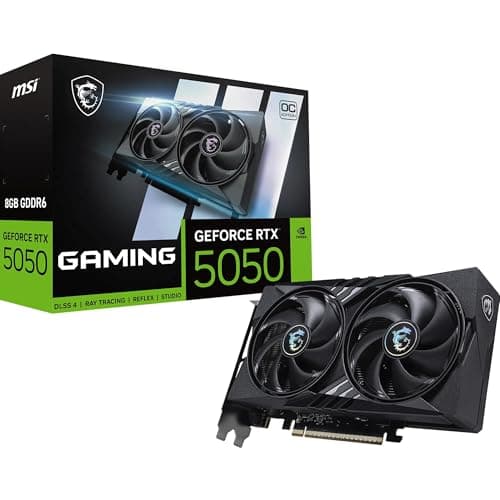
The RTX 5050 is Nvidia's entry-level Blackwell card, and MSI's GAMING OC version wraps it in their excellent Twin Frozr 10 cooler with dual Stormforce fans. It's a well-built card with modern connectivity, PCIe 5.0 support, and DLSS 4 access. On paper, it sounds decent. In practice, for 1440p gaming specifically, it's a bit of a stretch.
The RTX 5050 is designed primarily for 1080p gaming. At 1440p, you'll need to lean heavily on DLSS upscaling to hit smooth frame rates in demanding titles. With DLSS 4 Quality mode enabled, it can manage 1440p in many games, but you're not getting native 1440p performance. The 8GB GDDR6 (not GDDR7, note) and 128-bit bus mean raw bandwidth is limited compared to the 5060 Ti.
Where it makes more sense is as a 1080p card that can occasionally handle 1440p in less demanding titles or with upscaling assistance. The Twin Frozr 10 cooler is genuinely excellent for the card's thermal output, running near-silent in most scenarios. And at around £220, it's the cheapest modern Blackwell card in this roundup.
If your budget genuinely can't stretch to the RX 9060 XT or RTX 5060 Ti, the RTX 5050 GAMING OC is a reasonable choice. Just go in with realistic expectations about 1440p performance.
Pros
Most affordable Blackwell card in the roundup
Twin Frozr 10 cooler is excellent for the price
DLSS 4 support for upscaling at 1440p
PCIe 5.0 and modern display outputs
Cons
Not a true 1440p card without DLSS assistance
GDDR6 rather than GDDR7 limits bandwidth
Overpriced relative to its actual 1440p capability
Look, the RTX 3050 is a card that's honest about what it is. It's a budget entry-level GPU, and the MSI VENTUS 2X XS WHITE version is a compact, clean-looking implementation of it. The white colourway is genuinely attractive for themed builds, and MSI's dual-fan cooler does a solid job keeping temperatures reasonable given the card's modest power draw.
For 1440p gaming? It's a struggle. The RTX 3050 was designed for 1080p, and at 1440p you'll be dropping settings to medium or relying on DLSS 2 to maintain playable frame rates. In less demanding titles like Rocket League, CS2, or older games, it can manage 1440p reasonably well. But modern open-world games, shooters with heavy effects, or anything with ray tracing will need significant compromises.
The 8GB GDDR6 on a 128-bit bus is the same constraint as the RTX 5050, but without the newer architecture to compensate. And at around £310, it's priced too close to the RTX 5060 Ti and RX 9060 XT to make much sense as a 1440p card. If you find it significantly cheaper, it's a decent beginner card for someone who primarily plays 1080p and occasionally wants to try 1440p in lighter titles.
The white aesthetic is a genuine selling point for the right build. But buy it for looks and 1080p gaming, not for serious 1440p performance.
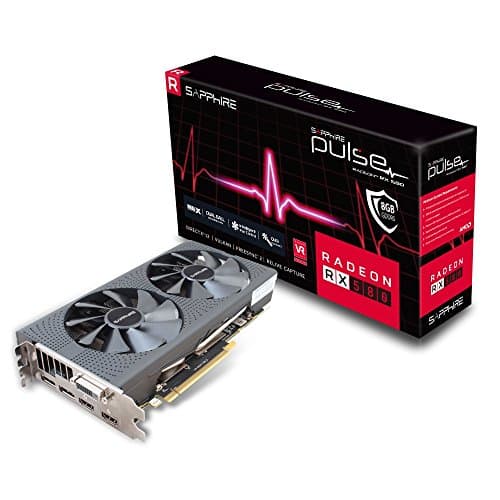
We need to be straight with you here. The Sapphire Pulse RX 580 is a seven-year-old GPU. It launched in 2017 on the Polaris architecture, and while it was a cracking card in its time, recommending it for 1440p gaming in 2026 would be doing you a disservice.
At 1440p, the RX 580 will struggle with most modern titles even at medium settings. Games like Cyberpunk 2077, Alan Wake 2, or any recent open-world release will be a slideshow at 1440p. Even at 1080p, it's showing its age in demanding titles. The 8GB GDDR5 memory is slow by modern standards, and there's no upscaling technology worth speaking of to compensate.
So why is it in this roundup? Because it's priced at around £149 and it does appear in searches for budget GPUs. Sapphire's Pulse cooler is well-built and the card runs reliably. For very old games, esports titles, or someone who genuinely just needs a display output and light gaming, it functions. And if your budget is truly limited and you're playing games from 2018 or earlier, it won't embarrass itself.
But for the stated purpose of this roundup, finding the best graphics cards for 1440p gaming under £400, the RX 580 is the wrong answer. Save up for the RTX 5050 at minimum, or better yet stretch to the RX 9060 XT.
Buying Guide: What to Look For in the Best Graphics Cards for 1440p Gaming Under £400
Buying a GPU for 1440p gaming is a different calculation to buying for 1080p. The resolution bump from 1080p to 1440p represents roughly 78% more pixels to push, which means a card that's comfortable at 1080p can feel sluggish at QHD. Here's what actually matters.
VRAM: how much do you actually need? For 1440p gaming in 2026, 8GB is the practical minimum and 12GB to 16GB is preferable. Games like Hogwarts Legacy and Forza Horizon 5 can exceed 8GB VRAM usage at 1440p with high texture settings. If you're playing competitive titles or older games, 8GB is fine. If you want headroom for the next two or three years of releases, more is better. The RX 9060 XT's 16GB at its price point is genuinely hard to argue with on this front.
Memory bandwidth matters more than bus width alone. A 128-bit GDDR7 card can outperform a 192-bit GDDR6 card because GDDR7 is roughly twice the speed per pin. Don't dismiss a card purely because of its bus width. Look at the total bandwidth figure instead.
Upscaling technology is now essential. DLSS 4 (Nvidia) and FSR 4 (AMD) both allow you to render at a lower resolution and upscale to 1440p with minimal visual quality loss. This effectively gives you higher frame rates for free. Cards that support these technologies, basically anything in this roundup except the RX 580, are much better positioned for 1440p gaming than raw rasterisation performance alone suggests.
Power consumption and PSU requirements. The RTX 5060 Ti and RX 9060 XT both have reasonable TDPs for their performance level. A 650W PSU is sufficient for either. The older cards like the RTX 3060 and RX 580 are similarly modest. You don't need a 1000W PSU for any card in this roundup.
Avoid buying old stock at inflated prices. The RTX 3060 12G and RTX 3050 are both priced too high relative to what newer cards offer. If you see either of them at a significant discount, say 30% to 40% below the prices listed here, they become more interesting. At current prices, the newer cards are better value every time.
For a deeper look at how these cards perform in benchmarks, TechPowerUp's GPU database is an excellent resource for comparing specs and real-world performance data across the entire GPU landscape.
How We Selected These Best Graphics Cards for 1440p Gaming Under £400
We evaluated each card based on published specifications, architecture generation, memory configuration, and real-world performance data from trusted benchmark sources. We cross-referenced owner feedback from verified UK buyers to identify common issues with thermals, driver stability, and build quality. Cards were ranked primarily on their suitability for 1440p gaming at their current UK price point, with secondary consideration given to features like upscaling support, VRAM capacity, and form factor. Nvidia's official GPU specifications page at nvidia.com was used to verify clock speeds and memory configurations for the Blackwell cards.
Best Overall
Gigabyte GeForce RTX 5060 Ti GAMING OC 8G
The top pick for 1440p gaming under £400. Fast GDDR7 memory, DLSS 4 support, and a factory overclock make this the card most buyers should choose.
Final Verdict: Best Graphics Cards for 1440p Gaming Under £400
The best graphics cards for 1440p gaming under £400 in 2026 come down to two clear winners depending on your priorities. If you want the best all-round package with Nvidia's ecosystem, DLSS 4, and a strong factory overclock, the Gigabyte RTX 5060 Ti GAMING OC 8G is the one to buy. If VRAM headroom matters more to you, or you're doing creative work alongside gaming, the Powercolor RX 9060 XT HellHound OC 16GB is a remarkable piece of value engineering that's hard to overlook. The ASUS RTX 5060 LP BRK earns its place for anyone building a compact PC. Everything else in this roundup is either overpriced for what it delivers at 1440p, or simply too old to be a sensible recommendation. Spend your money on the RTX 5060 Ti or the RX 9060 XT and you won't be disappointed.
Frequently Asked Questions
Yes, with DLSS enabled. Cards like the RTX 4060 and RTX 5060 deliver 60+ FPS in demanding AAA titles at high-to-ultra settings when DLSS 3 or 4 upscaling is active. Without DLSS, budget cards may require medium settings for consistent 60 FPS, particularly in demanding releases. Performance varies by game; less intensive titles achieve higher frame rates even on entry-level hardware.
DLSS 4 is the latest version with improved upscaling quality and more extensive frame generation capabilities. DLSS 3 remains excellent and supports a larger library of games currently. For new card purchases under £400, DLSS 4 support future-proofs better, but don't discard cards with DLSS 3 as game support remains strong for years. The real-world performance difference in current titles is often negligible.
Barely. Six gigabytes works in most games at high settings, but demanding titles with high-resolution texture packs may cause stuttering or require texture reduction. Eight to twelve gigabytes is comfier and future-proofs better. If you plan keeping the card for several years, prioritising 8GB+ VRAM is worthwhile despite slight cost premiums.
Cards under £400 vary from 70W to 170W TDP. Most require 650-750W PSUs minimum; check your current supply before purchasing. Modern efficient cards like the RTX 4060 at 115W work in systems with 550W supplies. Older higher-TDP cards demand beefier supplies, potentially necessitating expensive PSU replacements alongside the card purchase.
Used cards can offer better performance per pound, but warranty coverage and unknown operating history create risks. Mining-used cards may have degraded memory, whilst gaming-used cards are typically safer. If buying used, prioritise cards under two years old with full images of the device and proof of original retail packaging. New cards with manufacturer warranties provide safer peace of mind.