Our editors evaluated 12 Monitor options against the criteria readers actually weigh up: price, real-world performance, build quality, warranty, and UK availability. Picks lean toward what we'd recommend to a friend buying today, not specs-on-paper winners.
Hands-on contextEditor notes from individual reviews, not press releases.
Live UK pricingRefreshed from Amazon UK twice daily.
No paid placementsAffiliate commission doesn't change what wins.
Finding the best monitors for gaming under £150 used to mean accepting serious compromises. Not anymore. In 2026, this price bracket has genuinely impressive options: 280Hz refresh rates, Fast IPS panels, curved VA screens, and even an ultrawide. We've rounded up 12 of the strongest contenders available right now on Amazon UK, covering everything from sub-£80 bargains to near-£150 performers that punch well above their weight. Whether you're building your first gaming PC or upgrading from an ageing 60Hz screen, there's something here for you.
Best Monitors for Gaming Under £150: Quick Comparison
acer Nitro KG241YS3 24 inch Full HD (1920 x 1080) Gaming Monitor - 180Hz, 4ms, VA Panel, FreeSync Premium, 72% NTSC, HDR10, Speakers, DisplayPort, HDMI
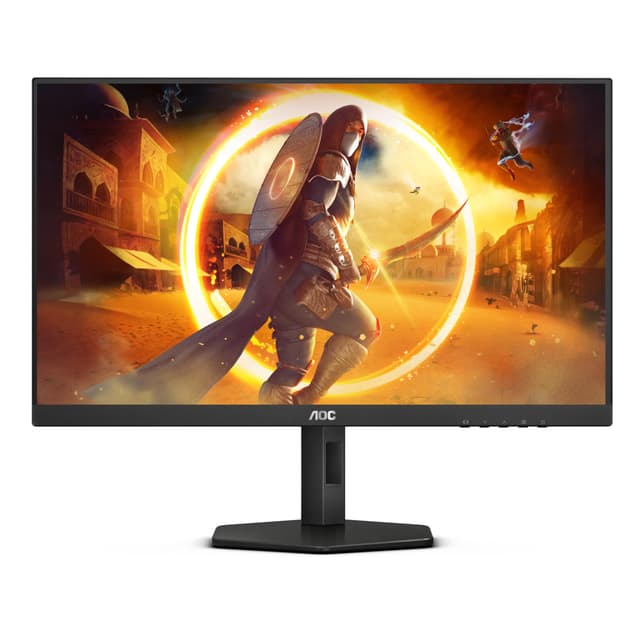
Here's the thing: 280Hz at this price is genuinely remarkable. The AOC C27G4ZXED sits at the top of this roundup because it delivers a spec sheet that would have cost twice as much just a couple of years ago. For competitive gaming under £150, this is the one to beat.
The 27-inch curved VA panel with a 1500R curve gives you an immersive feel without going full ultrawide. At 1920x1080, the pixel density is comfortable at this screen size, and the curve helps pull peripheral content into your field of view during racing games or open-world titles. The 1ms response time (MPRT) keeps ghosting in check, and FreeSync Premium means tear-free gaming even when your frame rate dips.
HDR10 support is present, though like most monitors at this price, peak brightness limits the real-world HDR impact. Don't buy this for HDR. Buy it for the refresh rate and the smooth, responsive gaming experience it delivers in fast-paced shooters like Valorant, CS2, or Apex Legends.
AOC's build quality is reliable. The stand is basic but functional, and the rear has a clean, understated design. Connectivity covers HDMI and DisplayPort, which is all you need. Owner feedback on Amazon UK is consistently positive, with most buyers highlighting how smooth the 280Hz feels compared to their old 60Hz or 144Hz screens. That jump is real, and you'll notice it immediately.
Pros
280Hz refresh rate is exceptional at this price
Curved 27-inch panel feels immersive for gaming
FreeSync Premium for tear-free play
Reliable AOC brand with decent UK support
Clean, understated design
Cons
HDR10 is largely cosmetic at this brightness level
The MSI MAG 274CXF is the AOC's closest rival, and in some ways it's the better-built monitor. MSI's gaming hardware has a strong reputation, and that shows here in the chassis quality and the thoughtful stand design. It's a proper gaming monitor that doesn't feel like it was assembled on a budget.
The Rapid VA panel is worth talking about. Traditional VA panels can struggle with fast motion, showing smearing in dark scenes. Rapid VA addresses this with faster pixel response, and the 0.5ms GtG spec reflects that. At 280Hz, the MAG 274CXF is genuinely competitive for fast-paced gaming. Adaptive Sync covers both AMD and Nvidia users, which is a practical bonus.
HDMI 2.0b with CEC support is a nice touch if you want to connect a console. The DisplayPort 1.2a handles PC gaming duties. At under £90, this is one of the strongest value propositions in the entire roundup for gamers who want a big, fast, curved screen without spending close to the £150 ceiling.
The main caveat is the same as any VA panel: viewing angles aren't as wide as IPS, and if you sit far off-centre, colours can shift. For a dedicated gaming setup where you're sitting directly in front of the screen, it's a non-issue.
Pros
MSI build quality is noticeably better than budget alternatives
If you want IPS colour rather than VA contrast, the AOC 24G4ZR is the compact option to consider. Fast IPS panels give you better colour accuracy and wider viewing angles than VA, and at 260Hz with 0.3ms MPRT, this is no slouch for competitive gaming either.
The height adjustment stand is a genuine differentiator at this price. Most budget monitors give you tilt only. Being able to raise or lower the screen properly makes a real difference to comfort during long sessions. G-Sync compatibility means Nvidia GPU owners get proper variable refresh rate support, not just AMD FreeSync.
Two HDMI 2.0 ports plus a DisplayPort 1.4 gives you solid connectivity options. The 23.8-inch size is ideal if desk space is limited or you prefer a tighter field of view for competitive play. Colours look vibrant out of the box, and the IPS panel handles bright, colourful games particularly well.
The trade-off versus the VA options is contrast. IPS blacks look greyer in dark scenes, which can affect immersion in horror games or cinematic titles. For competitive gaming though, that's rarely a concern.
Essentially the bigger sibling of the 24G4ZR above, the AOC 27G4ZR gives you the same Fast IPS panel technology and 260Hz refresh rate in a 27-inch flat format. If you found the 24-inch a touch cramped but still want IPS colour quality, this is the natural step up.
At 27 inches with 1080p resolution, pixel density drops slightly compared to the 24-inch version. Some people notice this, some don't. For gaming it's rarely an issue, but if you're doing close-up work or reading small text, it's worth bearing in mind. The height-adjustable stand carries over, which is great.
G-Sync compatibility and Adaptive Sync support make this a flexible choice regardless of your GPU brand. The dual HDMI 2.0 setup is handy if you're switching between a PC and a console. At just under £135, it's near the top of this budget bracket, but the IPS panel quality and ergonomic stand justify the premium over cheaper VA options.
The AOC 25G3ZM/BK sits at a comfortable mid-point in this roundup, priced around £100 and offering 240Hz performance from a trusted brand. It's not the flashiest option here, but AOC's consistency is reassuring when you're spending real money on a monitor.
240Hz is still very fast for gaming. The difference between 240Hz and 280Hz is noticeable only to the most sensitive eyes in the most competitive scenarios. For the vast majority of gamers, 240Hz is more than enough to feel genuinely smooth and responsive. The 25-inch size is a slightly unusual choice that sits between the common 24 and 27-inch options, giving you a bit more screen without going full large-format.
As a flat monitor, it suits multi-monitor setups well and works fine for productivity alongside gaming. AOC's calibration on this model is reportedly solid out of the box, which saves you fiddling with settings on day one. A decent, no-drama choice for gamers who want a reliable brand at the £100 mark.
Pros
240Hz from a reliable brand at £100
Good out-of-box calibration
25-inch size is a useful middle ground
Flat panel suits multi-monitor setups
Cons
Outpaced on specs by pricier options in this roundup
Samsung's Odyssey G4B is the pick for gamers who also care about what their screen looks like outside of games. The IPS panel delivers noticeably better colour reproduction than the VA options in this roundup, and Samsung's panel quality control is consistently strong.
At 240Hz with 1ms GtG response time, it's properly fast for gaming. FreeSync Premium and G-Sync compatibility cover both GPU camps. The 25-inch flat format is clean and versatile. If you're switching between gaming sessions and creative work, or you just want colours that look accurate without calibration, this is the monitor to consider.
Samsung's build quality is solid. The stand is a bit basic but the monitor itself feels premium. Owner reviews highlight the colour quality and the smooth 240Hz experience as the main strengths. At around £128, it's not the cheapest IPS option here, but Samsung's brand reliability and panel quality make it worth the extra few pounds over lesser-known alternatives.
Pros
Excellent IPS colour accuracy
Samsung panel quality is consistently reliable
240Hz with 1ms GtG for fast gaming
G-Sync and FreeSync compatible
Great for mixed gaming and work use
Cons
IPS contrast is weaker than VA in dark rooms
Basic stand with limited adjustment
Pricier than some VA alternatives with higher refresh rates
The KTC 27-inch is the wildcard in this roundup. On paper, the specs are genuinely impressive: 2K resolution with 210Hz overclocking, 101% DCI-P3 colour coverage, HDR400 with 450 nits brightness, and a Fast IPS panel with ΔE under 2. That's a colour-accurate, high-brightness, high-resolution monitor for around £127. It sounds almost too good.
Here's the honest caveat: KTC is not a household name. Brand trust matters when you're buying a monitor, because if something goes wrong, support quality varies. That said, the specs are verifiable, and early owner feedback is broadly positive. The colour gamut claims in particular seem to hold up, with buyers noting vivid, accurate colours straight out of the box.
For gaming, the 2K resolution at 210Hz (overclocked) is a compelling combination. You get sharper visuals than 1080p without the GPU demands of 4K. The built-in speakers are a bonus. If you're willing to take a small risk on a newer brand in exchange for genuinely impressive specs, the KTC is worth serious consideration.
Pros
2K resolution with 210Hz OC is rare at this price
101% DCI-P3 colour coverage is exceptional
HDR400 with 450 nits is the best HDR in this roundup
Built-in speakers included
ΔE under 2 means accurate colour out of the box
Cons
KTC is an unknown brand with uncertain long-term support
Overclocked refresh rate may not be stable on all systems
The CRUA 30-inch is the only ultrawide in this roundup, and at under £150 for a 2560x1080 curved screen, it's a tempting proposition. Ultrawide gaming is a genuinely different experience. Racing games, flight sims, and open-world titles feel properly immersive on a 21:9 panel. You get more peripheral vision in supported games, and the 1500R curve pulls the edges into your sightline naturally.
The 200Hz refresh rate (144Hz over HDMI) is solid for an ultrawide at this price. The 0.5ms response time and AMD FreeSync support keep things smooth. The VA panel delivers decent contrast for dark scenes, and 120% sRGB coverage means colours look reasonably vibrant.
The honest limitations: CRUA is not a well-established brand, and a 30-inch ultrawide at this price will involve compromises somewhere, whether in panel uniformity, build quality, or after-sales support. Also, not all games support ultrawide resolutions natively, so check your favourite titles before buying. But if you want the ultrawide experience on a tight budget, this is the only real option here.
Pros
Only ultrawide in this roundup
2560x1080 at 30 inches is genuinely immersive
200Hz is impressive for an ultrawide at this price
The Gawfolk 24-inch is a no-frills 200Hz gaming monitor that comes in under £90. For that money you get a frameless VA panel with 100% sRGB coverage, DisplayPort and HDMI connectivity, and VESA wall mount support. It's a decent spec list for the price.
Gawfolk is a newer brand with limited track record, so go in with realistic expectations about build quality and long-term support. That said, for a secondary monitor, a budget gaming setup, or someone's first PC gaming screen, the specs are genuinely usable. 200Hz is fast enough to feel smooth, and 1080p on a 24-inch panel looks sharp.
The frameless design looks clean on a desk, and the eye care features (flicker-free, low blue light) are a nice touch for longer sessions. Just don't expect the same rigidity or finish quality as AOC or Samsung. It's a budget monitor. But it does what it says.
The Gawfolk 27-inch curved monitor in white is an unusual sight in a market dominated by black gaming screens. If you're building a white-themed setup, options are genuinely limited at this price, and this one fills that gap. The 1800R curve, 200Hz refresh rate, and built-in speakers make it a surprisingly complete package for under £95.
FreeSync support and 1ms response time (MPRT) are listed, and the 178-degree viewing angle suggests a decent panel. The 98% sRGB coverage is slightly below the 100% claimed by the 24-inch Gawfolk, but still reasonable for gaming. Built-in speakers are always welcome at this price, even if they won't replace a proper audio setup.
The same brand caveats apply as with the 24-inch Gawfolk. This is a budget monitor from a newer brand. The white finish might show scuffs more easily over time. But for the price and the aesthetic, it's a genuinely interesting option that's hard to find elsewhere in this budget.
The Acer Nitro KG241Y is the safest choice in this roundup for someone buying their first gaming monitor. Acer is a well-established brand with proper UK warranty support, and the Nitro line has a long track record of delivering reliable, well-calibrated screens at accessible prices.
At 180Hz with a 1080p IPS panel, it's fast enough to feel like a genuine upgrade from any 60Hz screen, and the IPS panel means colours look good from day one without any tweaking. Setup is straightforward, the OSD is simple to navigate, and Acer's customer service is accessible if anything goes wrong.
It's not the most exciting monitor in this roundup. The refresh rate is lower than the 240Hz and 280Hz options, and the price at around £110 means you're paying a brand premium over some of the no-name alternatives. But for a beginner who wants a reliable, well-supported screen that will just work, that premium is worth it. You're not just buying a monitor, you're buying peace of mind.
At under £80, the Acer Nitro KG241YS3 is the best budget pick in this entire roundup. Full stop. You get 180Hz, FreeSync Premium, HDR10, built-in speakers, DisplayPort, and HDMI, all from Acer with proper UK warranty support. That's a remarkable amount of monitor for the money.
The VA panel delivers better contrast than IPS at this price, making dark gaming scenes look richer. The 4ms response time is slightly slower than the fastest options here, but for 180Hz gaming it's perfectly adequate. FreeSync Premium ensures smooth, tear-free play across the refresh rate range, which matters more than shaving a millisecond off response time for most gamers.
The built-in speakers are genuinely useful if you don't have external audio sorted yet. They won't blow you away, but they work. The 72% NTSC colour coverage is the main spec compromise, meaning colours are less vibrant than monitors with wider gamuts. For gaming it's fine. For colour-critical work, look elsewhere.
But here's the thing: at this price, with Acer's brand behind it, the KG241YS3 is almost impossible to fault as a starting point for PC gaming. It's the monitor we'd recommend to anyone who asks "what's the cheapest decent gaming monitor I can buy right now?"
Pros
Exceptional value under £80
FreeSync Premium for smooth gaming
Built-in speakers are a genuine bonus
Acer brand reliability and warranty
VA panel contrast is better than IPS at this price
Buying Guide: What to Look For in the Best Monitors for Gaming Under £150
Shopping for the best monitors for gaming under £150 means making smart trade-offs. Here's what actually matters and what you can safely ignore.
Refresh Rate
This is the single biggest upgrade you can make over a standard office monitor. At this budget, you can get 144Hz, 180Hz, 240Hz, and even 280Hz. The jump from 60Hz to 144Hz is dramatic and immediately noticeable. The jump from 144Hz to 240Hz is real but subtler. Beyond 240Hz, you're in diminishing returns territory unless you're a serious competitive player. For most gamers, 144Hz to 180Hz is the sweet spot. If you play fast shooters competitively, push for 240Hz or above.
Panel Type: VA vs IPS
VA panels offer deeper blacks and better contrast, which makes dark scenes look richer. IPS panels give you wider viewing angles and better colour accuracy. Fast IPS is a newer technology that closes the response time gap with VA. For gaming in a dark room, VA is often more immersive. For a bright office environment or mixed use, IPS is the safer choice. Both are well represented in this roundup.
Response Time
Manufacturers quote response times in different ways. GtG (grey to grey) and MPRT (moving picture response time) are different measurements. MPRT is typically lower and sounds more impressive, but GtG is more representative of real-world performance. A 1ms MPRT monitor might have a 4ms to 5ms GtG time. Don't obsess over these numbers too much. At 240Hz or above, even a 4ms GtG monitor will feel fast.
Resolution
Every monitor in this roundup is 1080p except the KTC (2K) and the CRUA (2560x1080 ultrawide). At 24 inches, 1080p looks sharp. At 27 inches, some people notice the lower pixel density. If sharpness matters to you, consider the 24-inch options or the KTC's 2K panel. For competitive gaming, 1080p is actually preferable because it's easier for your GPU to push high frame rates.
Adaptive Sync
FreeSync Premium and G-Sync Compatible are the two main standards. FreeSync Premium works natively with AMD GPUs and is supported by most monitors here. G-Sync Compatible means the monitor has been validated to work with Nvidia GPUs using variable refresh rate. If you have an Nvidia GPU, check for G-Sync compatibility. If you have AMD, any FreeSync monitor will work.
Brand and Warranty
At this budget, brand matters more than people realise. AOC, Acer, MSI, and Samsung all have proper UK warranty support and established service networks. Newer brands like KTC, CRUA, and Gawfolk may offer impressive specs for less money, but their after-sales support is unproven. If you're risk-averse, stick to the established names. If you're comfortable taking a small gamble for better specs, the newer brands can offer real value.
We assessed each monitor based on published specifications, verified Amazon UK owner reviews, and cross-referenced independent testing data where available. Key factors included refresh rate consistency, panel type performance characteristics, build quality reports from real owners, connectivity options, and value relative to price. We paid particular attention to honest limitations, including HDR performance at this price bracket, brand support quality, and the gap between marketed specs and real-world experience. No monitor in this roundup was given a free pass based on spec sheets alone.
Best Overall
AOC Gaming C27G4ZXED
280Hz curved VA panel with FreeSync Premium and HDR10. The complete gaming package under £150 from a brand you can trust.
Final Verdict: Best Monitors for Gaming Under £150
The best monitors for gaming under £150 in 2026 are genuinely impressive, and this roundup proves that you don't need to spend big to get a fast, capable gaming screen. The AOC Gaming C27G4ZXED is our top pick overall: 280Hz, a solid curved VA panel, FreeSync Premium, and AOC's reliable build quality make it the most complete option at this budget. If you're watching the pennies more carefully, the Acer Nitro KG241YS3 is the best budget gaming monitor under £80 we've seen, packing 180Hz, FreeSync Premium, and built-in speakers with Acer's warranty behind it. For IPS colour quality, the Samsung Odyssey G4B is the one to consider, and if you want something genuinely different, the CRUA 30-inch ultrawide offers an immersive experience you won't find elsewhere at this price. Whatever your budget within this range, there's a strong option here. The days of settling for a dodgy 60Hz screen just because you're on a tight budget are well and truly over.
Frequently Asked Questions
At this price point, 120Hz represents a solid baseline offering noticeable smoothness over standard 60Hz displays. 144Hz and higher refresh rates like the 180Hz options available here provide competitive responsiveness for esports titles. Most budget graphics cards can achieve these frame rates at 1080p resolution, making them genuinely achievable targets rather than theoretical specs.
VA panels offer darker blacks and higher contrast, improving visibility in shadowed competitive game environments. IPS panels deliver superior colour accuracy and wider viewing angles, making them better for mixed-use monitors combining gaming with productivity or content creation. Your choice depends on whether you prioritise competitive performance or visual quality alongside gaming.
Yes, 24 inches represents the optimal size for 1080p resolution, balancing immersion with acceptable pixel density. Smaller 22-inch displays feel cramped for modern gaming, whilst larger 27-inch monitors make 1080p appear soft and blurry. 24-inch 1080p provides sharp, detailed imagery without creating excessive desk footprint for budget setups.
DisplayPort becomes essential for refresh rates above 120Hz, as HDMI can limit bandwidth. HDMI remains valuable for universal compatibility across multiple devices. FreeSync support matters if you own AMD graphics cards, eliminating screen tearing. USB inputs prove useful for connecting gaming peripherals directly to the monitor rather than daisy-chaining cables.
Quality budget gaming monitors from established manufacturers like Acer typically last 4-5 years with regular use. Panel technology is mature and stable at this price point, with failure rates low amongst proven models. Investing slightly more in a reliable brand beats choosing the absolute cheapest option that might fail after 18-24 months.