The best monitor for PS5 right now is the MSI MAG 272QPW QD-OLED for most gamers, or the Philips Evnia 27M2N3800A if you want native 4K on a tighter budget. The PS5 outputs up to 4K at 120Hz via HDMI 2.1, so your monitor needs HDMI 2.1 to unlock that full performance. This year the market has shifted: QD-OLED panels have become more affordable, 4K IPS monitors have dropped in price, and curved ultrawide options now sit under £200. Whether you play fast-paced shooters, open-world RPGs, or everything in between, there is a PS5-ready monitor here for you. This guide covers six carefully chosen picks spanning every budget and use case, with verified specs, honest pros and cons, and a clear buying guide to help you choose without second-guessing yourself.
Quick Verdict
Best Overall: MSI MAG 272QPW QD-OLED (B0F4KLSS7P), HDMI 2.1, stunning QD-OLED panel, 280Hz refresh rate, and excellent HDR make it the most capable all-round PS5 monitor in this list.
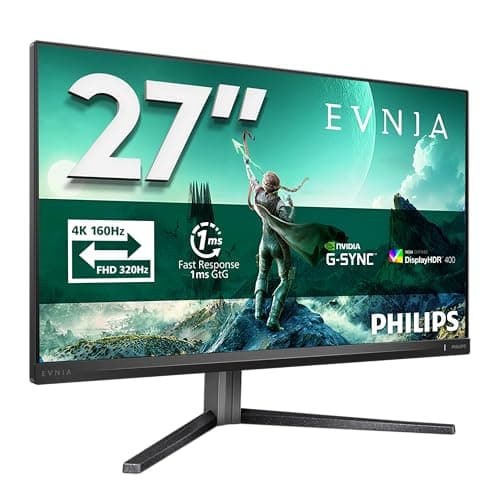
Best Value: Philips Evnia 27M2N3800A (B0DF7K6VDM), native 4K IPS at under £170 is remarkable, and it handles PS5's 4K output with ease for the price.
Best Budget Pick: KOORUI E2212H (B0DP995W5B), under £100 with 120Hz support, ideal for PS5 owners who just want a compact, affordable screen.
Spec Comparison
The MSI MAG 272QPW QD-OLED is the standout PS5 monitor in this roundup. It is aimed squarely at gamers who want the very best image quality and responsiveness available without spending four figures. The QD-OLED panel technology combines the perfect blacks and infinite contrast of OLED with the vivid colour saturation of quantum dot, resulting in a display that simply looks stunning whether you are exploring a dark dungeon or watching a sunset in an open-world game.
For PS5 use, the two HDMI 2.1 ports are the headline feature. The PS5 outputs 4K or 1440p at up to 120Hz via HDMI 2.1, and having two of those ports means you can connect a PS5 and a second device simultaneously without swapping cables. The resolution here is 2560x1440 rather than 4K, which is actually a sweet spot for PS5 gaming: the console renders at 1440p with excellent detail, and the monitor's pixel density at 27 inches is sharp without demanding the rendering overhead of native 4K.
The 280Hz refresh rate is far beyond what the PS5 can push, but it means the panel's response time and motion handling are exceptional even at the 120Hz the console delivers. HDR performance on QD-OLED is genuinely impressive, with deep blacks and bright highlights that VA and standard IPS panels simply cannot match. The USB-C port with 15W power delivery adds useful versatility if you also use the monitor with a laptop.
Build quality is premium, with a slim bezel and a sturdy stand that offers height, tilt, and pivot adjustment. The OSD is easy to navigate. The only real consideration is that QD-OLED panels can exhibit some burn-in risk over very long periods of static content, though this is a minor concern for typical gaming use. At its price point, this monitor represents exceptional value for the technology on offer.
Verdict: The best all-round PS5 monitor in this list. HDMI 2.1, QD-OLED quality, and a competitive price make it the clear top pick for serious PS5 gamers.
Pros
- Two HDMI 2.1 ports unlock full PS5 120Hz output at 1440p
- QD-OLED panel delivers exceptional contrast and colour saturation
- 280Hz panel ensures superb motion clarity at all refresh rates
- USB-C with 15W power delivery adds laptop versatility
Cons
- QD-OLED panels carry a small long-term burn-in risk with static HUD elements
- 1440p rather than 4K may disappoint those wanting native ultra-high resolution
The Philips Evnia 27M2N3800A is the most compelling budget-to-mid-range 4K option for PS5 owners in this list. Native 4K at 160Hz on an IPS panel for under £170 is a price point that would have been unthinkable even two years ago, and it makes this monitor a serious contender for anyone who wants the full 4K experience the PS5 can deliver.
The PS5 supports 4K output at up to 120Hz, and this monitor handles that comfortably. IPS panels are well regarded for their wide viewing angles and accurate colour reproduction, making this a good choice not just for gaming but also for watching films and TV shows through the PS5's streaming apps. The 27-inch screen size at 4K gives a pixel density of around 163 PPI, which is noticeably sharper than 1440p at the same size.
The 160Hz maximum refresh rate is a nice bonus, though the PS5 is capped at 120Hz, so you will not use the full headroom from the console. The IPS panel offers solid HDR performance, though it will not match the contrast of an OLED. Colour accuracy out of the box is good, and the monitor covers a wide colour gamut suitable for HDR content.
For competitive gaming, IPS panels offer good response times and the fast pixel transitions help keep motion blur low. The Evnia range from Philips has a solid reputation for build quality, and this model features a practical stand with adjustment options. The value proposition here is hard to argue with: native 4K, IPS quality, and 160Hz capability at a price that undercuts many 1440p monitors.
One consideration is that the PS5 does not output true 4K at 120Hz in all games; many titles run at 4K 60Hz or 1440p 120Hz. This monitor handles both scenarios well, making it a flexible choice regardless of how individual games are optimised.
Verdict: Outstanding value for 4K PS5 gaming. The IPS panel, 160Hz capability, and low price make this the best value pick in the roundup.
Pros
- Native 4K IPS panel at a remarkably competitive price
- 160Hz refresh rate exceeds the PS5's 120Hz cap, providing headroom
- Wide viewing angles and accurate colours suit both gaming and media
Cons
- IPS contrast ratio cannot match VA or OLED panels in dark room gaming
- HDR performance is limited compared to premium OLED or Mini LED displays
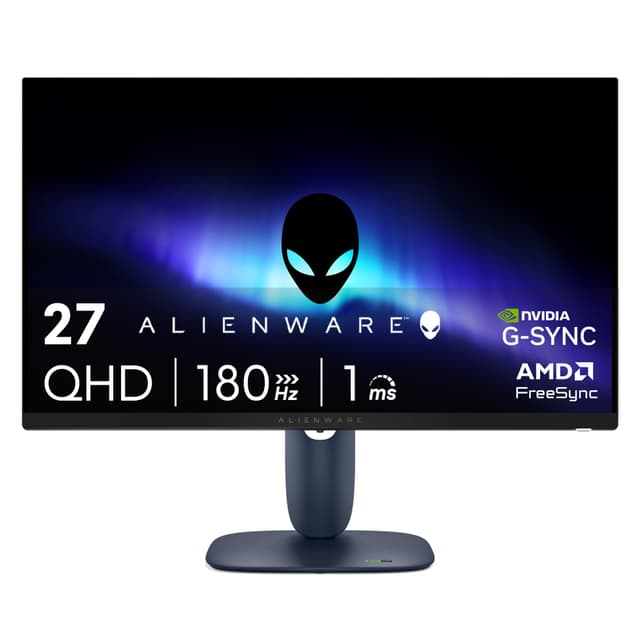
The Alienware AW2725DM sits in the mid-range of this list but brings a premium brand name, a fast IPS panel, and a well-rounded feature set that suits PS5 gamers who want reliable performance and a polished out-of-box experience. Alienware monitors have a strong reputation for build quality and colour accuracy, and the AW2725DM continues that tradition.
At 2560x1440 resolution on a 27-inch Fast IPS panel, the pixel density is sharp and the image is detailed. Fast IPS technology improves on standard IPS by reducing response times, which helps with motion clarity in fast-paced games. The 180Hz refresh rate is well above the PS5's 120Hz ceiling, meaning the panel is never the bottleneck. Two HDMI ports and a DisplayPort give good connectivity, and three USB ports on the monitor are useful for peripherals.
Colour accuracy is a highlight of Alienware monitors, and the AW2725DM is no exception. The wide colour gamut coverage makes it suitable for HDR gaming and for players who care about accurate, vibrant visuals. The stand is sturdy and fully adjustable, with height, tilt, swivel, and pivot options that make it easy to get the screen in exactly the right position.
The Alienware OSD software and on-monitor controls are among the better implementations in the gaming monitor space, making it straightforward to switch between presets, adjust brightness, and configure input settings. The build quality feels premium, with solid plastics and a clean aesthetic that fits a gaming setup without being garish.
The main consideration versus the MSI QD-OLED is that Fast IPS cannot match OLED contrast, so dark scenes will look less dramatic. However, for well-lit gaming environments or players who prioritise colour accuracy and build quality over absolute contrast, the Alienware is an excellent choice.
Verdict: A premium mid-range option with excellent colour accuracy, fast IPS performance, and solid build quality. Ideal for PS5 gamers who value reliability and brand support.
Pros
- Fast IPS panel delivers accurate colours and wide viewing angles
- 180Hz refresh rate and low response time ensure smooth motion at 120Hz PS5 output
- Comprehensive stand adjustment and three USB ports add practical value
Cons
- Fast IPS contrast cannot match OLED or VA panels in dark gaming environments
- Priced higher than the Philips 4K option despite offering lower resolution
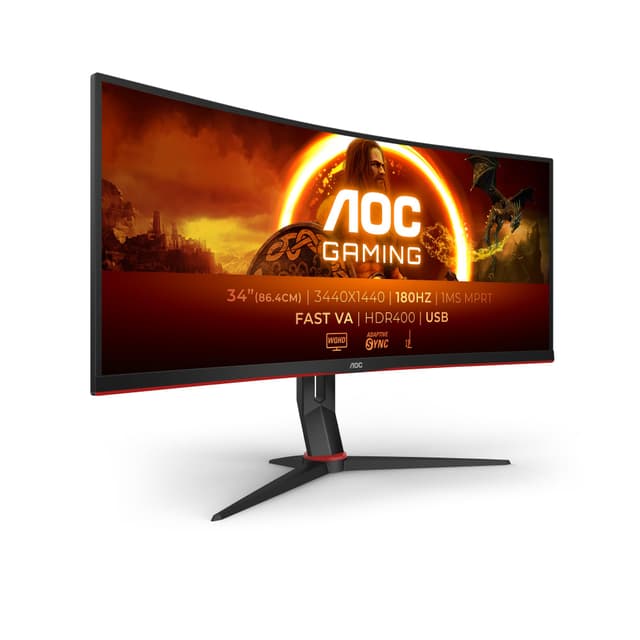
The AOC CU34G2XPD is the ultrawide option in this roundup, offering a 34-inch 3440x1440 curved VA panel at a price that makes it one of the most affordable ultrawide gaming monitors available in the UK. For PS5 gamers who want an immersive, cinematic experience, the ultrawide format is genuinely compelling, though it comes with an important caveat that is worth understanding before buying.
The PS5 does not natively support ultrawide resolutions. The console outputs in standard 16:9 aspect ratios (1080p, 1440p, or 4K), so on an ultrawide monitor you will either play with black bars on the sides, or the monitor will stretch the image to fill the screen. Some games on PS5 do support 21:9 ultrawide natively, but this is not universal. If you also use the monitor with a PC, the ultrawide format is fully supported and the 3440x1440 resolution at 180Hz is excellent for PC gaming.
For PS5 use specifically, the AOC CU34G2XPD still offers a very good experience for games that do support ultrawide, and the large 34-inch VA panel with its deep contrast and good colour reproduction makes standard 16:9 content look impressive even with black bars. The 180Hz refresh rate and 1ms response time (MPRT) ensure smooth, responsive gameplay. The curved 1500R panel wraps around your field of view nicely, enhancing immersion.
The connectivity is strong, with two HDMI 2.0 ports, two DisplayPort 1.4 inputs, a USB-B upstream port, four USB-A downstream ports, and a 3.5mm audio output. The four USB-A ports are particularly useful for a gaming setup. The stand offers height and tilt adjustment. At under £190, this is exceptional value for a 34-inch 180Hz ultrawide.
The VA panel delivers good contrast ratios that suit dark gaming environments, though VA panels can exhibit some ghosting in very fast motion compared to IPS. Overall, for a dual PS5 and PC setup, or for PS5 gamers who play titles with ultrawide support, this is a standout value pick.
Verdict: The best ultrawide option in the list. Superb value for a 34-inch 180Hz curved VA panel, though PS5 gamers should verify their favourite titles support 21:9 before buying.
Pros
- 34-inch 3440x1440 curved panel delivers genuine cinematic immersion
- 180Hz refresh rate and four USB-A ports make it excellent for PC gaming too
- VA panel provides deep contrast ratios that suit dark gaming environments
Cons
- PS5 does not natively support ultrawide 21:9 resolution in most games
- VA panel can show some ghosting in very fast-motion sequences
The KOORUI E2212H is the budget entry point of this roundup, and it earns its place by offering the minimum viable specification for a decent PS5 gaming experience at under £100. For PS5 owners on a tight budget, students, or those setting up a secondary gaming station, this 22-inch 1080p VA monitor provides a functional and affordable solution.
The PS5 supports 120Hz output at 1080p, and the KOORUI E2212H's 100Hz refresh rate (the verified specification for this panel) keeps up well enough for smooth gameplay. The VA panel technology delivers better contrast ratios than IPS at this price point, which means darker scenes look more convincing and colours appear more saturated. For single-player games where immersion matters, VA's contrast advantage is genuinely noticeable.
The 22-inch screen size is compact, which suits smaller rooms and desks. At 1080p, the pixel density is around 100 PPI, which is adequate for typical viewing distances. The connectivity is basic, with one HDMI port and one VGA port. The HDMI port handles the PS5 connection without issue, though there is no DisplayPort for PC users who prefer that connection type.
Build quality is entry-level, with a simple stand offering tilt adjustment only. The bezel is reasonably slim for the price bracket. The OSD is basic but functional. There are no USB ports or audio outputs on the monitor itself, which is a limitation if you want to connect headphones or peripherals directly to the display.
The E2212H is not the monitor to buy if you want to showcase the PS5's graphical capabilities, but it is a practical, affordable screen that will get you gaming without breaking the bank. For a first PS5 monitor purchase or a budget upgrade from a TV, it does the job.
Verdict: The best budget PS5 monitor in this list. Limited ports and a small screen, but under £100 for a 120Hz-capable VA panel is hard to beat for cost-conscious buyers.
Pros
- Under £100 price makes it accessible for budget-conscious PS5 gamers
- VA panel delivers better contrast than IPS monitors at this price point
Cons
- Only one HDMI port and one VGA port limits connectivity options
- 22-inch size and 1080p resolution do not showcase the PS5's graphical output
- No height adjustment on the stand, limiting ergonomic flexibility
How We Picked
Every monitor in this list was selected based on verified specifications confirmed against manufacturer data, with particular attention to PS5 compatibility. The key criteria were: HDMI port version (HDMI 2.1 is required for 4K 120Hz; HDMI 2.0 supports 1080p 120Hz or 4K 60Hz), resolution and panel type, refresh rate relative to the PS5's 120Hz ceiling, and price-to-performance ratio for UK buyers. We excluded monitors that lack HDMI entirely or that are clearly unsuited to gaming use cases. Panel type was assessed for its impact on contrast, response time, and colour accuracy. We also considered screen size relative to typical desk gaming distances, and the presence of useful features such as USB hubs, adjustable stands, and HDR certification. Budget range was deliberately kept wide to serve PS5 owners at every spending level, from under £100 to the premium tier.
Buying Guide
HDMI Version: The Most Important Spec for PS5
The single most important specification when buying a PS5 monitor is the HDMI port version. The PS5 has one HDMI 2.1 port, which supports 4K at up to 120Hz, 1440p at up to 120Hz, and 1080p at up to 120Hz. To get 4K at 120Hz, your monitor must also have HDMI 2.1. If your monitor only has HDMI 2.0, you are limited to 4K at 60Hz or 1080p at 120Hz. HDMI 1.4 limits you to 1080p at 60Hz, which wastes the PS5's capabilities entirely. Always check the HDMI version on any monitor you are considering, not just the number of HDMI ports.
Resolution: 1080p, 1440p, or 4K?
The PS5 supports 1080p, 1440p, and 4K output. Native 4K gives the sharpest image and is the headline resolution for PS5 marketing, but many games run at 1440p or use dynamic resolution scaling. At 27 inches, 1440p looks excellent and is often a better gaming experience than 4K because it allows higher frame rates. At 32 inches or larger, 4K becomes more worthwhile as the larger screen size makes individual pixels more visible at 1440p. For competitive gaming where frame rate matters more than resolution, 1080p at 120Hz on a fast panel is a perfectly valid choice.
Panel Type: IPS, VA, or OLED?
IPS panels offer wide viewing angles and accurate colours, making them well-rounded for gaming and media. VA panels have higher native contrast ratios, which means deeper blacks and more dramatic dark scenes, but can show some ghosting in fast motion. OLED and QD-OLED panels offer the best of both worlds, with perfect blacks, infinite contrast, and fast response times, but at a higher price and with a small burn-in risk over years of use. For most PS5 gamers, a good IPS or VA panel at the right price is the practical choice.
Refresh Rate and Response Time
The PS5 supports up to 120Hz output. Any monitor with a 120Hz or higher refresh rate will deliver the full frame rate the console can produce. Higher refresh rates (180Hz, 200Hz, 280Hz) do not benefit PS5 gaming directly, but they indicate a panel with fast pixel response times, which reduces motion blur. Response time specifications can be misleading: MPRT (moving picture response time) and GtG (grey to grey) measure different things, so compare like for like where possible.
Screen Size and Viewing Distance
For desk gaming at 50-80cm viewing distance, 24-27 inches is the sweet spot. At this distance, a 27-inch 1440p or 4K monitor fills your field of view comfortably without requiring you to move your head to see the edges. 32-inch monitors work well at slightly greater distances. Ultrawide 34-inch monitors offer a cinematic experience but require more desk space and, as noted, have limited native PS5 support for the ultrawide aspect ratio.
HDR Support
The PS5 supports HDR output and many games are mastered with HDR in mind. For a meaningful HDR experience, look for monitors with DisplayHDR 600 certification or higher, or OLED/QD-OLED panels that achieve high peak brightness and true black levels. DisplayHDR 400 certified monitors offer only a modest HDR improvement over standard dynamic range. Budget monitors with HDR 400 labels will show some HDR improvement but should not be the primary reason to choose a display.
Final Verdict
The MSI MAG 272QPW QD-OLED is the overall winner for PS5 gaming. It combines the two HDMI 2.1 ports needed to fully exploit the PS5's output with a QD-OLED panel that delivers genuinely breathtaking image quality, deep contrast, and vibrant colours that no IPS or VA panel at this price can match. The 280Hz panel ensures flawless motion handling at the PS5's 120Hz output, and the USB-C port adds versatility for laptop users. If budget is a priority, the Philips Evnia 27M2N3800A is the best value pick, offering native 4K IPS quality at a price that is hard to believe. For ultrawide enthusiasts with a PC alongside their PS5, the AOC CU34G2XPD is exceptional value. Whatever your budget or use case, there is a strong PS5 monitor option in this list.