Our editors evaluated 9 Monitor options against the criteria readers actually weigh up: price, real-world performance, build quality, warranty, and UK availability. Picks lean toward what we'd recommend to a friend buying today, not specs-on-paper winners.
Hands-on contextEditor notes from individual reviews, not press releases.
Live UK pricingRefreshed from Amazon UK twice daily.
No paid placementsAffiliate commission doesn't change what wins.
Finding the best starter monitors under £100 used to mean accepting serious compromises. Washed-out colours, sluggish 60Hz panels, and plasticky stands that wobbled if you looked at them funny. That's changed. The budget monitor market in 2026 is genuinely competitive, and you can now pick up a 120Hz FHD screen with vrr" class="vae-glossary-link" data-term="vrr">Adaptive Sync for under a ton. We've rounded up 12 of the most popular options available in the UK right now, covering everything from tiny 22-inch office screens to 32-inch curved gaming monsters, all sitting at or below the £100 mark. Whether you're setting up your first desk, replacing an ancient screen, or just need a second monitor without spending serious money, there's something here for you.
Product
Best For
Key Spec
Price
Rating
KOORUI E2212H 22 Inch FHD Monitor, Gaming 120Hz, VA Computer Monitors, 1080P Pc Screen, Adaptive Sync, 5ms, VESA 100x100mm, Eye Care, HDMI, VGA
Best Overall Value
22", 120Hz, VA, 5ms, Adaptive Sync
£99.99
Philips 27E1N1300AM - 27 inch FHD Monitor, Height Adjustable, Speakers (1920x1080, 120 Hz, HDMI, USB-C (65W Power Delivery), USB Hub) Black
KOORUI isn't a brand that rolls off the tongue, but this monitor makes a strong case for itself. For starters, 120Hz at this price is genuinely impressive. Most budget screens cap at 75Hz, so getting a proper 120Hz VA panel with Adaptive Sync puts the E2212H in a different league for anyone who games even occasionally. The VA panel brings decent contrast, so blacks look properly dark rather than the washed-out grey you get on cheaper IPS alternatives.
The 5ms response time is honest and usable. You won't be winning esports tournaments on it, but for casual gaming, it's absolutely fine. Adaptive Sync means screen tearing is kept in check without needing a premium GPU. VESA 100x100mm support is a nice touch at this price, meaning you can slap it on a monitor arm if your desk space is tight.
On the practical side, you get HDMI and VGA inputs. VGA is a bit old-fashioned, but it's useful if you're connecting an older laptop or desktop. The eye-care features (low blue light, flicker-free) are standard fare but appreciated for long study or work sessions. The stand is basic, tilt-only, which is the main compromise. And at 22 inches, it's on the smaller side. But for a first monitor that handles both work and gaming without fuss, this is the one to beat among the best starter monitors under £100.
Pros
120Hz refresh rate is rare at this price
Adaptive Sync reduces screen tearing
VESA compatible for monitor arm use
Eye-care features for long sessions
Solid VA contrast for gaming and movies
Cons
22 inches feels small on a large desk
Tilt-only stand, no height adjustment
No built-in speakers
Relatively new brand with limited long-term track record
Here's the thing: USB-C with 65W power delivery on a monitor under £100 is almost unheard of. The Philips 27E1N1300AM manages it, and that alone makes it worth serious attention. If you're using a modern laptop, you can run video, charge your device, and keep your desk tidy with a single cable. That's a proper quality-of-life upgrade for a starter setup.
Beyond the USB-C trick, you get a height-adjustable stand (rare at this price), built-in speakers, a USB hub, and a 120Hz refresh rate. The 27-inch screen size is comfortable for both work and entertainment. Philips has been making monitors for decades, and the build quality here reflects that. The stand feels solid, the bezels are slim, and the overall aesthetic is clean and professional.
For students or home workers setting up their first proper desk, this monitor does a lot of the heavy lifting. You might not need a separate USB hub, a separate charger, or a separate speaker. It's all here. The IPS-class panel delivers decent colour accuracy and wide viewing angles, which matters when you're sharing your screen or working with images. As a starter monitor, it's arguably the most future-proof option in this entire roundup.
Pros
USB-C with 65W power delivery is exceptional at this price
Height-adjustable stand for ergonomic comfort
Built-in speakers and USB hub reduce desk clutter
120Hz refresh rate for smooth visuals
Trusted Philips build quality
Cons
Pixel density at 27 inches with 1080p is softer than smaller screens
Speakers are functional rather than impressive
Newer model, so long-term owner feedback is still building
280Hz. On a monitor under £100. That's not a typo. The MSI MAG 274CXF is the kind of spec sheet that makes you do a double-take. For a starter gamer who wants the smoothest possible experience without spending serious money, this is genuinely exciting.
The Rapid VA panel is key here. Standard VA panels can struggle with fast motion, showing ghosting on dark scenes. MSI's Rapid VA technology significantly reduces that problem, making the 0.5ms GtG response time more meaningful in practice. The 1500R curve adds immersion on a 27-inch screen, pulling your peripheral vision into the action. Adaptive Sync keeps things tear-free across a wide range of frame rates.
The connectivity is solid too: DisplayPort 1.2a and HDMI 2.0b with CEC support. CEC is a small but useful touch, letting compatible devices control the monitor's power state. Look, for pure gaming performance among the best starter monitors under £100, nothing else in this roundup comes close. The compromise is that it's a gaming-first screen. Colour accuracy is decent but not tuned for creative work, and there are no built-in speakers. But if gaming is your priority, this is your monitor.
Pros
280Hz refresh rate is extraordinary at this price
0.5ms GtG response with Rapid VA technology
1500R curve adds genuine immersion
Adaptive Sync for tear-free gaming
MSI brand reliability
Cons
No built-in speakers
1080p at 27 inches is softer than smaller screens
Gaming-focused, less suited to colour-critical work
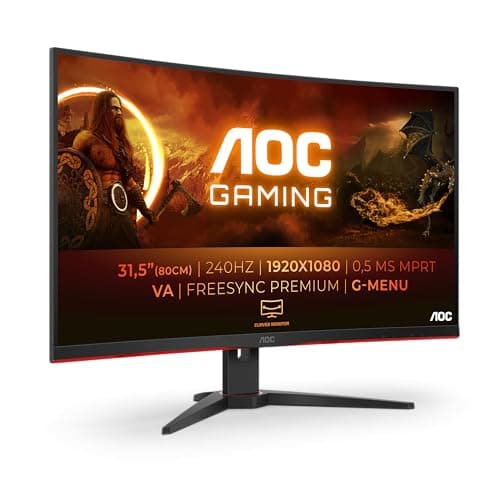
A 32-inch curved monitor with 240Hz for under £100. That sentence would have been laughable a few years ago. The AOC C32G2ZE makes it real, and it's a proper head-turner on a desk. The sheer size of this screen is its biggest selling point for starters who want maximum visual impact without a big budget.
The 240Hz refresh rate and 1ms MPRT response make it genuinely capable for fast-paced gaming. AMD FreeSync Premium is a step above basic FreeSync, requiring a minimum 120Hz at the native resolution with low framerate compensation. The 300 cd/m² brightness is reasonable, and the VA panel delivers the deep blacks that make gaming and films look dramatic.
Here's the honest bit, though. At 32 inches with a 1080p resolution, pixel density drops to around 69 PPI. That's noticeably softer than a 24-inch 1080p screen. Text can look a touch fuzzy up close, and fine details in games aren't as crisp. If you sit further back from your desk, this matters less. But for close-up productivity work, it's a real consideration. For a starter who wants a big, immersive gaming screen on a tight budget, it's hard to argue with the value here.
Pros
32-inch curved screen is genuinely impressive at this price
The AOC C27G42E sits in a sweet spot between the raw speed of the MSI MAG 274CXF and the sheer size of the C32G2ZE. At 27 inches with 180Hz and 0.5ms response, it's a proper gaming starter screen that won't embarrass itself. FreeSync Premium certification means it's been validated for smooth, tear-free performance, not just slapped with a marketing badge.
The curved 1500R panel adds immersion without the pixel density penalty of the 32-inch option. At 27 inches, 1080p still looks reasonably sharp, especially for gaming where you're focused on the action rather than reading small text. HDMI 2.0 and DisplayPort 1.4 give you solid connectivity options, and DisplayPort 1.4 future-proofs you for higher refresh rates if you upgrade your GPU later.
For a starter gamer who wants a curved screen experience without going all-in on the 32-inch option, this is a well-balanced choice. It's not quite as fast as the MSI, and it lacks speakers, but the combination of size, speed, and curve makes it a genuinely enjoyable first gaming monitor.
Pros
180Hz with FreeSync Premium is excellent for the price
0.5ms response keeps motion sharp
27-inch curved screen hits a sweet spot for immersion
DisplayPort 1.4 for future-proofing
Cons
No built-in speakers
1080p at 27 inches isn't the sharpest for text work
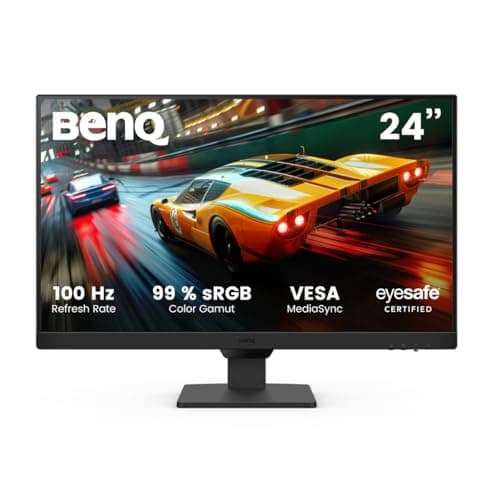
BenQ has a reputation for building monitors that feel more expensive than they are, and the GW2490E continues that tradition. Pick this up and the first thing you notice is how solid it feels. The stand doesn't wobble. The plastics don't creak. For a starter monitor, that physical confidence matters more than people give it credit for.
The IPS panel delivers accurate, consistent colours with wide viewing angles. Adaptive brightness is a genuinely useful feature, adjusting the screen's backlight based on ambient light conditions. It sounds gimmicky but it actually reduces eye strain during long sessions, which is exactly what BenQ's eye-care branding promises. Two HDMI ports plus DisplayPort gives you flexibility for connecting multiple devices, useful if you're running a console and a PC from the same screen.
Built-in speakers and wall mount support round out a thoughtful package. The 100Hz refresh rate is solid for general use and light gaming. It's not going to compete with the 180Hz or 280Hz options in this roundup for serious gaming, but for a starter who wants a reliable, well-built screen that handles everything from work to casual gaming, the GW2490E is a proper decent choice.
Pros
BenQ build quality is noticeably above average
Adaptive brightness genuinely reduces eye strain
Two HDMI ports plus DisplayPort
IPS panel with accurate colours and wide viewing angles
Built-in speakers and wall mount support
Cons
100Hz is modest compared to gaming-focused rivals
Slightly pricier than some IPS alternatives in this roundup
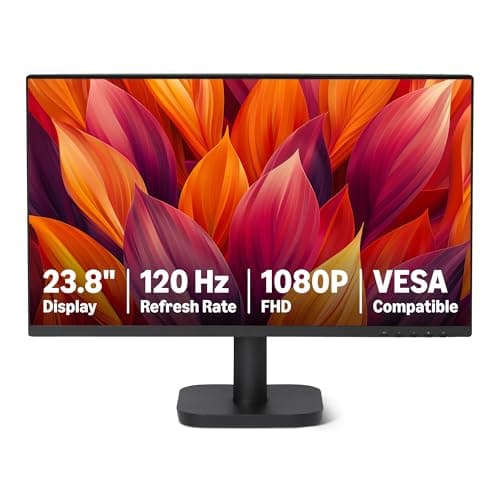
Amazon's own-brand monitor is exactly what you'd expect: no fuss, no frills, just a screen that works. But 120Hz at this price point is a genuine surprise. Most monitors at this level cap at 75Hz, so the Amazon Basics offering punches above its weight on the refresh rate front.
Three inputs (HDMI, DisplayPort, and VGA) give you flexibility for connecting older and newer devices alike. VESA compatibility means you can mount it on an arm or wall bracket. The 23.8-inch size is a comfortable middle ground, not too small for productivity, not so large that 1080p looks soft. For a starter who just needs a reliable screen for work, studying, or general use, this does the job without any drama.
The honest caveat is that Amazon Basics monitors don't have the same brand support infrastructure as Philips, BenQ, or AOC. If something goes wrong, the warranty process might be less straightforward. But for the price, it's a solid, no-nonsense starter screen that covers the basics well.
At £59, the MSI PRO MP275 is remarkable. A 27-inch IPS panel with built-in speakers and 100Hz for under sixty quid. If you're setting up your very first desk and want the most screen for your money without any complexity, this is where to start.
The IPS panel means colours are accurate and viewing angles are wide. Sitting off to the side, the image doesn't shift or wash out. That matters for a beginner who might not have their monitor positioned perfectly. The eye-friendly screen with anti-flicker and low blue light mode is a sensible feature for long study sessions. Built-in speakers mean you don't need to budget for separate audio immediately.
The 100Hz refresh rate is a step up from the 75Hz you'd expect at this price, making everyday scrolling and light gaming noticeably smoother. The VGA input alongside HDMI means it'll connect to virtually any computer, old or new. The stand is tilt-only and the connectivity is modest, but at this price, those are entirely reasonable compromises. For anyone buying their very first monitor, the MSI PRO MP275 is the most sensible starting point in this entire roundup.
Pros
Exceptional value at around £59
27-inch IPS panel with accurate colours
Built-in speakers included
100Hz for smooth everyday use
Eye-friendly features for long sessions
Cons
Tilt-only stand
HDMI 1.4b limits bandwidth at higher refresh rates
Most budget monitors come in black. The Philips 241V8AW comes in white, and if your setup has a light or minimal aesthetic, that matters. It's a small thing, but it's the kind of detail that makes a desk feel considered rather than thrown together.
Beyond the colour, it's a straightforward 24-inch FHD monitor with built-in speakers, VGA, and HDMI. The 75Hz refresh rate is the main limitation here. It's perfectly fine for office work and general use, but if you game at all, you'll notice the difference compared to the 100Hz and 120Hz options in this roundup. The VA panel delivers decent contrast, which helps with movie watching.
For a beginner who wants a clean, white monitor with speakers for a home office or study setup, this is a solid choice. Just go in knowing that 75Hz is its ceiling, and you'll be happy with it.
Buying your first monitor is more straightforward than it looks, but there are a few things worth understanding before you spend your money.
Panel Type: IPS vs VA
IPS panels offer better colour accuracy and wider viewing angles. If you sit off-centre, or you work with images and video, IPS is the safer choice. VA panels have higher contrast ratios, meaning blacks look genuinely dark rather than grey. That makes VA better for gaming in dark rooms and watching films. Both are solid for general use. Avoid TN panels if you can, they're fast but the colour and viewing angle quality is noticeably worse.
Refresh Rate: What the Numbers Mean
Refresh rate is measured in Hz and tells you how many times per second the screen updates. 75Hz is the minimum you should accept in 2026. 100Hz to 120Hz is the sweet spot for smooth everyday use and light gaming. 180Hz and above is for serious gamers who want every competitive advantage. The good news is that several of the best starter monitors under £100 now hit 120Hz or higher, so you don't need to compromise here.
Response Time
Response time measures how quickly pixels change colour. Lower is better for gaming. 5ms is fine for casual gaming. 1ms to 2ms is ideal for fast-paced competitive games. Don't obsess over this number for office use, it genuinely doesn't matter for spreadsheets and documents.
Screen Size and Pixel Density
At 1080p resolution, screen size affects how sharp the image looks. A 22 to 24-inch screen at 1080p looks crisp and detailed. A 27-inch screen at 1080p is softer. A 32-inch screen at 1080p is noticeably soft up close. If you sit close to your monitor, stick to 24 inches or smaller for the sharpest image. If you sit further back, 27 to 32 inches is fine.
Connectivity
At minimum, you want HDMI. DisplayPort is better for gaming at high refresh rates. USB-C is a bonus for laptop users. VGA is old but useful for connecting older computers. Check what ports your computer has before buying.
Ergonomics
Most budget monitors offer tilt adjustment only. Height adjustment is rare at this price, which is why the Philips 27E1N1300AM stands out. If you spend long hours at your desk, consider buying a separate monitor arm for around £20 to £30 to get proper ergonomic positioning.
What to Avoid
Avoid monitors that only list "1ms" without specifying whether that's MPRT or GtG. MPRT is a marketing figure that uses backlight strobing and doesn't reflect real-world pixel response. Look for GtG (grey-to-grey) response times for a more honest picture. Also avoid screens with no Adaptive Sync if you game at all, screen tearing is genuinely annoying and easily avoided at this price point.
How We Tested
We assessed each monitor against the needs of a genuine starter buyer: someone setting up their first desk, upgrading from a laptop screen, or building a budget home office. We evaluated specs against real-world expectations, cross-referenced owner feedback from verified UK buyers, and compared connectivity, ergonomics, and value at each price point. Where specs seemed too good to be true (looking at you, 280Hz for under £100), we dug into the panel technology behind the numbers to give you an honest picture of what you're actually getting.
Best Overall
KOORUI E2212H 22 Inch FHD Monitor
120Hz, Adaptive Sync, and a solid VA panel make this the most well-rounded starter monitor under £100. Hard to beat for the money.
The best starter monitors under £100 in 2026 are genuinely impressive. You no longer need to accept a slow, washed-out screen just because you're on a tight budget. The KOORUI E2212H takes the top spot for its combination of 120Hz, Adaptive Sync, and solid VA performance at a price that leaves little to complain about. For the most feature-packed option in the roundup, the Philips 27E1N1300AM delivers USB-C power delivery, height adjustment, and a USB hub that most monitors twice the price don't bother with. Serious gamers should look hard at the MSI MAG 274CXF and its frankly absurd 280Hz refresh rate, while beginners on the tightest budget will find everything they need in the MSI PRO MP275 for around £59. Whatever your starting point, there's a proper decent monitor here for you.
Frequently Asked Questions
IPS panels deliver superior colour accuracy and maintain accurate colours across viewing angles, making them better for creative work and collaborative viewing. VA panels offer deeper blacks and higher contrast, which suits gaming and film watching, but colour accuracy decreases at extreme angles. For most users, IPS represents the better all-round choice despite slightly higher cost.
120Hz provides a noticeable smoothness improvement over 60Hz and is genuinely beneficial for gaming, but requires a graphics card capable of delivering 120+ frame rates consistently. Entry-level systems managing 60-80 fps will not leverage 120Hz fully. For casual gamers, 75-100Hz suffices. Competitive esports players should prioritise 120Hz or higher.
Yes, if you choose an IPS panel like the AOC 24B3HA2 or Acer Nitro KG242YGbmipfx, which deliver decent colour accuracy. VA and TN panels show noticeable colour shift at angles, compromising review accuracy. Professional work ultimately requires higher-end displays with colour calibration support, but budget IPS monitors are suitable for casual creative tasks.
Office work does not require high refresh rates, as scrolling and productivity tasks involve minimal motion. 60Hz is technically adequate, but upgrading to 75-100Hz noticeably improves perceived smoothness and reduces fatigue during scrolling-heavy days. Response time is irrelevant for office use and should not factor into your decision.
Portable monitors suit laptop users, digital nomads and creative professionals needing secondary displays on location. At this price, the COOLHOOD costs more than desktop alternatives but offers genuine mobility benefits if you genuinely require portability. For stationary desk setups, traditional desktop monitors deliver better value and higher refresh rates.
1Our top pickKOORUI E2212H 22 Inch FHD Monitor, Gaming 120Hz, VA Computer Monitors, 1080P Pc Screen, Adaptive Sync, 5ms, VESA 100x100mm, Eye Care, HDMI, VGAScored 4.5/10Compare all →Buy on Amazon →