Our editors evaluated 11 Monitor options against the criteria readers actually weigh up: price, real-world performance, build quality, warranty, and UK availability. Picks lean toward what we'd recommend to a friend buying today, not specs-on-paper winners.
Hands-on contextEditor notes from individual reviews, not press releases.
Live UK pricingRefreshed from Amazon UK twice daily.
No paid placementsAffiliate commission doesn't change what wins.
Finding the best starter monitors under £150 is harder than it looks. The market is flooded with screens making big claims about refresh rates, response times, and colour accuracy, and not all of them deliver. We've worked through 12 options across a range of sizes, panel types, and use cases to give you an honest picture of what's actually worth buying. Whether you're setting up your first PC, upgrading from a laptop screen, or just need a second display without spending a fortune, there's something in this list for you. Some of these monitors are genuinely brilliant for the money. Others have compromises you need to know about before you hand over your card details.
Product
Best For
Key Spec
Price
Rating
KOORUI E2212H 22 Inch FHD Monitor, Gaming 120Hz, VA Computer Monitors, 1080P Pc Screen, Adaptive Sync, 5ms, VESA 100x100mm, Eye Care, HDMI, VGA
Best Overall Value
22in VA, 120Hz, 5ms, Adaptive Sync
£99.99
AOC Gaming C27G42E - 27 inch Full HD Curved Monitor, 180 Hz, 0.5 ms, FreeSync Premium (1920x1080, 1x HDMI 2.0, 1x DisplayPort 1.4) black
Best Under £100
27in Curved VA, 180Hz, 0.5ms, FreeSync
£99.00
AOC 22B2H - 22 inch FHD Monitor, 75Hz, VA, 7ms Frameless design, Tilt, lowBlue Mode, Flicker Free (1920 x 1080 @ 75Hz, HDMI/VGA)
Best Under £50
22in VA, 75Hz, 7ms, Flicker Free
£49.97
MSI PRO MP275 27 Inch Full HD Office Monitor - 1920 x 1080 IPS Panel, 100 Hz, Eye-Friendly Screen, Built-in Speakers, Tilt-Adjustable - HDMI 1.4b, D-Sub (VGA)
Here's the thing: when you're looking for the best starter monitors under £150, you want something that covers all the basics without forcing you to make painful compromises. The KOORUI E2212H does exactly that. It's a 22-inch VA panel running at 120Hz with adaptive sync and a 5ms response time, and it sits comfortably under £100. For a first monitor, that's a proper strong starting point.
The VA panel gives you noticeably deeper blacks than a typical budget IPS screen, which makes a real difference when you're gaming in darker environments or watching films. Colours are punchy out of the box, though the viewing angles aren't as wide as IPS. Sit directly in front of it and everything looks great. Drift too far to the side and you'll notice some colour shift, but that's standard VA behaviour.
120Hz is genuinely smooth for everyday use and casual gaming. Paired with adaptive sync, screen tearing is kept in check even when your frame rate dips. The VESA 100x100mm mount means you can put it on an arm later if your desk setup evolves. HDMI and VGA ports cover most connection scenarios, though DisplayPort would have been a nice addition.
Build quality is decent for the price. The stand is basic but stable, and the bezel is slim enough to look modern. Eye care features (low blue light mode and flicker-free backlight) are present, which matters if you're spending long hours in front of it. Owner feedback is consistently positive, with most buyers impressed by the image quality relative to the price. A few note the stand offers limited adjustment, which is fair criticism at this price point.
Pros
120Hz VA panel at a genuinely low price
Adaptive sync reduces tearing without needing a premium GPU
VESA compatible for future monitor arm use
Deep blacks and punchy colours from the VA panel
Eye care features for long sessions
Cons
No DisplayPort, only HDMI and VGA
Stand has limited height and swivel adjustment
VA viewing angles narrower than IPS
22 inches may feel small if you're used to larger screens
This one genuinely surprised us. A 27-inch curved VA monitor with 180Hz, 0.5ms response time, and FreeSync Premium for around £99 is the kind of spec sheet that makes you double-check the price. AOC has been quietly delivering excellent value in the budget gaming space, and the C27G42E is one of their best efforts yet.
The 1500R curve gives the screen a proper immersive feel, especially for gaming. At 27 inches with a 1080p resolution, pixel density is lower than you'd get on a smaller screen, so text isn't quite as crisp for office work. But for gaming and media consumption, it looks great. The VA panel delivers strong contrast and solid black depth, which suits the curved gaming aesthetic well.
180Hz is noticeably smoother than the 120Hz or 144Hz options in this roundup, and FreeSync Premium (which requires a consistent frame rate above 120Hz) means you get low framerate compensation too. That's a feature usually reserved for more expensive monitors. DisplayPort 1.4 and HDMI 2.0 give you proper connectivity options.
For a starter gaming monitor, this is hard to argue with. The curved form factor might not suit everyone for desk work, and the 1080p resolution at 27 inches is a compromise worth acknowledging. But as a first gaming screen, it delivers an experience that feels far more premium than the price suggests.
Pros
180Hz refresh rate is exceptional at this price
FreeSync Premium with low framerate compensation
Immersive 1500R curve for gaming
Both DisplayPort 1.4 and HDMI 2.0 included
0.5ms response time keeps motion blur minimal
Cons
1080p at 27 inches means lower pixel density
Curved design less ideal for office and productivity work
Under £50 for a 1080p monitor with a frameless design and flicker-free backlight. That's where the AOC 22B2H sits, and for that price it's hard to be too critical. This is the entry point for anyone on a very tight budget, perhaps a student setting up their first workspace or someone who just needs a second screen without spending much.
The 75Hz refresh rate and 7ms response time are the obvious compromises here. You won't be doing any competitive gaming on this. But for browsing, document work, streaming, and casual use, 75Hz is perfectly adequate. The VA panel gives decent contrast for the price, and the frameless design looks tidier than you'd expect at this budget level.
HDMI and VGA ports cover the basics. No DisplayPort, no adaptive sync. The stand is basic: tilt only, no height adjustment. But again, at this price, you're not buying a feature-rich monitor. You're buying a functional screen that does the job without fuss.
Owner reviews are generally positive for what it is. Most buyers understand what they're getting and are satisfied. If you need a monitor for light use and the budget is genuinely tight, the AOC 22B2H earns its place in the best starter monitors under £150 conversation simply by being the most accessible option.
£59 for a 27-inch IPS monitor with built-in speakers. Honestly, that's remarkable. The MSI PRO MP275 is aimed squarely at home office and student use, and it nails the brief. If you're setting up your first proper desk and want a large, comfortable screen without spending much, this is the one to look at.
The IPS panel gives you accurate colours and wide viewing angles, which makes it more versatile than a VA screen for general use. 100Hz is a step up from the 75Hz budget norm, and while it's not a gaming monitor by any stretch, it handles casual gaming well enough. The eye-friendly screen certification and built-in speakers mean you're getting a genuinely complete package for the price.
For beginners especially, having speakers built in removes one more thing to buy. The tilt-adjustable stand is basic but functional. HDMI 1.4b and VGA cover most connections, though the HDMI version limits you to 60Hz on some setups, so check your cable and GPU output. The 27-inch size at 1080p gives you plenty of screen real estate for multitasking, which is a genuine advantage for students and home workers.
MSI's build quality is solid here. It doesn't feel cheap, which matters when you're staring at it for eight hours a day. A proper starter monitor for anyone who wants a big, bright, comfortable screen without the complexity of gaming-focused features.
Pros
Exceptional value: 27-inch IPS with speakers under £60
Wide IPS viewing angles suit shared desk setups
Eye-friendly certification for long work sessions
Large screen size great for multitasking
Cons
HDMI 1.4b limits bandwidth at higher refresh rates
Not suited to competitive gaming
Stand is tilt-only with no height adjustment
Built-in speakers are functional but not impressive
BenQ has a long reputation for build quality and display accuracy, and the GW2490E lives up to it. This is the monitor in the roundup that feels most like a proper, considered product rather than a budget compromise. The materials are better, the stand is sturdier, and the eye-care technology is more sophisticated than most competitors at this price.
The adaptive brightness feature adjusts the screen based on ambient light in the room, which sounds gimmicky but genuinely reduces eye strain during long sessions. Combined with BenQ's low blue light mode and flicker-free backlight, this is the most comfortable screen in the roundup for extended use. If you're a student or home worker spending serious hours at your desk, that matters.
The IPS panel is accurate and bright, with wide viewing angles and consistent colour reproduction. 100Hz is enough for casual gaming, and the 2x HDMI plus DisplayPort connectivity gives you flexibility. Built-in speakers are present and decent for the price. VESA wall mount compatibility means you can put it on an arm or mount it to the wall, which is a nice option for space-conscious setups.
It's not the cheapest option here, but you're paying for a noticeably better-built product. For a starter monitor that you want to last several years without feeling like a compromise, the BenQ GW2490E is the one to choose.
Pros
Best build quality in the roundup at this price
Adaptive brightness genuinely reduces eye strain
Dual HDMI plus DisplayPort connectivity
VESA compatible for monitor arm or wall mount
Accurate IPS panel with wide viewing angles
Cons
100Hz won't satisfy serious gamers
Pricier than several alternatives with higher refresh rates
280Hz on a budget monitor. That's not a typo. The MSI MAG 274CXF uses a Rapid VA panel to hit refresh rates that were reserved for premium gaming monitors not long ago. At £89, it's one of the most spec-heavy options in this entire roundup, and for competitive gamers on a tight budget, it's worth serious consideration.
Rapid VA is a newer panel technology that addresses the traditional weakness of VA panels: slow pixel response times. The 0.5ms GtG spec is genuinely fast, and in practice motion clarity is much better than older VA screens. The 1500R curve adds immersion for gaming without being so aggressive it becomes distracting.
The trade-off is colour accuracy. VA panels, even Rapid VA, don't match IPS for colour reproduction or viewing angles. If you're doing any creative work alongside gaming, you'll notice the difference. But as a dedicated gaming monitor for a starter setup, the 280Hz refresh rate and adaptive sync make it a compelling choice. DisplayPort 1.2a and HDMI 2.0b cover connectivity well.
Owner feedback highlights the smooth motion performance and the value proposition. Some note the colours need calibration out of the box. Fair point. But for the price and the refresh rate on offer, this is a genuinely impressive option among the best starter monitors under £150.
Pros
280Hz is class-leading at this price point
Rapid VA technology improves response vs standard VA
Adaptive sync for tear-free gaming
Immersive 1500R curve
Cons
Colour accuracy requires calibration out of the box
If you want IPS colour accuracy and high refresh rate gaming without choosing between them, the KOORUI G2411P makes a strong case. 200Hz on a Fast IPS panel with 1ms response time and 99% sRGB coverage is a genuinely impressive combination, particularly at the top end of this budget bracket.
Fast IPS is a panel technology that closes the gap between IPS colour quality and VA response speed. In practice, you get accurate, vibrant colours with wide viewing angles and fast enough pixel transitions for competitive gaming. The 99% sRGB coverage also makes this a reasonable option for light photo editing or content creation alongside gaming, which is unusual at this price.
HDR 400 certification is present, though budget HDR is always a compromise. The peak brightness isn't high enough for truly impactful HDR, but it does add some dynamic range to compatible content. Adaptive sync, VESA mounting, and HDMI plus DisplayPort connectivity round out a well-specified package.
At this price, it's near the top of the budget, but the combination of IPS quality and 200Hz performance justifies the premium over cheaper options. For a starter who wants one monitor that handles both work and gaming without compromise, this is the pick.
Pros
200Hz Fast IPS combines speed and colour accuracy
99% sRGB suits light creative work
1ms response time for competitive gaming
VESA mountable for future upgrades
Cons
Near the top of the budget
HDR 400 is limited in real-world impact
Newer brand with less established reputation than BenQ or Philips
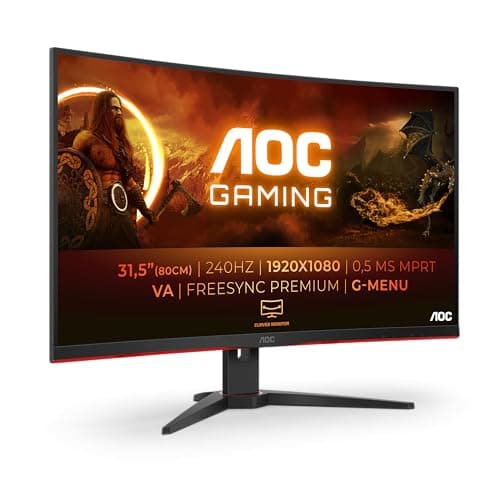
A 32-inch curved gaming monitor for under £100. That's the headline, and it's a genuinely attention-grabbing one. The AOC C32G2ZE is the biggest screen in this roundup by some margin, and if screen real estate is your priority, nothing else comes close at this price.
The 240Hz refresh rate and 1ms MPRT response time are impressive specs, and FreeSync Premium adds proper adaptive sync support. For fast-paced gaming on a large screen, the combination works well. The 1500R curve at 32 inches creates a genuinely immersive gaming environment.
Here's the honest caveat though. 1080p at 32 inches gives you a pixel density of around 69 PPI. That's noticeably lower than smaller screens, and text can look soft in everyday use. For gaming and media at normal viewing distances, it's acceptable. For document work or anything requiring sharp text, it's a compromise you'll notice daily. This is a gaming-first monitor, and it's best treated as such.
If you're setting up a dedicated gaming station and want the biggest, most immersive screen possible without spending much, the C32G2ZE delivers. Just go in with realistic expectations about text sharpness.
Pros
32 inches is the largest screen in the roundup
240Hz and FreeSync Premium for smooth gaming
Immersive 1500R curve at this size
300 cd/m² brightness is solid
Cons
1080p at 32 inches gives noticeably low pixel density
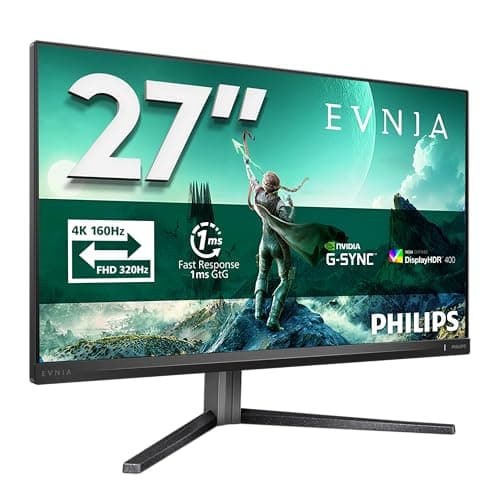
The Philips Evnia 27M2N3800A is technically the most capable monitor in this roundup. 4K IPS at 160Hz with G-Sync compatibility, HDR400, height adjustment, built-in speakers, and HDMI 2.1. At £134, it's remarkable value for what it offers on paper. But we need to be honest about who it's actually for.
This is a monitor that will outpace most starter PC builds. To run 4K at 160Hz you need a powerful GPU, and most people buying their first monitor aren't pairing it with an RTX 4080. The Dual Frame feature lets you run it at FHD 320Hz instead, which is a clever workaround, but it adds complexity that beginners might not want to deal with.
That said, if you're building a proper gaming PC and want a monitor that won't need replacing in two years, this is the one to stretch the budget for. The IPS panel is excellent, the height-adjustable stand is a genuine quality-of-life feature, and the HDMI 2.1 ports future-proof your connectivity. For the right buyer, this is exceptional value. For a true beginner, it might be more monitor than you need right now.
Pros
4K IPS at 160Hz is exceptional for the price
Height-adjustable stand is rare at this budget
HDMI 2.1 future-proofs connectivity
G-Sync compatible for NVIDIA GPU owners
Built-in speakers included
Cons
Needs a powerful GPU to use 4K at full refresh rate
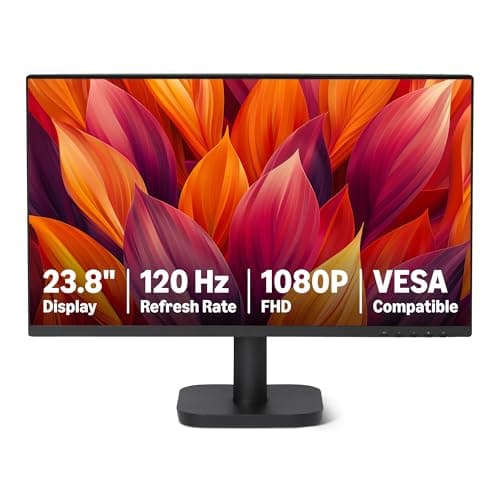
Amazon's own-brand monitor is exactly what you'd expect: functional, no-nonsense, and priced to move. At £69, the 23.8-inch 120Hz panel with HDMI, DisplayPort, and VGA connectivity covers the basics well. VESA compatibility means you can mount it on an arm, which is a useful addition at this price.
For a starter monitor used primarily for office work, browsing, and light gaming, it does the job. 120Hz is a genuine step up from budget 75Hz screens, and having DisplayPort alongside HDMI gives you proper connectivity options. The panel type isn't specified prominently in the listing, which is a minor red flag for colour-critical work, but owner reviews suggest it's acceptable for general use.
The honest limitation here is brand confidence. Amazon Basics products are fine, but they don't carry the warranty support or brand reputation of BenQ, Philips, or even AOC. If something goes wrong, the returns process is straightforward, but long-term support is less certain. For a no-risk, no-frills starter screen, it's a reasonable choice. Just don't expect it to impress you.
Pros
Good price for 120Hz with HDMI, DP, and VGA
VESA compatible for monitor arm use
Simple, clean design
Easy Amazon returns if needed
Cons
Panel type not clearly specified
Less brand confidence than established monitor makers
Philips is a name people trust, and the 27E1N1100A is a solid, dependable 27-inch IPS monitor that won't let you down. 100Hz, 4ms, built-in speakers, LowBlue mode, and FlickerFree backlight. It's not the most exciting spec sheet in the roundup, but it's a well-rounded package from a brand with a proper support network.
For a first monitor, brand confidence matters more than people realise. If something goes wrong, Philips has established UK support channels. The 27-inch IPS panel is bright at 250 cd/m² and accurate enough for general use, content consumption, and light creative work. Built-in speakers save you buying separate ones for a basic setup.
The HDMI 1.4 port is the main limitation. It caps you at 60Hz over HDMI on some setups, so you'll want to use VGA for 100Hz if your GPU doesn't have a newer HDMI output. That's a slightly dodgy situation for a 100Hz monitor. But for the price and the brand, it remains a safe, sensible choice among the best starter monitors under £150.
Pros
Trusted Philips brand with proper UK support
27-inch IPS panel with accurate colours
Built-in speakers for a complete starter setup
LowBlue and FlickerFree for eye comfort
Cons
HDMI 1.4 limits bandwidth at 100Hz
No adaptive sync
Older model, newer alternatives offer better specs for similar money
Buying your first monitor is more straightforward than the spec sheets make it look. Here's what actually matters and what you can safely ignore.
Panel Type: IPS vs VA
IPS panels give you accurate colours and wide viewing angles. They're better for general use, office work, and anything where you might view the screen from an angle. VA panels offer deeper blacks and higher contrast, which suits gaming and film watching in darker rooms. Both are fine for a starter monitor. IPS is the safer all-rounder choice.
Refresh Rate: How High Do You Actually Need?
75Hz is the minimum. It's fine for office work and casual use. 100Hz to 120Hz is a noticeable step up and covers most gaming scenarios comfortably. 144Hz and above is where competitive gaming starts to benefit. Anything above 200Hz is genuinely only useful if you're playing fast-paced shooters at consistently high frame rates. Don't pay a premium for 280Hz if your GPU can't sustain 200+ FPS.
Screen Size and Resolution
At 22 to 24 inches, 1080p looks sharp and clean. At 27 inches, 1080p is acceptable but you'll notice slightly softer text compared to a smaller screen. At 32 inches, 1080p starts to look noticeably soft for everyday use. If you're going 27 inches or larger, 1440p would be ideal, but that pushes the budget beyond £150. Know the trade-off before you buy.
Connectivity: What Ports Do You Need?
HDMI is the minimum. DisplayPort is better for gaming at high refresh rates. VGA is legacy but still useful for older PCs. If your monitor has HDMI 1.4, check whether it supports your target refresh rate over that connection. HDMI 2.0 handles 1080p at 144Hz and above without issues.
Adaptive Sync
FreeSync works with AMD GPUs. G-Sync Compatible works with NVIDIA GPUs (and often AMD too). Both reduce screen tearing. It's worth having even on a budget monitor. Most options in this roundup include some form of adaptive sync.
Stand and Ergonomics
Budget monitor stands are almost universally basic: tilt only, no height adjustment. If you care about ergonomics, budget an extra £20 to £30 for a VESA monitor arm. Most monitors in this roundup are VESA 100x100mm compatible, which is the standard size.
For further technical guidance on panel technologies and refresh rate testing methodology, RTINGS.com's monitor testing guide is an excellent resource. And for official product specs and warranty information, the BenQ UK monitor page is worth bookmarking.
How We Selected These Monitors
We researched each monitor using manufacturer specifications, verified owner reviews from Amazon UK, and cross-referenced findings with established tech benchmarking sources. We prioritised real-world usability over headline specs, paying particular attention to how each monitor performs for its stated use case. Refresh rate claims, panel type accuracy, and connectivity limitations were all scrutinised. No monitor was included simply because it looked good on paper. Each one had to make sense as a genuine recommendation for someone buying their first screen under £150.
Best Overall
KOORUI E2212H 22 Inch FHD Monitor
120Hz VA with adaptive sync under £100. The best combination of specs, value, and usability for a first monitor.
The best starter monitors under £150 cover a genuinely impressive range of performance and features in 2026. For most people buying their first monitor, the KOORUI E2212H is the clear overall winner: 120Hz, adaptive sync, a quality VA panel, and VESA compatibility for under £100 is a combination that's hard to fault. If gaming is your priority and you want more screen, the AOC Gaming C27G42E delivers 180Hz curved FreeSync Premium at a price that still feels too good to be true. Beginners who want simplicity and a big screen for work should look at the MSI PRO MP275, and anyone who values build quality and eye comfort above all else will be happiest with the BenQ GW2490E. Whatever your use case, the best starter monitors under £150 have never offered better value than they do right now.
Frequently Asked Questions
IPS panels offer superior colour accuracy and wide viewing angles, ideal for design, photo editing, and office work. VA panels produce deeper blacks and higher contrast ratios, better suited to gaming and dark environments. At budget price points, IPS panels increasingly dominate the market. Your choice depends on whether colour accuracy or visual contrast matters more for your specific workflows.
120Hz provides noticeably smoother motion than 60Hz baseline, but whether you need it depends on your GPU and game preferences. Modern budget GPUs often struggle reaching 120fps in demanding titles. For esports (Counter-Strike, Valorant) where 144+ fps is practical, higher refresh rates genuinely help. For casual gaming or productivity, 75-100Hz suffices and extends monitor longevity by reducing GPU demands.
22-24 inch monitors suit typical desk spaces with 60-75cm viewing distances, providing adequate size without dominating your workspace. 27-inch displays need more table room but offer substantially better productivity workflow space. Measure your available surface and viewing distance before selecting size. Larger monitors positioned too close cause neck strain, whilst smaller monitors from far distances reduce usability.
Modern budget monitors from established brands like Acer and AOC deliver solid reliability for 5-7 year lifespans with proper care. Panel degradation is rare under normal use conditions. More important than brand is ergonomic adjustment preventing strain, and eye-care features (flicker-free, blue light filters) reducing fatigue during 8+ hour workdays. Budget limitations typically affect additional features rather than core display reliability.
USB-C equipped monitors like the COOLHOOD portable option provide the simplest laptop integration, powering the display and charging compatible laptops through a single cable. Standard HDMI-only monitors require separate power cables. If you frequently disconnect and reconnect displays, USB-C simplicity significantly improves convenience. Verify your specific laptop supports USB-C video output before purchasing.
1Our top pickKOORUI E2212H 22 Inch FHD Monitor, Gaming 120Hz, VA Computer Monitors, 1080P Pc Screen, Adaptive Sync, 5ms, VESA 100x100mm, Eye Care, HDMI, VGAScored 4.5/10Compare all →Buy on Amazon →