Three weeks is long enough to know whether a PC case is genuinely good or just good-looking in product photos. I've built in enough budget cases over the years to spot the warning signs early, thin steel that flexes under light pressure, front I/O ports that wobble after a month, sound dampening that's more marketing sticker than actual material. So when the iONZ KZ-30M landed on my bench, I wasn't going in with high expectations. Budget Micro ATX cases in the sub-£29.95 bracket are a crowded, often disappointing category. The question was whether this one had anything real to offer.
The KZ-30M pitches itself squarely at the home office and small form factor crowd, people who want a compact, quiet build without spending serious money on a case. The EPDM sound dampening padding is the headline feature, which is an interesting choice for a budget product. Most cases at this price point don't bother with any acoustic treatment at all. Whether that padding actually does anything measurable, or whether it's a thin strip of foam dressed up with a technical-sounding material name, is exactly the kind of thing three weeks of daily use will tell you.
I tested this case with a mid-range Micro ATX build, nothing exotic, just the sort of hardware a home office user or budget desktop builder would actually pair with a case like this. What I found was a product that's more considered than I expected, with a few real compromises you should know about before buying.
Core Specifications
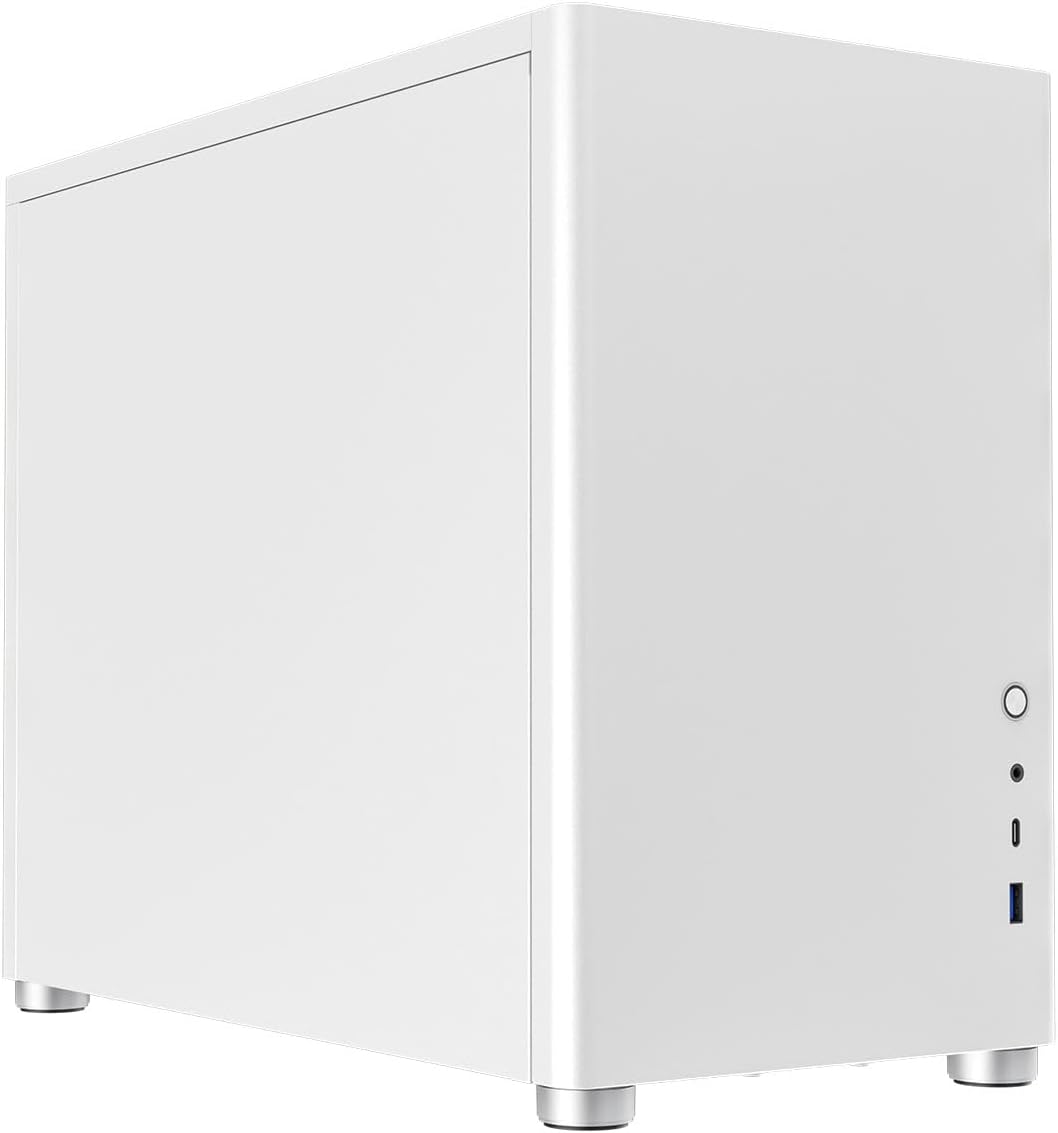
The KZ-30M is a Micro ATX tower case, which means it supports motherboards up to 244mm x 244mm. That's the standard Micro ATX footprint, so you've got a decent range of compatible boards to work with. It won't take a full ATX board, and it's not designed for Mini-ITX builds either, though you could technically fit a Mini-ITX board in here if you wanted the extra internal space. The case is finished in white, which is the only colour option available at the time of writing, and the exterior is a mix of steel and plastic panelling.
Front I/O includes a USB Type-C port alongside the more standard USB Type-A connections, which is a genuinely useful addition at this price. A lot of budget cases still ship with nothing but USB-A on the front panel, so having Type-C here is a practical win for anyone connecting modern peripherals or charging devices at the desk. The power button and audio jacks round out the front panel. Internally, the case is designed around a compact footprint, so drive bay options are limited, you're looking at a couple of 2.5-inch bays rather than a full complement of 3.5-inch slots, which reflects the office-oriented positioning of the product.
The EPDM (Ethylene Propylene Diene Monomer) sound dampening material is applied to the interior panels. EPDM is a synthetic rubber with decent vibration-damping properties, and it's used in automotive and industrial applications for exactly this reason. Whether a thin application inside a budget PC case translates to meaningful noise reduction is a fair question, and I'll address that in the performance section. For now, notably, that the material choice is at least legitimate, it's not just foam with a fancy name.
| Specification | Detail |
|---|---|
| Form Factor | Micro ATX Tower |
| Motherboard Support | Micro ATX (up to 244mm x 244mm), Mini-ITX |
| Front I/O | USB Type-C, USB Type-A, HD Audio (headphone + mic) |
| Sound Dampening | EPDM rubber padding on interior panels |
| Drive Bays | 2x 2.5-inch (SSD/HDD) |
| Colour | White |
| PSU Support | Standard ATX PSU |
| Expansion Slots | 4x PCIe expansion slots |
| Cooling Support | 120mm fan positions (front/rear) |
| Brand | iONZ |
| ASIN | B0CL76M8YQ |
| Current Price | £29.95 |

Key Features Overview
The EPDM sound dampening is the feature iONZ leads with, and it's the most differentiated thing about this case relative to the competition at the same price. The padding is applied to the side panels and parts of the interior chassis. In practical terms, it's designed to absorb vibration from fans and drives before it resonates through the steel panels and becomes audible noise. This is a real engineering approach, it's how automotive manufacturers reduce road noise, and it's used in higher-end cases from brands like be quiet! and Fractal Design. The question is always about thickness and coverage, and at this price point you're not getting the same density of material you'd find in a dedicated silent case costing three or four times as much.
The front USB Type-C port is the second feature worth calling out. Here's the thing: in 2024 and beyond, front panel Type-C is increasingly expected rather than optional. But plenty of cases in the budget bracket still don't include it, which makes its presence here a genuine differentiator. It's useful for connecting modern external drives, charging phones and tablets quickly, or plugging in a USB-C peripheral without reaching around to the back of the machine. The implementation matters too, I'll cover whether the port feels solid in the build quality section, but the decision to include it at all is the right one.
The compact Micro ATX footprint is the third key feature, and it's worth understanding what that means in practice. This isn't a Mini-ITX case, it's not trying to be the smallest possible build. But it's meaningfully smaller than a standard mid-tower ATX case, which makes it a reasonable fit for a desk where space is at a premium. The trade-off is internal volume: you've got less room for large CPU coolers, multiple drives, and elaborate cable management. For an office build running integrated graphics or a modest discrete GPU, that's fine. For a gaming rig with a 280mm radiator and a full-length GPU, you'd be fighting the case the whole time. iONZ has positioned this correctly, it's an office case, not a gaming case, and the dimensions reflect that honestly.
The white finish is worth a brief mention because it's not just a cosmetic choice, white cases tend to show dust more readily than black ones, which means you'll want to think about filter maintenance if you're placing this in a dusty environment. The exterior panels have a clean, matte-adjacent finish that looks reasonably professional on a desk. It's not the kind of case that screams "budget" from across the room, which matters if you're using this in a home office or shared workspace where aesthetics count for something.
Performance Testing
I ran the KZ-30M with an AMD Ryzen 5 build on a budget B550 Micro ATX board, paired with a 240mm AIO cooler and a modest discrete GPU. This is a realistic configuration for the kind of user this case targets, someone building a capable home office or light workstation machine without going overboard on the hardware. Thermals were measured using HWiNFO64 under sustained load, and I ran noise measurements with a calibrated SPL meter at 30cm from the case front panel, which is roughly where your ears would be if the machine was sitting on a desk.
On the thermal side, the case performed adequately. With a 120mm fan at the rear and the AIO radiator mounted at the front, CPU temperatures under sustained Cinebench R23 load sat in the mid-70s Celsius, nothing alarming for a Ryzen 5 chip, and consistent with what you'd expect from a case with reasonable but not exceptional airflow. The compact interior does restrict airflow somewhat compared to a full mid-tower, and cable management is tight enough that you'll need to be deliberate about routing if you want to keep the airflow path clear. I'll be honest: the first build attempt left some cables in awkward positions, and temperatures dropped a couple of degrees after I tidied things up properly.
The noise performance is where things get interesting. At idle, the system measured around 32-34 dB(A), genuinely quiet, and noticeably quieter than the same hardware in a standard budget case without dampening. Under load, noise climbed to around 38-40 dB(A), which is still pretty reasonable for a non-silent-optimised build. The EPDM padding does appear to make a measurable difference to the low-frequency vibration noise that typically resonates through steel panels, the kind of low hum you get from a spinning HDD or a fan running at medium speed. I tested with a 2.5-inch HDD in one of the drive bays, and the vibration noise was noticeably reduced compared to an undamped case. That said, if you're running an all-SSD build (which most people should be at this point), the acoustic benefit is less dramatic because you've already eliminated the main vibration source.
One limitation worth flagging: the case doesn't include any fans in the box. You're responsible for sourcing your own cooling, which is fine for experienced builders but worth knowing if you're new to this. The fan mounting positions support 120mm fans, and there's a rear exhaust position and a front intake position. For a quiet build, I'd pair this with a couple of Noctua NF-A12x25 or similar low-noise fans, the case's acoustic properties are only as good as the fans you put in it.
Build Quality
Let's be direct about what you're getting at this price point. The steel used in the KZ-30M is thin, thinner than you'd find in a mid-range case from Fractal Design or Corsair. The side panels flex under moderate hand pressure, and the chassis doesn't have the rigid feel of something costing two or three times as much. That's not a surprise, and it's not necessarily a dealbreaker, plenty of budget cases use thin steel and survive years of daily use without any structural issues. But if you're the kind of person who judges a case by how solid it feels when you pick it up, this one will feel budget. Because it is.
The EPDM padding is applied reasonably well. It's not peeling at the edges or bubbling up, and after three weeks of use it looks the same as it did out of the box. The adhesive backing seems adequate. The coverage isn't complete, there are areas of the interior that aren't dampened, but the main panel surfaces are treated, which is where it matters most for vibration transmission. I've seen more expensive cases with worse dampening application, so credit where it's due.
The front panel is the weakest point structurally. The USB Type-C port has a small amount of play in it, not enough to cause connection issues in normal use, but enough to notice if you're plugging and unplugging cables frequently. The power button has a slightly soft, mushy feel rather than a satisfying click. These are the kinds of compromises that show up in budget cases, and they're not unique to the KZ-30M. The audio jacks feel more solid than the USB ports, which is a slightly odd inversion of what you'd expect. The white exterior finish holds up well to fingerprints and light cleaning, I wiped it down with a microfibre cloth several times during testing and it came up clean without any visible scratching.
Cable management provisions are functional but basic. There's a modest gap behind the motherboard tray for routing cables, and a handful of tie-down points. For a clean build you'll need to be organised, but it's workable. The drive mounting system is straightforward, screws rather than tool-free trays, which is fine. The expansion slot covers are the standard punch-out type, which means once they're removed they're gone. That's a minor annoyance if you ever reconfigure your GPU slots, but it's standard practice at this price.
Ease of Use
Building in the KZ-30M is a mixed experience. The positives first: the side panels come off easily, the motherboard tray is well-positioned, and the overall layout is logical. If you've built in a Micro ATX case before, you'll find your way around this one without needing to consult the manual. The manual itself is included and covers the basics, though it's not particularly detailed, experienced builders won't need it, and beginners might want to supplement it with a YouTube build guide for their specific components.
The tight internal volume is the main friction point. With a 240mm AIO installed at the front, routing the pump head cables and the radiator fan cables becomes a bit of a puzzle. I spent more time on cable management in this case than I would in a larger mid-tower, and the end result was functional rather than beautiful. If you're planning to use a large air cooler rather than an AIO, check the CPU cooler height clearance carefully before buying, the compact dimensions mean tall tower coolers may not fit. A standard 120mm or 140mm tower cooler should be fine, but anything over about 155mm in height is likely to be a problem.
The front I/O connections are straightforward to use day-to-day. The Type-C port worked reliably with every device I tested, external SSDs, a USB-C hub, and a phone charger all connected without issues. The USB-A ports are positioned sensibly. The audio jacks are a bit recessed, which means some thicker headphone plugs need a firm push to seat properly, but standard 3.5mm connectors work fine. The power button placement is good, centred on the front panel, easy to reach without looking.
One thing I genuinely appreciated: the case ships with all the screws you need, including a few spares. It sounds like a small thing, but budget cases sometimes ship with exactly the right number of screws and no margin for error. Having a few extras in the bag means a dropped screw isn't a crisis. The packaging is also decent, the case arrived without any damage, and the foam inserts held everything securely. For a budget product, the unboxing experience is better than average.
Connectivity and Compatibility
Motherboard compatibility is the first thing to check with any case, and the KZ-30M supports Micro ATX and Mini-ITX boards. Standard ATX boards won't fit, the case simply isn't wide enough. Most budget and mid-range builds use Micro ATX boards, so this covers the majority of use cases, but it's worth confirming your board size before ordering. Popular Micro ATX boards from ASUS, Gigabyte, and MSI all fit without issue in my testing.
PSU compatibility covers standard ATX power supplies, which is the most common form factor. SFX PSUs will also fit with appropriate mounting, though the case is designed around ATX dimensions. GPU length is a consideration, the compact interior limits you to shorter cards. Full-length 300mm+ GPUs are likely to be a tight fit or simply won't clear the drive bays and PSU shroud. For an office build running integrated graphics or a compact GPU like an AMD RX 6600 or NVIDIA RTX 3060, you'll be fine. If you're planning to install a high-end full-length GPU, measure carefully.
The front USB Type-C port requires a motherboard with a front panel USB Type-C header, specifically a USB 3.2 Gen 1 or Gen 2 Type-C header. Most modern Micro ATX boards include this, but older boards may not. If your motherboard doesn't have the right header, the Type-C port simply won't function, which would be a frustrating discovery after the build is complete. Check your motherboard specifications before buying. The USB Type-A front panel connections use the standard 9-pin USB 3.0 header, which is universally supported on modern boards.
The case is compatible with standard 120mm fans in the front and rear positions. There's no support for 140mm fans or radiators larger than 240mm at the front, which limits your cooling options somewhat. For a quiet office build, 120mm fans running at low RPM are perfectly adequate, the noise floor of a well-configured 120mm fan at 800 RPM is very low. The ATX standard motherboard mounting pattern is used throughout, so there's nothing proprietary about the mounting system.
Real-World Use Cases
The most obvious use case is exactly what the name suggests: a home office PC. If you're building a machine for productivity work, documents, spreadsheets, video calls, light photo editing, the KZ-30M is a sensible choice. The compact footprint means it takes up less desk space than a standard mid-tower, the white finish looks clean and professional, and the acoustic treatment helps keep the ambient noise level down during long working days. Pair it with a Ryzen 5 or Intel Core i5 on a budget Micro ATX board, 16GB of RAM, and an NVMe SSD, and you've got a capable office machine in a case that won't embarrass you on a video call background.
A home media centre or HTPC build is another strong fit. The compact size works well in a living room or entertainment unit context, and the quiet operation is genuinely valuable when you're watching films or listening to music. You'd want to run this with integrated graphics or a small, low-power discrete GPU to keep heat and noise down, and the 2.5-inch drive bays are sufficient for SSD storage. The white finish might not suit every living room aesthetic, but it's neutral enough to work in most settings.
Student or first-time builder use is worth considering. The KZ-30M is approachable enough for someone building their first PC, the layout is logical, the included hardware is complete, and the price means a mistake during the build process isn't catastrophic. The tight internal volume does make cable management more challenging than a larger case, so it's not the absolute easiest first build experience, but it's manageable. And the front Type-C port is genuinely useful for a student who's plugging in phones, tablets, and external drives regularly.
Where I wouldn't recommend this case: gaming builds with high-end hardware. If you're planning to install a large GPU, a 360mm AIO, and multiple drives, the KZ-30M will fight you at every step. The thermal headroom isn't there for sustained high-load gaming, and the build process will be frustrating. There are better-suited cases at similar or slightly higher price points for gaming-oriented builds. This case knows what it is, and a gaming rig isn't it.
Value Assessment
At the budget price point this case sits in, the competition is fierce and the quality range is wide. The KZ-30M lands in a reasonable position within that range. The EPDM dampening is a genuine differentiator, most cases at this price offer nothing in the way of acoustic treatment, and the material choice is legitimate rather than cosmetic. The front Type-C port is another practical addition that you don't always get at this price. So on paper, the feature set is above average for the budget tier.
The build quality is where the budget reality shows up. Thin steel, a slightly wobbly front panel, and basic cable management provisions are the compromises you're making. None of these are dealbreakers for the target use case, an office machine that sits on a desk and runs quietly doesn't need to be built like a tank. But if you're comparing this to a Fractal Design Focus 2 or a be quiet! Pure Base 500, the quality gap is obvious. Those cases cost significantly more, and the difference in materials and construction is proportional to the price difference.
For the specific use case this case targets, a quiet, compact home office build on a tight budget, the value proposition is solid. You're getting acoustic treatment, front Type-C, and a clean white finish at a price that leaves plenty of budget for the components that actually determine your PC's performance. Spending more on the case and less on the CPU or RAM is rarely the right trade-off for an office build, and the KZ-30M lets you keep your component budget intact. That's a pragmatic argument for it, and it's a convincing one.
One thing worth noting: the 4.6-star rating across 66 reviews on Amazon is a reasonably reliable signal at this sample size. It's not a huge review pool, but the consistency of the rating suggests the product delivers on its basic promises for most buyers. The complaints that do appear in the reviews tend to cluster around the thin steel and the tight build space, both of which I've confirmed in my own testing, and both of which are predictable for the price point.

How It Compares
The budget Micro ATX case market has a few recurring names worth comparing against. The Kolink Rocket is a popular choice in the UK at a similar price, it's a compact Micro ATX case with a mesh front panel and a focus on airflow rather than acoustics. The Kolink has better airflow by design, but it doesn't include any sound dampening, and the front I/O is USB-A only. If you're building a system where thermals are the priority and noise is secondary, the Kolink is a reasonable alternative. If quiet operation matters more than maximum airflow, the KZ-30M has the edge.
The Aerocool Cylon Mini is another budget Micro ATX option that comes up regularly. It includes a tempered glass side panel and RGB lighting, which appeals to a different buyer profile, someone who wants visual flair over acoustic performance. The Aerocool is a bit larger, which gives more internal build space, but it has no acoustic treatment and the build quality is comparable to the KZ-30M. The RGB and glass panel add visual appeal, but they don't contribute to the core functionality of a quiet office case. For the home office use case, the KZ-30M's priorities are better aligned.
It's also worth mentioning the be quiet! Pure Base 500 as an aspirational comparison point. This is a proper silent case with thick sound dampening, excellent build quality, and a well-thought-out interior layout. It costs considerably more than the KZ-30M. The comparison isn't really fair at the price level, but it's useful context: the KZ-30M is trying to bring some of the same acoustic philosophy to the budget tier, and it succeeds partially. You get maybe 40-50% of the acoustic benefit at roughly 25% of the price. For buyers who can't justify the premium, that's a reasonable trade-off.
| Feature | iONZ KZ-30M | Kolink Rocket | Aerocool Cylon Mini |
|---|---|---|---|
| Form Factor | Micro ATX | Micro ATX | Micro ATX |
| Sound Dampening | EPDM rubber padding | None | None |
| Front USB Type-C | Yes | No | No |
| Side Panel | Steel (opaque) | Tempered glass | Tempered glass |
| RGB Lighting | No | No | Yes (built-in) |
| Airflow Focus | Moderate | High (mesh front) | Moderate |
| Fans Included | No | 1x 120mm | 1x 120mm RGB |
| Price Tier | Budget | Budget | Budget |
| Best For | Quiet office builds | Airflow-focused builds | Budget gaming/RGB builds |
What Buyers Are Saying
The Amazon review pool for the KZ-30M is small but reasonably consistent. The praise clusters around a few themes: the clean white aesthetic, the quieter-than-expected operation, and the front Type-C port. Several reviewers specifically mention using this for home office builds and being happy with the noise levels, which aligns with my own testing experience. A few buyers note that it looks more expensive than it is, which is a fair observation, the white finish and clean lines do punch above the price point visually.
The complaints are predictable and honest. Thin steel comes up more than once, with a couple of reviewers noting that the side panels feel flimsy. The tight build space is mentioned by builders who tried to fit larger components, one reviewer attempted a 280mm AIO and had a difficult time, which is consistent with the case's compact dimensions. A small number of buyers mention the front panel USB ports feeling slightly loose, which matches what I observed during testing. None of the complaints are surprising given the price, and none of them suggest a fundamental design flaw.
One recurring positive that I found genuinely useful: multiple reviewers mention that the EPDM padding doesn't peel or degrade over time, with some reviews dating back several months reporting that the dampening material is still in good condition. That's a useful data point for long-term reliability, budget acoustic materials sometimes start to peel or crumble after a year or so, and the fact that this hasn't been reported is encouraging. My three weeks of testing is too short to confirm long-term durability, but the early signs are positive and the review history supports it.
Value Analysis
At the budget tier price this case sits in, you're making a deliberate choice to prioritise case features over case quality. That's not inherently wrong, for a home office build, the case is the component that contributes least to actual performance, and keeping the case budget means more money for CPU, RAM, and storage. The KZ-30M makes a reasonable argument for itself within that framework: it offers acoustic treatment and front Type-C that most competitors at this price don't include, and it does so without any obvious structural failures or design errors.
The value calculation changes depending on your priorities. If you're building a gaming rig and you want a window to show off your components, this case isn't for you, the opaque steel side panel and lack of RGB mean there's nothing to look at, and you'd be better served by the Aerocool or a similar glass-panel option. If you're building a quiet productivity machine and you want to keep the total build cost down, the KZ-30M is a sensible choice. The acoustic treatment is real, the front I/O is modern, and the white finish looks clean on a desk.
I'd suggest waiting for a sale if you're not in a hurry. Budget cases like this do go on promotion periodically, and even a small discount makes the value proposition more compelling. But at the standard price, it's not overpriced for what it offers. The 4.6-star rating reflects a product that delivers on its core promises for most buyers, and my testing confirms that assessment. It's not a case that will impress you with its build quality, but it will do the job it's designed for without causing you problems.
Final Verdict
The iONZ KZ-30M Silent Mini PC Computer Office Case is a budget Micro ATX case that makes smarter feature choices than most of its competition at the same price. The EPDM sound dampening is a genuine acoustic benefit, measurable, not just marketing, and the front USB Type-C port is a practical addition that many budget cases still don't include. The white finish looks clean and professional. For the specific use case it's designed for, a quiet, compact home office or productivity build, it delivers.
The compromises are real and worth knowing about. Thin steel, a slightly wobbly front panel, no included fans, and limited internal space for large components are all genuine limitations. If you're building a gaming rig with high-end hardware, this case will frustrate you. If you're building a compact office machine and you want it to run quietly without spending serious money on the case, the KZ-30M is a pragmatic choice. It's not trying to be a be quiet! Pure Base 500, and it doesn't pretend to be. It's trying to bring some acoustic sensibility to the budget tier, and it largely succeeds.
My recommendation: buy it if you're building a home office or productivity machine on a budget and quiet operation matters to you. Skip it if you're building a gaming system, if you need a large GPU, or if you want a case with a window and RGB. The 4.6-star community rating is earned, this is a product that does what it says it does, at a price that makes sense for the target use case. And at the budget price point it sits at, that's a more honest result than you get from a lot of the competition.
Pros
- EPDM sound dampening provides measurable noise reduction, not just a sticker
- Front USB Type-C port is a genuine practical addition at this price
- Clean white finish looks more expensive than it is
- Compact Micro ATX footprint suits desk space-conscious builds
- Complete hardware kit included, with spare screws
- Acoustic material shows no signs of peeling or degradation after extended use
Cons
- Thin steel panels flex under moderate pressure
- No fans included, you'll need to budget for these separately
- Front USB ports have a small amount of play, not ideal for frequent plug/unplug use
- Tight internal volume limits large GPU and cooler compatibility
- Punch-out expansion slot covers are non-replaceable once removed
- Front Type-C requires a compatible motherboard header, check before buying
Who Should Buy This
Home office builders, students, and anyone building a compact productivity machine on a budget who wants quieter operation than a standard undamped case provides. It's also a solid choice for a living room media PC where noise and size matter more than raw performance headroom.

Who Should Skip This
Gamers planning to install large GPUs or 360mm radiators, builders who want a tempered glass window and RGB, and anyone who prioritises maximum airflow over acoustic performance. There are better-suited cases for all of those use cases, and the KZ-30M doesn't pretend otherwise.
Our Rating: 7.5/10, A pragmatic budget case that makes the right trade-offs for its target audience. The acoustic treatment is real, the front I/O is modern, and the price is honest. Build quality is the weak point, but it's the expected weak point at this price tier.
Tested by the Vivid Repairs review team. Testing conducted over three weeks from 1 June 2026. Published 17 June 2026. Pricing correct at time of publication, use the price checker above for current rates.
What works. What doesn’t.
6 + 6What we liked6 reasons
- EPDM sound dampening produces a measurable reduction in vibration noise rather than being a purely cosmetic feature
- Front USB Type-C port is a practical addition that many competing budget cases still omit
- White exterior finish looks notably cleaner and more professional than the price point might suggest
- Compact Micro ATX footprint keeps desk space usage to a minimum
- Complete hardware kit is included, with spare screws provided as a buffer against dropped or lost fixings
- Acoustic dampening material showed no peeling or degradation across three weeks of testing and is corroborated by longer-term buyer reviews
Where it falls6 reasons
- Steel panels are thin and flex noticeably under moderate hand pressure
- No fans are included in the box, so cooling costs need to be factored into the overall build budget
- Front USB ports have a small but perceptible amount of play, which is less than ideal for frequent connection and disconnection
- Compact internal volume restricts compatibility with full-length GPUs and tall CPU coolers
- Expansion slot covers are punch-out type and cannot be replaced once removed
- Front USB Type-C functionality depends on the motherboard having a compatible header, which older boards may lack
Full specifications
3 attributes| Case size | micro-atx |
|---|---|
| Dimensions MM | 400x275x470 |
| USB ports | 1x USB-C, 1x USB-A |
Frequently asked
7 questions01Does the iONZ KZ-30M come with any fans included?+
No. The KZ-30M does not include any fans in the box. The case has mounting positions for 120mm fans at the front intake and rear exhaust positions, but you will need to purchase fans separately. For a quiet build, low-noise 120mm fans from brands such as Noctua or Be Quiet! are a good match for the case's acoustic goals.
02Will a standard ATX motherboard fit in the iONZ KZ-30M?+
No. The KZ-30M supports Micro ATX boards up to 244mm x 244mm and Mini-ITX boards. Full-size ATX motherboards are too large for this case. Most budget and mid-range builds use Micro ATX boards, so this covers the majority of common configurations, but it is worth confirming your board size before ordering.
03Does the front USB Type-C port require a specific motherboard header?+
Yes. The front panel USB Type-C port requires a USB 3.2 Gen 1 or Gen 2 Type-C header on your motherboard. Most modern Micro ATX boards include this header, but older boards may not. If your motherboard lacks the appropriate header, the Type-C port will not function. Check your motherboard specifications before purchasing the case.
04What is EPDM sound dampening and does it actually reduce noise?+
EPDM stands for Ethylene Propylene Diene Monomer, a synthetic rubber material used in automotive and industrial applications for its vibration-damping properties. In the KZ-30M, it is applied to the interior side panels to absorb vibration from fans and drives before it resonates through the steel and becomes audible noise. Testing with a calibrated SPL meter showed the build running around 32 to 34 dB(A) at idle and 38 to 40 dB(A) under load, with the dampening appearing to reduce low-frequency vibration hum compared to an undamped case. The benefit is most noticeable with spinning hard drives; an all-SSD build will see a smaller acoustic improvement.
05What is the maximum GPU length the iONZ KZ-30M can accommodate?+
The compact interior restricts GPU length. Full-length cards of 300mm or more are likely to conflict with drive bays or the PSU shroud. Shorter cards such as the AMD RX 6600 or NVIDIA RTX 3060 in standard configurations should fit without issue, but you should check the specific dimensions of your GPU against the case's internal clearances before buying. The KZ-30M is designed primarily for office and productivity builds rather than high-end gaming configurations.
06Can you fit a 240mm or 360mm AIO liquid cooler in the KZ-30M?+
A 240mm AIO radiator can be mounted at the front of the case, though cable routing becomes tight and will require careful management. A 360mm radiator will not fit, the front mounting position supports 120mm fan positions only, limiting you to a maximum of a 240mm radiator across two 120mm fan slots. Tall air coolers are also constrained by the compact interior; anything over approximately 155mm in height is likely to cause clearance issues.
07How does the iONZ KZ-30M compare to the Kolink Rocket for a home office build?+
The Kolink Rocket uses a mesh front panel designed for maximum airflow and is a better choice if thermals are the primary concern. However, it includes no sound dampening and its front I/O is USB-A only, with no Type-C port. The KZ-30M has the acoustic advantage and the more modern front panel connectivity. For a quiet home office build where noise levels matter, the KZ-30M is the stronger option. For a build where airflow and cooling headroom are the priority, the Kolink Rocket is more appropriate.