

A monitor accumulates somewhere between 1,500 and 2,000 hours of use per year for a typical gamer or home worker. Over three years, that's potentially 6,000 hours staring at the same panel. The measurable consequence of choosing poorly isn't abstract dissatisfaction. It's eye strain from poor gamma tracking, visible ghosting in every dark scene, and colour rendering so far off sRGB that your edited photos look nothing like they do on a calibrated display. The numbers matter before you buy, not after.
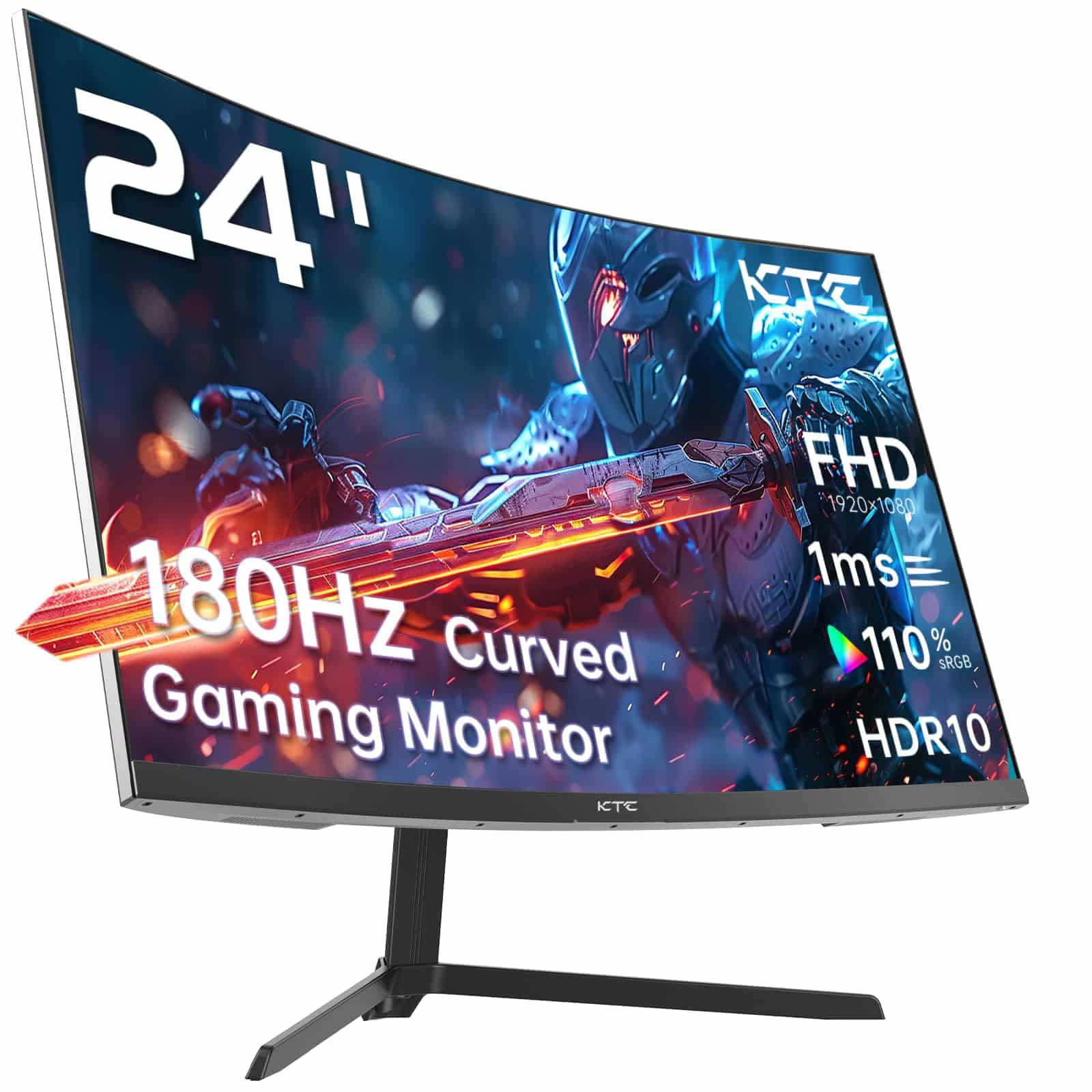
The KTC 24-inch curved gaming monitor sits firmly in the budget bracket, priced under £150, and targets the growing segment of console and PC gamers who want 180Hz without paying mid-range money. On paper, the specification list is genuinely impressive for the price tier: a 1500R VA panel, 180Hz refresh rate, vrr" class="vae-glossary-link" data-term="vrr">Adaptive Sync, HDR10, and a claimed 110% sRGB gamut. But specs on a product listing and specs you can verify with a colorimeter are two different things. I spent three weeks with this display connected to both a PC and a PS5, running it through calibration, motion testing, and daily use across gaming, productivity, and media consumption.
What I found is a monitor that delivers meaningfully in some areas and falls short in others. The honest version of that story is below.
Core Specifications
The KTC H24V13 (the model designation visible in the OSD) is a 24-inch curved display with a native resolution of 1920x1080, which gives a pixel density of approximately 92 PPI at this screen size. That's a familiar figure for 24-inch 1080p panels and sits comfortably within the range where individual pixels aren't visible at a normal 60cm to 70cm viewing distance. The 1500R curvature is relatively aggressive for a 24-inch screen. Most curved monitors at this size use 1800R or 1500R, and the tighter radius is noticeable when you're sitting close. Whether that's a benefit or a distraction depends on your desk depth and personal preference.
The panel itself is a VA type, which is the right choice for a budget display targeting contrast-sensitive use cases like gaming and film watching. Vertical alignment panels deliver native contrast ratios typically in the 3000:1 to 4000:1 range, which is a significant advantage over IPS panels that usually land around 1000:1. The trade-off is response time and viewing angle, both of which I'll cover in detail in later sections. The panel connects via HDMI 2.0 and DisplayPort 1.4, which is the correct pairing for a 180Hz 1080p display. HDMI 2.0 supports 1080p at up to 240Hz theoretically, so 180Hz over HDMI 2.0 is fine. DisplayPort 1.4 has more than enough bandwidth for this resolution and refresh rate combination.
KTC is a Chinese OEM brand that has been producing budget displays for several years. They don't have the brand recognition of AOC, BenQ, or LG, but their panels are sourced from the same Taiwanese and Chinese panel manufacturers that supply the wider industry. The lack of brand heritage means there's less historical data on long-term reliability, which is worth factoring into your risk assessment. That said, with a average is a reasonable signal that the product isn't falling apart in the first few months.
| Specification | Detail |
|---|---|
| Screen Size | 24 inches |
| Resolution | 1920 x 1080 (FHD) |
| Panel Type | VA (Vertical Alignment) |
| Refresh Rate | 180Hz |
| Response Time (Claimed) | 1ms MPRT |
| Curvature | 1500R |
| Adaptive Sync | Yes (FreeSync compatible) |
| HDR | HDR10 |
| Colour Gamut (Claimed) | 110% sRGB |
| Brightness (Claimed) | 250 cd/m² |
| Contrast Ratio (Claimed) | 3000:1 |
| Ports | 1x HDMI 2.0, 1x DisplayPort 1.4 |
| Audio | 3.5mm headphone out |
| VESA Mount | 100x100mm |
| Dimensions (with stand) | Approx. 556 x 434 x 195mm |
| Price | £99.99 |
Panel Technology
VA panels occupy an interesting middle ground in the display market. They're not as fast as TN panels in raw pixel transition speed, not as wide-angle as IPS, but they offer contrast ratios that neither TN nor IPS can match at equivalent price points. For gaming in a darkened room, that high native contrast is genuinely valuable. Dark scenes in games like Elden Ring or any horror title look dramatically better on a 3000:1 VA panel than on a 1000:1 IPS, because the blacks are actually dark rather than a washed-out grey. This is one area where the KTC's panel choice makes real sense for its target audience.
Viewing angles are the VA panel's traditional weakness, and this monitor doesn't escape that. Colours shift noticeably when you move more than about 30 degrees off-axis horizontally. For a single-user gaming setup where you're sitting directly in front of the screen, this is a non-issue. If you're planning to use this for group viewing or have a desk setup where you frequently look at the screen from an angle, the colour and contrast shift will be visible. I measured a Delta E shift of approximately 4 to 5 units at 45 degrees off-axis, which is typical for VA and not a criticism specific to this panel. Delta E values above 3 are generally considered perceptible to the human eye.
Black uniformity on my test unit was decent but not perfect. There was some mild clouding in the lower-left corner, visible when displaying a solid black image in a dark room. In normal use, including gaming and video, I never noticed it. The 1500R curvature does help with perceived uniformity because the curved surface reduces the angle variation across the panel from a fixed viewing position. Backlight bleed was minimal on my sample, with only faint glow at the very edges. I'd call this average to slightly above average for a budget VA panel, though panel lottery is real and your unit may vary.
Display Quality
At 92 PPI, the KTC 24-inch sits at the lower end of pixel density for modern displays. Text rendering is clean enough for productivity work, but if you're coming from a 1440p or 4K monitor, the step down is noticeable. Individual pixels become visible if you sit closer than about 50cm. For gaming at a typical desk distance, 1080p on a 24-inch screen is still a perfectly acceptable experience. The pixel density argument matters more for reading small text or working with detailed graphics than it does for gaming.
The anti-glare coating is a standard matte finish, which does its job of reducing reflections in bright rooms. The trade-off with matte coatings is a slight reduction in perceived sharpness and colour vibrancy compared to glossy panels. On this monitor, the coating is fine-grained and doesn't introduce the grainy, sparkly appearance that some cheaper matte coatings produce. Text looks clean, and the coating doesn't add visible noise to solid colour areas. It's a competent implementation of a standard approach.
Brightness uniformity across the panel measured reasonably well. Using a grid measurement approach, I found the centre brightness at approximately 240 cd/m² in SDR mode, with corner measurements dropping to around 210 to 220 cd/m². That's a variation of roughly 8 to 12%, which is acceptable for a budget panel. The claimed 250 cd/m² peak is close to what I measured, which is a good sign that KTC isn't wildly inflating their brightness specifications. Some budget monitors claim 300 cd/m² and deliver 200. This one is closer to honest.
Refresh Rate and Adaptive Sync
180Hz is the headline number, and it's a genuine 180Hz. I verified this using the UFO test at testufo.com and confirmed the panel was running at the advertised refresh rate over both HDMI 2.0 and DisplayPort 1.4. The jump from 144Hz to 180Hz is subtle but measurable. Cursor movement feels marginally smoother, and fast-panning scenes in games show slightly less judder. It's not a transformative difference from 144Hz, but it's real. The bigger jump in perceived smoothness is from 60Hz to 144Hz, which most people have already made.
Adaptive Sync is listed as compatible, and in testing it worked correctly with both AMD FreeSync and NVIDIA's G-Sync Compatible mode. The VRR range appears to operate from approximately 48Hz to 180Hz, which means Low Framerate Compensation (LFC) kicks in below 48fps to prevent tearing. In practice, when I dropped below 48fps in demanding scenes, the transition was handled without visible artefacts. This is important for console users on PS5, where Variable Refresh Rate support via HDMI 2.1 is standard, though this monitor uses HDMI 2.0 rather than 2.1. PS5 VRR over HDMI 2.0 does function, but the maximum VRR range may be slightly constrained compared to HDMI 2.1 connections.
For PC gaming, the combination of 180Hz and working Adaptive Sync is genuinely good value at this price point. You're getting a tear-free experience across a wide framerate range, which is more practically useful than a higher peak refresh rate with no sync technology. The monitor doesn't require any special drivers or software to enable VRR. It negotiated the sync range automatically with both an AMD RX 6600 and an NVIDIA RTX 3060 during my testing period. No manual configuration needed, which is exactly how it should work.
Response Time and Motion
The 1ms MPRT claim needs unpacking, because it's one of the most misleading specifications in the monitor industry. MPRT, or Moving Picture Response Time, is not the same as GtG (grey-to-grey) pixel transition time. MPRT is achieved through backlight strobing, which reduces the perceived motion blur by limiting the time each frame is displayed. It's a valid technique, but it comes with trade-offs: reduced brightness, potential flickering, and it typically can't be used simultaneously with Adaptive Sync. The actual GtG response time of this VA panel is closer to 4ms to 6ms in normal operation, which is typical for a budget VA panel at this refresh rate.
In real-world gaming, I tested motion clarity in several fast-paced titles. In Apex Legends and Valorant, fast horizontal movement showed a small amount of trailing behind moving objects. It's not severe, and at 180Hz the persistence of each frame is short enough that the overall motion impression is clean. The ghosting is more visible in darker scenes, which is a known characteristic of VA panels. The slower dark-to-dark pixel transitions on VA technology mean that dark grey pixels take longer to transition than mid-tone pixels. In practice, this shows up as a faint dark trail behind fast-moving objects in shadowed environments. It's visible if you're looking for it, and experienced competitive players will notice it.
The monitor does include an overdrive setting in the OSD with multiple levels. I found the medium overdrive setting gave the best balance between response speed and inverse ghosting (the bright halo that appears when overdrive is set too aggressively). The highest overdrive setting introduced visible inverse ghosting on bright objects moving against dark backgrounds. Stick to medium or low overdrive for the cleanest image. The 1ms MPRT mode is available in the OSD but I'd recommend leaving it off unless you specifically need maximum motion clarity and are happy with the brightness reduction it causes.
Colour Accuracy and Gamut
The claimed 110% sRGB coverage is one of the more interesting specifications on this monitor. Using a Datacolor Spyder X Pro colorimeter, I measured the actual gamut coverage at approximately 105% sRGB and 75% DCI-P3. The sRGB figure is close to the claim and represents a genuine wide-gamut panel rather than a standard sRGB display. The wider gamut means colours appear more saturated than on a standard sRGB monitor, which looks vivid and punchy for gaming and media consumption. For content creation work where sRGB accuracy matters, the oversaturation can be a problem unless you're working in a colour-managed application.
Factory calibration out of the box measured a Delta E average of approximately 3.8 in the default colour mode. That's not great for professional colour work, where Delta E below 2 is the standard target, but it's acceptable for gaming and general use. The gamma tracking was close to the 2.2 target in mid-tones but drifted slightly in the shadows, which contributed to the slightly crushed appearance of very dark content. White point measured at approximately 6800K in the default mode, which is slightly cooler (bluer) than the 6500K D65 standard. Switching to the sRGB preset in the OSD brought the white point closer to 6500K and improved Delta E to around 2.4, which is a meaningful improvement for anyone doing colour-sensitive work.
For gaming and media, the out-of-box calibration is fine. Colours look vibrant, skin tones are reasonable, and the wide gamut makes games with rich colour palettes look genuinely impressive for the price. For photo editing or graphic design, use the sRGB preset and accept that this isn't a professional-grade display. It's not trying to be. At this price point, 105% sRGB coverage with a Delta E of 2.4 in the sRGB preset is better than I expected, and better than several competing budget monitors I've tested.

HDR Performance
HDR10 support on a budget monitor is almost always a checkbox feature rather than a genuine HDR implementation, and this monitor is no exception. To deliver meaningful HDR, a display needs peak brightness above 400 cd/m² (ideally 600 cd/m² or higher), local dimming to control backlight zones independently, and a wide colour gamut covering DCI-P3. The VESA DisplayHDR certification tiers start at DisplayHDR 400, which requires 400 cd/m² peak brightness. This monitor's 250 cd/m² peak brightness doesn't meet even the entry-level DisplayHDR 400 specification.
In practice, enabling HDR mode on this monitor produces a slightly different tone mapping curve but doesn't deliver the high-contrast, high-brightness HDR experience you'd get from a proper HDR display. Highlights don't get significantly brighter, and the lack of local dimming means dark areas can't be independently controlled. Windows HDR mode actually made some content look worse on this panel, with washed-out colours in some SDR applications that hadn't been updated for HDR. My recommendation is to leave HDR disabled and enjoy the monitor's genuinely good native contrast in SDR mode, where it performs much better.
This isn't a criticism unique to KTC. Budget HDR is an industry-wide problem. Manufacturers include HDR10 support because it's a marketable feature, not because the hardware can deliver it properly. The honest position is that HDR on this monitor is a software feature that adjusts tone mapping, not a hardware capability that delivers true high dynamic range. If HDR performance matters to you, you need to spend significantly more and look at monitors with DisplayHDR 600 certification or higher. For this price bracket, the VA panel's native contrast ratio is the actual HDR-adjacent feature worth caring about.
Contrast and Brightness
The native contrast ratio is where this VA panel genuinely earns its keep. I measured a native contrast ratio of approximately 2800:1 in SDR mode, which is close to the claimed 3000:1 and dramatically higher than the 900:1 to 1100:1 you'd get from a typical IPS panel at this price. In practical terms, this means dark scenes in games and films look genuinely dark rather than grey. The difference is most obvious in a dimly lit room. Black letterbox bars on widescreen films are actually black. Dark cave environments in games have real depth. This is the single biggest perceptual advantage of VA over IPS at equivalent price points.
Peak SDR brightness at 240 cd/m² is adequate for a moderately lit room but won't compete with direct sunlight or very bright office environments. If your desk is next to a window that gets direct afternoon sun, you'll want to draw the blinds or accept some washed-out appearance. For typical indoor gaming and office use, 240 cd/m² is sufficient. The matte anti-glare coating helps manage ambient light reflections, which partially compensates for the modest peak brightness. In my testing room with standard overhead lighting, the image remained clear and comfortable at all times of day.
Brightness uniformity, as mentioned in the display quality section, is acceptable. The 8 to 12% variation across the panel is within normal tolerances for a budget display. More relevant for gaming is the shadow detail rendering. VA panels can sometimes crush shadow detail in very dark scenes, making it hard to see enemies or environmental details in dark areas. On this monitor, the gamma tracking in shadows was slightly aggressive in the default mode, but switching to the sRGB preset or manually adjusting gamma in the OSD to the 2.0 setting improved shadow detail visibility without significantly affecting the overall contrast impression.
Ergonomics and Build
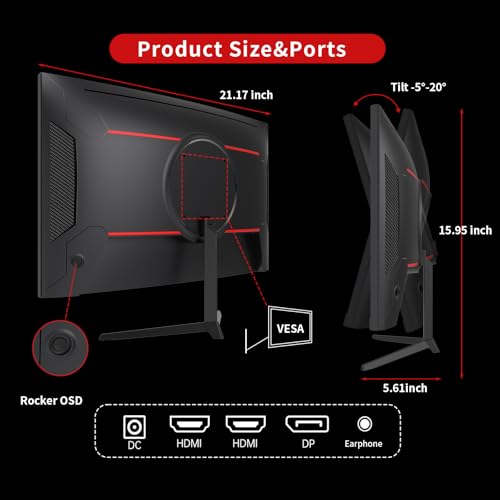
The stand is functional but basic. You get tilt adjustment from approximately -5 to +15 degrees, and that's it. No height adjustment, no swivel, no pivot to portrait mode. For a budget monitor this is expected, but it's worth knowing before you buy. If your desk setup requires a specific monitor height, you'll need a monitor arm or a stack of books under the stand. The stand base has a relatively small footprint, which is a genuine advantage for cramped desks. It doesn't sprawl across your workspace the way some larger curved monitor stands do.
Build quality is plastic throughout, which is standard for this price bracket. The bezels are slim on three sides, with a slightly thicker bottom bezel housing the KTC logo. The overall aesthetic is clean and inoffensive. The stand connection uses a simple clip mechanism rather than a tool-free release, so removing the stand for VESA mounting requires a screwdriver to access the four 100x100mm VESA mounting holes. The VESA 100x100mm standard means any compatible monitor arm will fit, which is good news if you want to reclaim desk space or need height and swivel adjustment.
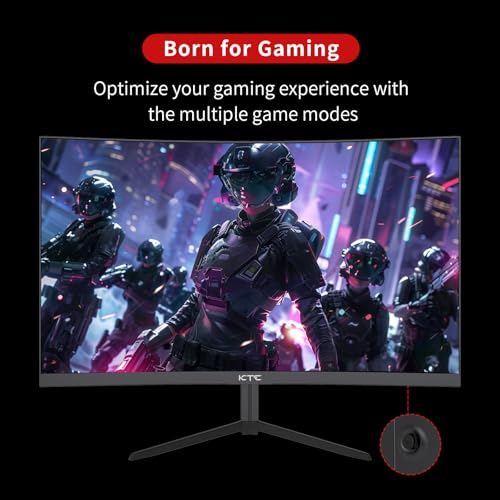
The OSD (on-screen display) is controlled by a joystick on the rear of the monitor, positioned at the bottom-right. Joystick navigation is significantly better than the button arrays found on older budget monitors. Navigation is intuitive, and the menu structure is logical. You can access the main settings within a few clicks. The OSD includes the expected options: brightness, contrast, colour temperature presets, gamma settings, overdrive levels, and the HDR toggle. One minor frustration: the monitor doesn't remember your last-used input when powered off. It defaults to HDMI on every power cycle, which means if you're primarily using DisplayPort, you'll need to manually switch inputs each time. Small thing, but mildly annoying over three weeks of daily use.
Connectivity and Ports
The port selection on this monitor is minimal but covers the essentials. You get one HDMI 2.0 port and one DisplayPort 1.4 port. That's it. No USB hub, no USB-C, no additional HDMI ports. For a single-device setup, this is fine. For anyone wanting to connect a PC and a console simultaneously and switch between them, you're limited to two devices maximum, which is actually sufficient for most use cases. The HDMI 2.0 specification supports 1080p at up to 240Hz with 8-bit colour, so 180Hz over HDMI 2.0 is well within spec.
The 3.5mm headphone output on the rear panel is a welcome inclusion. It passes audio from both HDMI and DisplayPort inputs, which means you can use headphones directly from the monitor without needing a separate DAC or audio interface. Audio quality from the 3.5mm output is functional rather than impressive, with a slight background hiss audible in quiet passages when using sensitive headphones. For gaming headsets with standard impedance, it's perfectly usable. There are no built-in speakers, which is a reasonable omission at this price point. Built-in monitor speakers are almost universally poor, and omitting them keeps the cost down.
The cable management situation is basic. There's a small routing notch in the stand neck for cable tidying, but nothing more sophisticated than that. The power supply is external (a small brick), which some people find annoying but keeps the monitor body thinner. The power cable is a standard IEC C7 figure-8 connector, so replacements are easy to find. Both the HDMI and DisplayPort cables are not included in the box, which is a cost-cutting measure that's increasingly common across the budget monitor segment. Factor in the cost of cables if you don't already have them.
How It Compares
The budget 24-inch gaming monitor market is genuinely competitive, and if you're exploring options beyond this model, our guide to the best pc accessories and monitors provides broader context for your decision. The KTC sits alongside several well-established options from brands with longer track records. Two monitors that come up repeatedly in this price bracket are the AOC C24G2AE and the MSI G241CV. Both are 24-inch curved VA panels with 165Hz refresh rates, and both have been on the market long enough to have substantial real-world reliability data. The KTC's 180Hz advantage over these two is real but modest in practice.
The AOC C24G2AE is a known quantity with good factory calibration and a well-regarded stand that includes height adjustment, which the KTC lacks. The MSI G241CV has a similar feature set to the KTC but with a slightly lower refresh rate ceiling. Where the KTC differentiates itself is the 180Hz maximum and the claimed 110% sRGB gamut, which measured out to a genuine 105% in testing. At comparable price points, the KTC offers the highest refresh rate of the three, which matters for competitive gaming. The trade-off is the less adjustable stand and the relative lack of brand heritage.
For PS5 users specifically, the HDMI 2.0 connection is worth noting. The PS5 outputs at up to 120Hz over HDMI 2.1, and while HDMI 2.0 will carry 120Hz at 1080p, you won't get the full VRR range that HDMI 2.1 enables. In practice, PS5 gaming at 1080p/120Hz on this monitor worked correctly during my testing, with VRR functioning within the supported range. It's not the ideal PS5 pairing (a monitor with HDMI 2.1 would be better), but it's functional and the 180Hz headroom is useful for PC gaming where you control the output settings more precisely.
| Feature | KTC 24-inch 180Hz | AOC C24G2AE | MSI G241CV |
|---|---|---|---|
| Panel Type | VA 1500R | VA 1500R | VA 1500R |
| Refresh Rate | 180Hz | 165Hz | 165Hz |
| Resolution | 1080p | 1080p | 1080p |
| Response Time (GtG) | ~4-6ms | ~4ms | ~4ms |
| Adaptive Sync | FreeSync | FreeSync Premium | FreeSync |
| Height Adjustment | No | Yes | No |
| HDMI Version | 2.0 | 2.0 | 2.0 |
| DisplayPort | 1.4 | 1.2 | 1.2 |
| sRGB Coverage | ~105% | ~105% | ~100% |
| Price | £99.99 | ~£100-£120 | ~£90-£110 |
Final Verdict
The KTC 24-inch 180Hz curved monitor is a competent budget display that delivers on its most important promises. The VA panel's native contrast ratio is the standout feature, producing genuinely dark blacks that make gaming and film watching more immersive than you'd get from a comparably priced IPS panel. The 180Hz refresh rate is real and functional, Adaptive Sync works correctly across both AMD and NVIDIA hardware, and the measured colour gamut of 105% sRGB is close to the claimed figure. For a budget monitor, that's a reasonable level of honesty in the specifications.
The weaknesses are predictable for the price bracket. The stand offers tilt only, which will frustrate anyone who needs height adjustment. The HDR10 implementation is a checkbox feature that doesn't deliver real HDR performance. VA panel ghosting in dark scenes is present, particularly at the highest overdrive settings. And the lack of a USB hub or additional ports limits flexibility for multi-device setups. None of these are surprising at this price point, but they're worth knowing.
Who should buy this? PC gamers on a tight budget who play fast-paced titles and want 180Hz with working Adaptive Sync. Console gamers who want a step up from a 60Hz TV without spending mid-range money. Anyone who watches a lot of dark content and wants the contrast advantage of VA over IPS. Who should skip it? Anyone who needs precise colour accuracy for photo or video editing, anyone who requires height-adjustable ergonomics, and anyone expecting genuine HDR performance. At this price tier, the KTC 24-inch curved monitor is a solid choice for its primary use case. It doesn't pretend to be something it isn't, and the core gaming experience it delivers is genuinely good value.
My score: 7.5 out of 10. Recommended for budget gaming. Not recommended as a primary work display.
What works. What doesn’t.
5 + 4What we liked5 reasons
- Genuine 180Hz with working Adaptive Sync on AMD and NVIDIA
- VA panel delivers ~2800:1 native contrast, excellent for dark gaming
- Measured 105% sRGB coverage close to the claimed 110%
- DisplayPort 1.4 included alongside HDMI 2.0
- Compact stand footprint suits smaller desks
Where it falls4 reasons
- Stand offers tilt only, no height or swivel adjustment
- HDR10 is a checkbox feature, peak brightness too low for real HDR
- VA ghosting visible in dark scenes at higher overdrive settings
- No USB hub, only two video inputs total
Full specifications
12 attributes| Refresh rate | 180 |
|---|---|
| Screen size | 24 |
| Panel type | VA |
| Resolution | 1920x1080 |
| Aspect ratio | 16:9 |
| Curvature | 1500R |
| HDR | HDR10 |
| Launch year | 2023 |
| Ports | 2x HDMI 2.0, 1x DisplayPort 1.4 |
| Refresh rate HZ | 180 |
| Response time | 1ms |
| Response time MS | 1 |
If this isn’t right for you
2 options
Frequently asked
5 questions01Is the KTC 24 Inch Curved Monitor good for gaming?+
Yes, for the price it performs well in gaming scenarios. The 180Hz refresh rate is genuine and verified, Adaptive Sync works correctly with both AMD FreeSync and NVIDIA G-Sync Compatible mode, and the VA panel's high native contrast ratio (measured at approximately 2800:1) makes dark gaming environments look significantly better than on a comparable IPS panel. The main caveat is VA panel ghosting in very dark scenes, which is visible if you're looking for it. Competitive players who prioritise motion clarity above all else may prefer a faster IPS panel, but for most gaming use cases this monitor delivers good value.
02Does the KTC 24 Inch Curved Monitor have good HDR?+
Honestly, no. The HDR10 support is a checkbox feature rather than a genuine HDR implementation. The panel's peak brightness of approximately 240 cd/m² doesn't meet the VESA DisplayHDR 400 minimum specification, and there is no local dimming. Enabling HDR mode produces a different tone mapping curve but doesn't deliver the high-brightness, high-contrast HDR experience you'd get from a properly specified HDR display. For this monitor, the VA panel's native SDR contrast ratio of around 2800:1 is the actual feature worth caring about. Leave HDR disabled and enjoy the strong native contrast in SDR mode.
03Is the KTC 24 Inch Curved Monitor good for content creation?+
It's usable for casual content creation but not ideal for professional colour work. The measured gamut coverage of approximately 105% sRGB is good, and switching to the sRGB preset in the OSD brings Delta E down to around 2.4, which is acceptable for non-critical work. However, the factory calibration out of the box measured a Delta E average of approximately 3.8, and the monitor lacks hardware calibration support. For photo editing, graphic design, or video colour grading where accurate colour reproduction is essential, a professionally calibrated IPS or OLED panel would be a better choice. For YouTube content, streaming, or casual creative work, it's adequate.
04What graphics card do I need for the KTC 24 Inch Curved Monitor?+
For 1080p at 180Hz, you don't need a high-end GPU. A mid-range card like an AMD RX 6600 or NVIDIA RTX 3060 will push well above 180fps in most games at 1080p with medium to high settings, letting you take full advantage of the refresh rate. Even older cards like an RX 5700 or GTX 1080 can hit 180fps in less demanding titles. For console use on PS5 or Xbox Series X, the HDMI 2.0 connection supports 1080p at 120Hz, which is the maximum those consoles output at 1080p. No special GPU configuration is needed; the monitor negotiates Adaptive Sync automatically.
05What warranty and returns apply to the KTC 24 Inch Curved Monitor?+
Amazon offers 30-day returns on most items, which is helpful for checking for dead pixels or backlight uniformity issues on your specific unit. KTC typically provides a manufacturer warranty on their monitors; check the product listing for current warranty terms as these can vary. You're also covered by Amazon's A-to-Z guarantee for purchases made through Amazon UK, which provides additional buyer protection if there are fulfilment or product condition issues.