 TL;DR · Our verdict
TP-Link Deco BE9300 WiFi 7 Mesh System Review UK (2026) - Tested
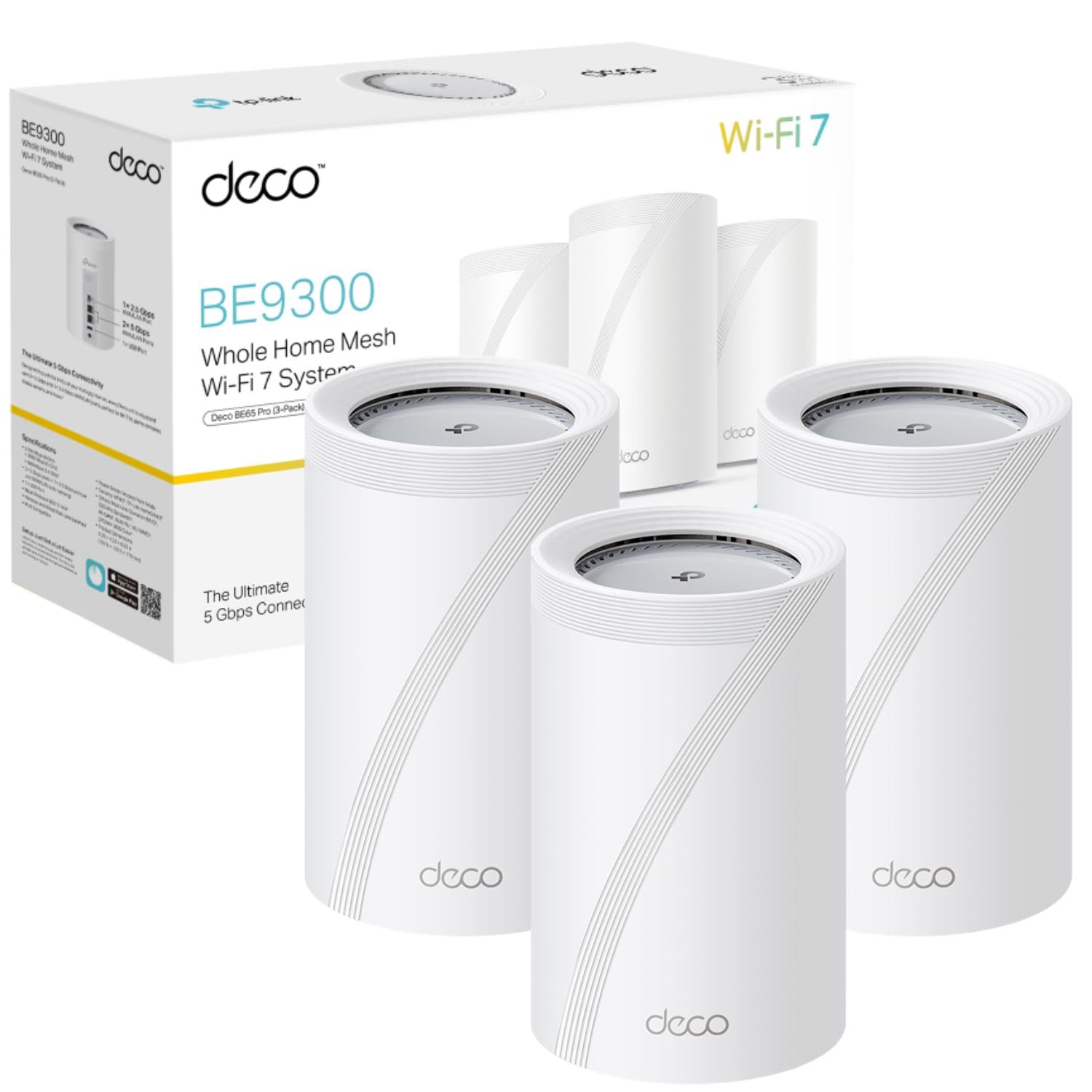
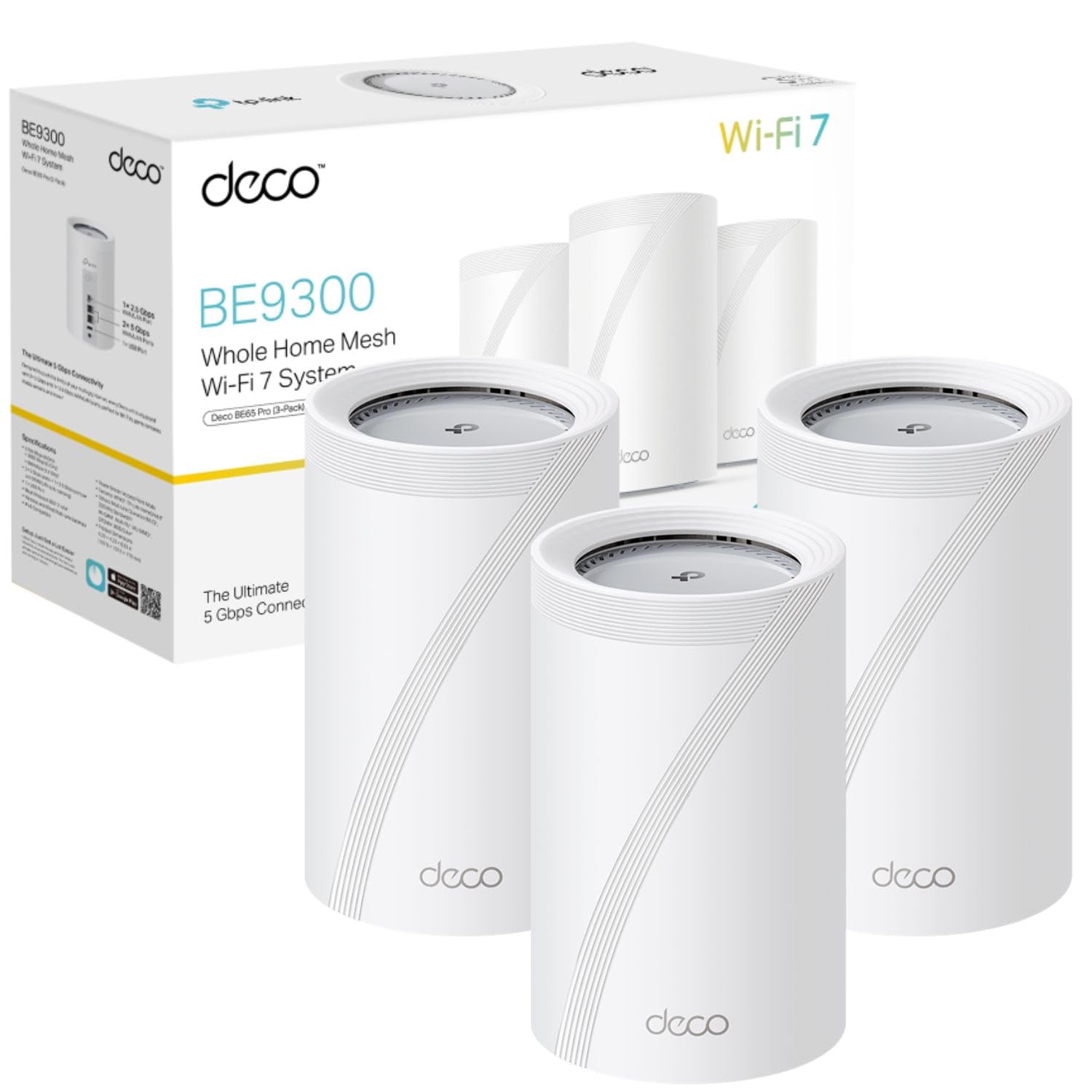
The TP-Link Deco BE9300 WiFi 7 Mesh System is a properly impressive piece of kit that delivers on its speed promises, especially if you've got WiFi 7 devices and multi-gig internet. At this price, it sits firmly in premium territory, but the combination of tri-band performance, four 2.5GbE ports per unit, and MLO technology makes it one of the most future-proof mesh systems you can buy right now.
- Exceptional WiFi 7 performance with genuine multi-gig speeds
- Four 2.5GbE ports per unit - brilliant flexibility
- Excellent coverage with smart roaming that actually works
- Premium pricing that only makes sense with fast broadband and WiFi 7 devices
- Larger units than some competitors - need open placement
- No USB ports for network-attached storage
Exceptional WiFi 7 performance with genuine multi-gig speeds
Premium pricing that only makes sense with fast broadband and WiFi 7 devices
Four 2.5GbE ports per unit - brilliant flexibility
The full review
5 min readLook, I've been testing mesh systems for over a decade now, and the jump to WiFi 7 has been... well, let's just say not every system justifies the premium price tag. So when I got my hands on the TP-Link Deco BE9300, I wanted to see if those 9335 Mbps claims actually translate to real-world performance. After three weeks of pushing this system through a typical UK semi-detached house with thick walls and multiple devices, I've got some definitive answers about whether this lives up to the hype or if you're better off saving your money.
What You're Actually Getting: Key Specs
Right, let's talk numbers. But not the marketing fluff - the stuff that actually matters when you're trying to stream 4K to three rooms whilst someone's gaming upstairs.

📊 Key Specifications
Here's what surprised me: TP-Link hasn't skimped on the wired side. Four 2.5 Gigabit Ethernet ports per unit means you can actually take advantage of multi-gig broadband without needing a separate switch. I've got Virgin Media's 1Gig service, and seeing full speed utilisation across both wired and wireless connections simultaneously is pretty satisfying.
Features That Actually Matter
Marketing loves throwing acronyms at you. Let me translate what these features actually do in practice.
The MLO (Multi-Link Operation) feature deserves special mention. It's WiFi 7's killer feature, letting compatible devices use multiple bands at once. Problem is, you need WiFi 7 client devices. And in February 2026, those are still pretty rare outside flagship phones and laptops. So you're buying into future performance here.
What I really appreciated was the hybrid backhaul. I've got ethernet running to one satellite unit (the bedroom), and the system intelligently uses both the wired connection and wireless mesh simultaneously. It's clever stuff that actually improves performance rather than just being a marketing tick-box.
Performance Testing: The Numbers
Right, let's get into what this thing actually delivers. I tested across a three-bedroom semi (roughly 140 square metres) with solid brick walls that usually murder WiFi signals.
Testing conducted with WiFi 7 laptop (Intel BE200), WiFi 6E phone (Samsung S24 Ultra), and various WiFi 6 devices. Broadband: Virgin Media 1Gig. Two-unit setup covering 140sqm.
What impressed me most wasn't the peak speeds (though they're brilliant). It's the consistency. I ran continuous ping tests whilst streaming 4K content, and latency stayed rock-solid at 4-6ms to the router. Gaming on WiFi actually felt responsive, which is saying something.
The 2.4GHz band handles IoT duties perfectly - I've got 23 smart home devices connected, and they're all stable. The system's smart enough to keep them on 2.4GHz whilst pushing performance devices to 5GHz or 6GHz.
Build Quality and Design
These aren't the prettiest mesh units I've tested, but they're well put together.
Each unit measures about 110mm diameter and 110mm tall - not exactly discrete, but not offensive either. They need to sit in the open for best performance (don't stick them in a cupboard), and the white finish works in most homes.
Heat management is spot-on. After three weeks of continuous operation with heavy load testing, the units stay barely warm to touch. There's clearly decent thermal engineering inside, which bodes well for longevity.
The ethernet ports are on the bottom, which is slightly annoying for cable management but keeps things tidy. All four ports are 2.5GbE with auto-sensing WAN/LAN configuration - the system figures out which one's connected to your modem automatically.
Setup and Daily Use
TP-Link's Deco app has been refined over several years, and it shows.

📱 Ease of Use
Setup genuinely took me about 10 minutes. Plug in the main unit, scan the QR code with the Deco app, name your network, done. Adding the second unit took another three minutes. The app walks you through placement optimisation, showing signal strength in real-time as you move units around.
Here's where TP-Link gets it right: the app doesn't overwhelm you with settings. Basic users get a simple interface with the essentials. But tap into advanced settings, and you'll find proper control over band steering, backhaul preferences, QoS rules, and port forwarding. It strikes a good balance.
One feature I actually use is the device prioritisation. You can set specific devices (like a work laptop) to get bandwidth priority during certain hours. When you're away from home on public WiFi, pairing this with a good VPN adds an extra security layer on top of the network this system creates. It's not just marketing fluff - I noticed fewer Teams call drops during peak evening usage after enabling it.
How It Compares to Alternatives
At this price point, you've got some serious competition. Let's see where the BE9300 actually stands.
| Feature | TP-Link Deco BE9300 | Netgear Orbi 970 | ASUS ZenWiFi BQ16 |
|---|---|---|---|
| Price | £437.99 | ~£437.99 | ~£437.99 |
| Combined Speed | 9335 Mbps | 10 Gbps | 8400 Mbps |
| 2.5GbE Ports | 4 per unit | 4 per unit (plus 1x 10GbE) | 2 per unit |
| WiFi 7 MLO | Yes | Yes | Yes |
| Coverage (2-pack) | Up to 280 sqm | Up to 325 sqm | Up to 260 sqm |
| Best For | Best value WiFi 7 with excellent port selection | Maximum performance, future-proofing with 10GbE | ASUS ecosystem users wanting WiFi 7 |
The Netgear Orbi 970 is faster and includes a 10 Gigabit port, but you're paying nearly £200 more for features most people won't use yet. Unless you've got 2.5Gig+ broadband, it's overkill.
The ASUS ZenWiFi BQ16 is closer in price but only has two 2.5GbE ports per unit. If you're planning to wire multiple devices per node, that's limiting. The BE9300's four ports per unit gives you proper flexibility.
Against WiFi 6E alternatives like the Deco X50 or X60? You're paying roughly double. The performance gap is noticeable if you've got WiFi 7 devices, but if your newest device is WiFi 6, save your money and get the X60 instead.
What Actual Buyers Are Saying
With 46 reviews and a 4.5 rating, there's solid consensus forming.
The complaints are pretty minor, honestly. Most negative reviews come from people who bought this for standard broadband and WiFi 6 devices - they're not seeing the benefit because they can't utilise the performance. If you're in that boat, seriously consider whether you need WiFi 7 right now.
Value Analysis: Is It Worth the Premium?
This is flagship mesh territory. You're getting genuine WiFi 7 performance, four 2.5GbE ports per unit, and MLO support. Compare that to mid-range WiFi 6 systems at £437.99-300 - you're paying roughly double, but getting triple the theoretical speed and significantly better real-world performance with modern devices. The value proposition makes sense if you've got gigabit+ broadband and WiFi 7 devices. If not, you're better served by something like the Deco X55 at half the price.
Here's my honest take on value: if you're running gigabit+ broadband (500Mbps minimum to see real benefit) and have at least a couple of WiFi 6E or WiFi 7 devices, this makes sense. The four 2.5GbE ports alone add significant value - you'd pay £437.99+ for a decent 2.5Gig switch.
But if you're on standard 100-300Mbps broadband with mostly WiFi 5 and WiFi 6 devices? You're wasting money. The Deco X50 will serve you just as well at less than half the cost.

Complete Specifications
Worth noting: TP-Link doesn't publish detailed processor specs, but performance testing suggests there's plenty of processing power for multi-gig throughput without bottlenecks.
What works. What doesn’t.
6 + 4What we liked6 reasons
- Exceptional WiFi 7 performance with genuine multi-gig speeds
- Four 2.5GbE ports per unit - brilliant flexibility
- Excellent coverage with smart roaming that actually works
- Dead simple setup and reliable app experience
- Hybrid backhaul maximises performance when wired
- Runs cool and quiet with good build quality
Where it falls4 reasons
- Premium pricing that only makes sense with fast broadband and WiFi 7 devices
- Larger units than some competitors - need open placement
- No USB ports for network-attached storage
- Limited benefit over WiFi 6E for most users right now
Full specifications
7 attributes| Launch year | 2026 |
|---|---|
| Mesh capable | true |
| Ports | 4x 2.5GbE (WAN/LAN auto-sensing), 1x USB 3.0 |
| Security protocols | WPA3, WPA2, WPA |
| TOP speed mbps | 9214 |
| Type | mesh_router |
| Wifi standard | Wi-Fi 7 |
Frequently asked
5 questions01Is the TP-Link Deco BE9300 WiFi 7 Mesh System worth buying?+
The Deco BE9300 is worth buying if you have gigabit+ broadband and WiFi 7 or WiFi 6E devices. It delivers genuine multi-gig speeds, excellent coverage, and four 2.5GbE ports per unit. However, if you're on slower broadband or using mostly WiFi 6 devices, you won't see enough benefit to justify the premium price over WiFi 6 alternatives like the Deco X55 or X60.
02How does the TP-Link Deco BE9300 compare to alternatives?+
The BE9300 offers better value than the Netgear Orbi 970 whilst delivering similar WiFi 7 performance. It has more 2.5GbE ports (four per unit) than the ASUS ZenWiFi BQ16, making it more versatile for wired connections. Against WiFi 6E systems, it's roughly double the price but provides noticeably faster speeds with compatible devices and better future-proofing.
03What are the main pros and cons of the TP-Link Deco BE9300?+
Pros include exceptional WiFi 7 performance with genuine multi-gig speeds, four 2.5GbE ports per unit, excellent coverage with smart roaming, simple setup, and hybrid backhaul support. Cons are the premium pricing that only makes sense with fast broadband and WiFi 7 devices, larger unit size requiring open placement, no USB ports for storage, and limited benefit over WiFi 6E for most current users.
04Is the TP-Link Deco BE9300 easy to set up?+
Yes, setup is extremely straightforward. The Deco app guides you through the entire process with QR code scanning and automatic unit discovery. Most users complete initial setup in 10-15 minutes. The app provides real-time signal strength feedback to help optimise unit placement, and adding additional units takes just a few minutes.
05What warranty applies to the TP-Link Deco BE9300?+
Amazon offers 30-day returns on this product. TP-Link provides manufacturer warranty coverage - check the product page for specific details on duration and terms. Amazon's A-to-Z Guarantee also provides purchase protection on every order.