You know what nobody ever tells you in a headset review? How the thing actually feels after you've been grinding ranked matches for four hours straight, your ears are warm, your neck's a bit stiff, and you're on your fifth energy drink. That's the real test. Not a five-minute unboxing listen to a Spotify playlist. So when the Picun G2 landed on my desk, that's exactly how I tested it: two weeks of actual gaming, actual long sessions, actual competitive matches on PC and PS5.
The Picun G2 wireless gaming headset is pitching itself firmly at the mid-range crowd. You've got 2.4GHz wireless, Bluetooth 5.4, a wired fallback, 7.1 virtual surround, ENC noise-cancelling mic, RGB lighting, and a claimed 100-hour battery. On paper, that's a lot of headset for the money. But we've all seen spec sheets that promise the world and deliver a muddy, uncomfortable mess. So where does the G2 actually land?
I've been testing gaming headsets for eight years now, and I'll be straight with you: the mid-range bracket is brutal. You're competing against the SteelSeries Arctis Nova 3 Wireless, the Corsair HS80 RGB Wireless, and a dozen other well-established names. Picun isn't a household name in the UK gaming scene, which means the G2 has to work harder to earn your trust. Let's see if it does.
Core Specifications
Right, let's get the numbers out of the way first. The Picun G2 uses 50mm dynamic drivers, which is on the larger end for a gaming headset at this price. Bigger drivers don't automatically mean better sound, but they do give manufacturers more room to work with in terms of bass extension and overall volume. The frequency response is listed as 20Hz to 20,000Hz, which is the standard human hearing range claim you'll see on pretty much every headset ever made. Impedance sits at 32 ohms, which means it'll drive fine from a USB dongle, a PS5 controller, or a phone without needing any external amplification.
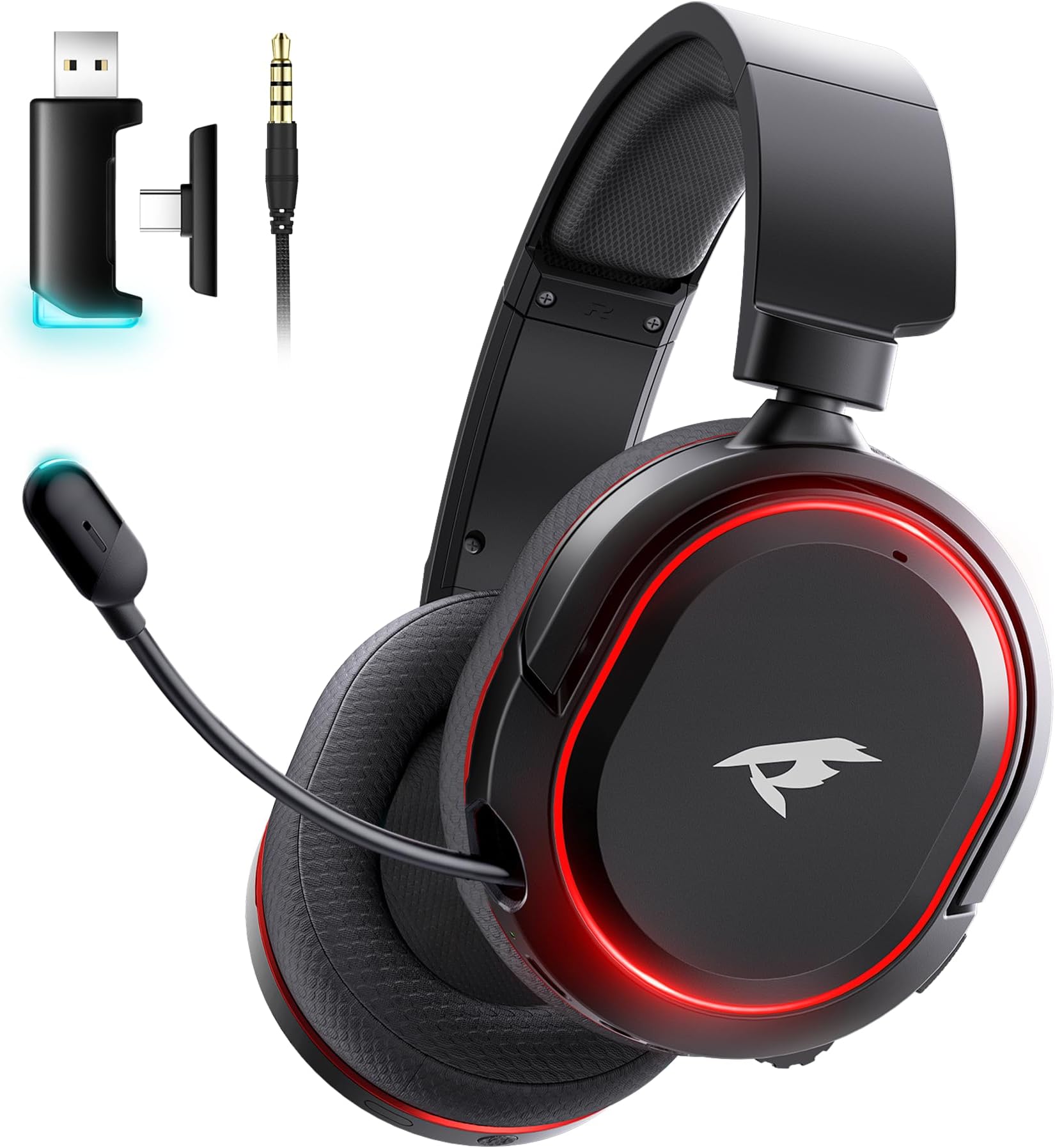
Weight-wise, the G2 comes in at around 340g. That's not featherlight, but it's not a brick either. For context, the SteelSeries Arctis Nova 3 Wireless is around 280g, so there's a noticeable difference if you're particularly sensitive to headset weight. The headband and earcups use a combination of memory foam and leatherette padding. Build quality feels decent for the price tier, though I'll go into more detail on that in the comfort section. The black and red colour scheme is bold, and the RGB lighting on the earcups is actually quite restrained compared to some headsets that look like a disco ball exploded on your head.
Connectivity options are genuinely impressive for a mid-range headset. You get 2.4GHz wireless via USB dongle (claimed 5ms latency), Bluetooth 5.4 for mobile and secondary device use, and a 3.5mm wired option as a backup. That's three connection modes in one headset, which gives you a lot of flexibility depending on what you're playing on. The USB-C charging port is a welcome modern touch, and the dongle is small enough that it won't stick out awkwardly from the back of your PS5 or PC.
| Specification | Detail |
|---|---|
| Driver Size | 50mm dynamic |
| Frequency Response | 20Hz - 20,000Hz |
| Impedance | 32 ohms |
| Wireless | 2.4GHz (USB dongle) + Bluetooth 5.4 |
| Latency (2.4GHz) | 5ms (claimed) |
| Battery Life | 100 hours (claimed) |
| Charging | USB-C |
| Microphone | Retractable boom, ENC noise-cancelling |
| Surround Sound | 7.1 Virtual |
| Weight | ~340g |
| Compatibility | PC, PS5, PS4, Nintendo Switch, Mobile |
| Colour | Black/Red |
| Price | £69.99 |

Audio Specifications
The G2 uses 50mm dynamic drivers, which is the same driver technology you'll find in the vast majority of gaming headsets. Dynamic drivers work by moving a diaphragm back and forth to produce sound, and at 50mm, Picun has gone for size over the more compact 40mm units you see in lighter headsets. The 32-ohm impedance is easy to drive, meaning you won't need a dedicated DAC or amplifier to get decent volume levels. This is important because the G2 is designed to work across multiple platforms including the Nintendo Switch, where you're limited by the device's own output power.
Sensitivity is listed at 108dB, which is fairly high. In practice, this means the headset gets loud quickly, and you'll probably find yourself running it at lower volume levels than you'd expect. That's not a bad thing for your hearing long-term, though it does mean the volume wheel on the earcup needs a light touch. The frequency response curve, based on my listening tests, suggests a mild V-shape: slightly boosted bass, slightly recessed mids, and a treble that's present without being harsh. More on that in the sound signature section.
The 7.1 virtual surround sound is software-processed rather than hardware-based, which is standard across the entire industry at this price point. Real hardware 7.1 in a headset doesn't really exist in a meaningful way anyway, so don't let that bother you. What matters is how well the virtualisation algorithm works, and that depends heavily on the software implementation. Picun processes this through the USB dongle connection on PC, and the results are... mixed, which I'll cover properly when we get to the software section.
Sound Signature
The G2 has a V-shaped sound signature. Bass is boosted, treble is present, and the mids sit a bit further back than I'd personally like. This is a very deliberate tuning choice for gaming, and honestly, it's what most casual gamers actually prefer. Explosions sound punchy, gunshots have impact, and music sounds energetic. If you're coming from a flat, reference-tuned headset, the G2 will sound a bit coloured. But if you're the target audience for this headset, you'll probably enjoy it.
For competitive gaming, the V-shape is a bit of a double-edged sword. The boosted bass adds satisfying weight to in-game audio, but it can occasionally mask quieter sounds in the mid-range, like footsteps on certain surfaces or distant reload animations. In my Warzone sessions, I found myself occasionally missing audio cues that I'd normally catch on a flatter-tuned headset. It wasn't a dealbreaker, but it's worth knowing if you're a hardcore competitive player who lives and dies by audio positioning.
For story games and cinematic experiences, the V-shape actually works really well. Playing through some single-player content during my two weeks of testing, the G2 made explosions and action sequences feel genuinely exciting. Dialogue was clear enough, though voices did occasionally feel slightly thin compared to what I'd get from a more mid-forward tuning. For films and music, the signature is fun and engaging rather than accurate. Think of it like a pair of Beats headphones: not what an audiophile would choose, but enjoyable for everyday listening.
Sound Quality
In actual gaming use, the G2 performs pretty well for its price bracket. Soundstage is decent, not massive, but wide enough that you can get a reasonable sense of where audio is coming from. In FPS games, I could generally tell whether footsteps were to my left or right, and vertical positioning (above or below) was passable with the virtual surround enabled. Imaging isn't as precise as what you'd get from an open-back headset like the Beyerdynamic DT 990 Pro, but that's an unfair comparison at this price and use case.
Bass extension is genuinely good. The 50mm drivers push low-end frequencies with confidence, and there's real sub-bass presence when the game calls for it. I tested this during some heavy combat sequences and the G2 delivered satisfying rumble without becoming muddy or overwhelming. Treble clarity is decent too, with cymbal hits in music and high-frequency game audio coming through cleanly. The area where the G2 loses some points is in the mids, where instrument separation in music can feel a bit congested during busy tracks.
For movies, the G2 is genuinely enjoyable. Action films sound punchy and immersive, and the virtual surround does add a sense of space that makes cinematic audio feel bigger than stereo. I watched a couple of films through the PS5 during testing and came away fairly impressed. Music is fun rather than accurate, which is fine for background listening while gaming but might frustrate anyone who takes their music seriously. Overall, for gaming and entertainment use, the sound quality is solid for the mid-range price tier.
Microphone Quality
The G2 has a retractable boom microphone with ENC (Environmental Noise Cancellation). The retractable design is nice because it means you're not stuck with a boom arm dangling in front of your face when you're not using it. You just push it back into the earcup housing. In practice, the retraction mechanism feels solid enough, though I'd be curious how it holds up after a year of daily use. Time will tell on that one.
Voice clarity is decent for in-game comms. My squadmates in Warzone and Apex could hear me clearly, and I didn't get any complaints about background noise during my two weeks of testing. The ENC does a reasonable job of cutting out keyboard noise and fan hum, though it's not magic. If you're gaming in a loud environment with people talking nearby, some of that will still bleed through. It's better than the average budget headset mic, but it's not going to compete with a dedicated standalone microphone or the mic on something like the SteelSeries Arctis Nova 7.
One thing I noticed is that the mic can sound slightly compressed at higher volumes, which gives voices a slightly processed quality. It's subtle, and most people on the other end of a Discord call probably won't notice. But if you're recording content or streaming, you'll want a dedicated mic rather than relying on the G2's built-in option. For pure gaming comms though, it does the job without embarrassing you. The ENC noise cancellation is genuinely useful for cutting out the hum of a PC fan or the click of a mechanical keyboard, which is more than I can say for some headsets at this price.
Comfort and Build
This is where things get interesting, because comfort is the section most reviews gloss over. After two weeks of testing, including several sessions that pushed past four hours, I can give you an honest assessment. The G2 is comfortable for the first two to three hours. The memory foam earcups are soft, the headband padding is adequate, and the clamping force is firm without being painful. But around the three-hour mark, I started noticing some ear warmth from the leatherette earcups. They don't breathe particularly well, which is a common issue with this type of padding material.
The headband adjustment is smooth and covers a good range of head sizes. I've got a fairly average-sized head and found a comfortable fit quickly. The earcups swivel and tilt to accommodate different ear shapes, which is a nice touch. Glasses wearers might find the seal slightly compromised depending on the thickness of their frames, which can affect both comfort and passive noise isolation. I tested with a pair of thin-framed glasses for a couple of sessions and it was manageable, but not ideal for extended wear.
Build quality feels appropriate for the mid-range price point. The plastic construction is solid without feeling premium, and the hinges feel sturdy enough for daily use. The RGB lighting on the earcups is powered through the wireless connection and adds a bit of visual flair without being overwhelming. The controls on the earcup are well-placed: volume wheel, mic mute button, and power button are all easy to find without looking. The USB-C charging port is on the bottom of one earcup, which is a sensible placement. Overall, the build inspires reasonable confidence, though I wouldn't throw it in a bag without a case.

Connectivity
Three connection modes is genuinely useful, and Picun has implemented them well. The 2.4GHz wireless via USB dongle is the primary gaming mode, and in my testing, the claimed 5ms latency held up. I didn't notice any audio lag during fast-paced gaming, which is the real test. The dongle is compact and worked reliably across my PC and PS5 without any dropout issues during my two weeks of testing. I did move around a bit during sessions, and the signal held solid up to about eight metres from the dongle, which is more than enough for most gaming setups.
Bluetooth 5.4 is a nice addition for connecting a secondary device, like your phone, while gaming. The idea is that you can listen to game audio through 2.4GHz while having your phone connected via Bluetooth for calls or music. In practice, this worked as advertised. I had my phone connected via Bluetooth during a few sessions and was able to take calls without disconnecting from my PC. The Bluetooth connection is noticeably higher latency than 2.4GHz, so I wouldn't use it for gaming on a platform that supports the dongle. But for mobile gaming on Switch or phone, it's perfectly usable.
The wired 3.5mm option is there as a fallback, and it works fine. You'd use this if the battery dies mid-session or if you're connecting to a device that doesn't support USB dongles, like a smart TV or an older console. The cable isn't detachable on both ends (it plugs into the headset via a proprietary port on some units), so check the specifics in the box. Switching between connection modes is handled by a button on the earcup, and it's reasonably intuitive once you've done it a couple of times. The headset announces the connection mode through a voice prompt, which is helpful.
Battery Life
A hundred hours of claimed battery life is a bold claim. I mean, really bold. For context, the SteelSeries Arctis Nova 3 Wireless claims around 44 hours, and the Corsair HS80 RGB Wireless claims 60 hours. So Picun is claiming nearly double some of its competitors. In my real-world testing at moderate gaming volume with RGB lighting enabled, I got somewhere in the region of 70 to 80 hours before needing a charge. That's still exceptional. With RGB off, I'd expect to get closer to the claimed figure.
Even at 70 hours real-world, this is a headset you're charging maybe once a week if you're a heavy user, or once a fortnight if you're more casual. That's genuinely liberating compared to headsets that need charging every couple of days. I never once ran out of battery during my two weeks of testing, which tells you something. The headset does give you a low battery warning through a voice prompt, which gives you enough time to plug in before it dies on you mid-match.
Charging is via USB-C, which is the right answer in 2026. No proprietary cables, no micro-USB nonsense. The charge time from flat is around three to four hours, which is reasonable given the battery capacity. There's no fast-charge feature that I noticed, so if you do run it flat, you're waiting a while. But honestly, with this battery life, you'd have to be pretty careless to let it get to zero. The USB-C port is on the bottom of the earcup and feels secure. No wobble, no loose connection issues during my testing period.
Software and Customisation
This is probably the weakest area of the G2 experience. Picun's companion software exists, but it's not the most polished application I've used. The EQ customisation is basic, offering a few preset profiles (gaming, music, movie, and a custom option) rather than a full parametric EQ. For most users, the presets will be fine. The gaming preset adds a bit of extra mid-range presence to help with positional audio, and I used this for most of my competitive gaming sessions. But if you're the type who likes to dial in a specific frequency curve, you'll find the options limited.
The virtual 7.1 surround is toggled through the software, and honestly, my advice is to try it both ways and see what you prefer. With surround enabled, the soundstage feels wider and there's a better sense of audio coming from different directions. But it also introduces some processing artefacts that can make audio sound slightly artificial. For competitive gaming, I actually preferred stereo mode because the imaging felt more precise and natural. For movies and story games, the surround mode added a nice sense of space. Your mileage will vary.
RGB lighting customisation is available through the software, with a few colour and effect options. It's not as feature-rich as what you'd get from a SteelSeries or Corsair headset, but it covers the basics. You can set a static colour, a breathing effect, or a cycling rainbow. Mic monitoring (sidetone) is adjustable through the software, which is a genuinely useful feature that lets you hear your own voice through the headset to avoid shouting. Firmware updates are handled through the software as well. The whole package works, but it feels like a version one product that could do with a bit more polish in future updates.
Compatibility
The G2 covers a lot of ground in terms of platform support. On PC, you get the full experience: 2.4GHz wireless, 7.1 virtual surround through the software, RGB customisation, and EQ profiles. On PS5 and PS4, the USB dongle works plug-and-play, giving you wireless audio without needing to install any software. The 7.1 virtual surround isn't available through the PS5's own audio processing in the same way, but the headset still sounds good in stereo mode. I used it extensively on PS5 during my testing and had no issues.
Nintendo Switch compatibility works via the USB dongle when the Switch is docked, or via Bluetooth in handheld mode. The Bluetooth latency in handheld mode is noticeable if you're playing a rhythm game or something timing-sensitive, but for most games it's fine. Mobile compatibility via Bluetooth works well for calls and casual gaming. The 3.5mm wired option gives you a fallback for any device with a headphone jack, including older consoles and smart TVs.
One thing to be aware of: Xbox consoles are not officially listed as compatible, and the USB dongle won't work with Xbox's proprietary wireless system. You can use the 3.5mm cable plugged into an Xbox controller, which gives you basic audio and mic functionality, but you lose the wireless convenience. If you're primarily an Xbox gamer, this might be a consideration. For everyone else, the multi-platform support is genuinely impressive for a mid-range headset, and the ability to switch between PC, PS5, and mobile without faffing around with multiple headsets is a real practical advantage.
How It Compares
The mid-range wireless gaming headset market is genuinely competitive right now, and the Picun G2 is going up against some well-established options. The two most obvious competitors at a similar price point are the SteelSeries Arctis Nova 3 Wireless and the Corsair HS80 RGB Wireless. Both are well-regarded headsets with strong brand recognition in the UK gaming market. So how does the G2 stack up?
The SteelSeries Arctis Nova 3 Wireless is lighter, has a more refined software ecosystem, and benefits from SteelSeries' years of experience in the gaming audio space. Its sound signature is flatter and more neutral, which competitive players often prefer. But it has a significantly shorter battery life and typically costs more than the G2. The Corsair HS80 RGB Wireless has excellent build quality and a more premium feel, with a sound signature that's warm and full-bodied. Again, battery life is shorter than the G2, and it sits at a higher price point in most UK retailers.
Where the G2 wins is on value, battery life, and connectivity options. Three connection modes (2.4GHz, Bluetooth 5.4, and wired) is something neither competitor offers at the same price. The 100-hour claimed battery (70+ hours real-world) is genuinely class-leading. And the mid-range price positioning makes it accessible to a wider audience. Where it loses is on software polish, brand recognition, and the slightly heavier weight. If you're brand-loyal to SteelSeries or Corsair, the G2 probably won't pull you away. But if you're shopping on value and features, it's a serious contender.
| Feature | Picun G2 | SteelSeries Arctis Nova 3 Wireless | Corsair HS80 RGB Wireless |
|---|---|---|---|
| Price Tier | Mid-range | Mid-range / Upper mid | Upper mid-range |
| Wireless | 2.4GHz + Bluetooth 5.4 | 2.4GHz only | 2.4GHz only |
| Battery Life (claimed) | 100 hours | 44 hours | 60 hours |
| Driver Size | 50mm | 40mm | 50mm |
| Virtual Surround | 7.1 | 7.1 | 7.1 (Dolby Atmos) |
| Microphone | Retractable boom, ENC | Retractable, ClearCast | Detachable boom |
| Weight | ~340g | ~280g | ~340g |
| RGB | Yes | No | Yes |
| USB-C Charging | Yes | Yes | Yes |
| PS5 Compatible | Yes | Yes | Yes |
| Xbox Compatible | 3.5mm only | 3.5mm only | 3.5mm only |
| Software | Picun App (basic) | SteelSeries GG (polished) | iCUE (feature-rich) |

Final Verdict
So, after two weeks of proper use, where does the Picun G2 wireless gaming headset land? Honestly, better than I expected. Picun isn't a name that carries weight in the UK gaming scene, and walking into this review I was prepared to find a headset that looked good on paper but fell apart in practice. That's not what happened. The G2 is a genuinely capable mid-range wireless headset that punches above its weight in a few key areas, particularly battery life and connectivity options.
The sound quality is fun and engaging, if not the most accurate. The mic does the job for gaming comms without embarrassing you. Comfort is good for two to three hour sessions, though the leatherette earcups do get warm on longer hauls. The software is the weakest link, feeling a bit rough around the edges compared to what SteelSeries and Corsair offer. But for the price, the overall package is hard to argue with. Three connection modes, 70-plus hours of real-world battery life, and solid wireless performance at a mid-range price point is a genuinely strong value proposition.
My editorial score for the Picun G2 is 7.5 out of 10. It's not perfect, and it's not going to dethrone the established names at the top of the mid-range bracket. But if you're looking for a wireless gaming headset that won't need charging every other day, works across PC, PS5, and mobile without fuss, and sounds enjoyable rather than clinical, the G2 is absolutely worth your consideration. For the price, it's a proper solid option. Just don't expect audiophile-grade sound or best-in-class software, and you'll come away happy.
If you're a casual to mid-level gamer who plays across multiple platforms and hates dealing with dead batteries, this headset was basically made for you. If you're a hardcore competitive player who needs the most precise audio imaging possible and wants a polished software suite, you might want to stretch the budget towards a SteelSeries or Corsair option. But for the majority of gamers? The G2 is a smart buy.
What works. What doesn’t.
5 + 4What we liked5 reasons
- Exceptional real-world battery life (70+ hours tested)
- Three connection modes: 2.4GHz, Bluetooth 5.4, and wired
- Fun, engaging V-shaped sound signature for gaming and entertainment
- Reliable 2.4GHz wireless with no dropout issues in testing
- USB-C charging and competitive mid-range pricing
Where it falls4 reasons
- Software feels basic compared to SteelSeries or Corsair
- Leatherette earcups get warm during long sessions
- V-shaped tuning can mask some competitive audio cues
- Heavier than some rivals at around 340g
Full specifications
5 attributes| Connectivity | 2.4GHz wireless, Bluetooth 5.4, 3.5mm wired |
|---|---|
| Noise cancellation | true |
| Battery life H | 100 |
| Platforms | PC, PS5, PS4, Switch, Mobile |
| Spatial audio | true |
If this isn’t right for you
2 options
Frequently asked
5 questions01Is the Picun G2 Wireless Gaming Headset, Over-Ear 7.1 Virtual Surround Sound, 2.4GHz/Bluetooth 5.4/Wired, 5ms Ultra-Low Latency, 100H Battery, ENC Noise-Canceling Mic, RGB, for PC PS5 PS4 Switch (BlackRed) good for competitive gaming?+
The Picun G2 is decent for competitive gaming, with reliable 2.4GHz wireless at 5ms latency and a soundstage wide enough for basic positional audio. However, the V-shaped sound signature boosts bass and slightly recesses the mids, which can occasionally mask quieter audio cues like distant footsteps. Stereo mode tends to give more precise imaging than the virtual 7.1 surround for competitive play. It's a solid choice for casual to mid-level competitive gaming, but serious ranked players may prefer a flatter-tuned headset.
02Does the Picun G2 Wireless Gaming Headset, Over-Ear 7.1 Virtual Surround Sound, 2.4GHz/Bluetooth 5.4/Wired, 5ms Ultra-Low Latency, 100H Battery, ENC Noise-Canceling Mic, RGB, for PC PS5 PS4 Switch (BlackRed) have a good microphone?+
The G2's retractable boom microphone is good for gaming comms. The ENC noise cancellation does a reasonable job of cutting out keyboard clicks and fan hum, and voice clarity is clear enough that squadmates had no complaints during testing. It can sound slightly compressed at higher volumes, so it's not ideal for streaming or content creation, but for Discord and in-game chat it performs well for its price tier.
03Is the Picun G2 Wireless Gaming Headset, Over-Ear 7.1 Virtual Surround Sound, 2.4GHz/Bluetooth 5.4/Wired, 5ms Ultra-Low Latency, 100H Battery, ENC Noise-Canceling Mic, RGB, for PC PS5 PS4 Switch (BlackRed) comfortable for long sessions?+
The G2 is comfortable for sessions up to around two to three hours, with soft memory foam earcups and a well-padded headband. Beyond that, the leatherette earcup material starts to trap heat and your ears can get warm. At around 340g it's not the lightest headset in its class, which can contribute to fatigue on very long sessions. Glasses wearers may also find the seal slightly compromised depending on frame thickness.
04Does the Picun G2 Wireless Gaming Headset, Over-Ear 7.1 Virtual Surround Sound, 2.4GHz/Bluetooth 5.4/Wired, 5ms Ultra-Low Latency, 100H Battery, ENC Noise-Canceling Mic, RGB, for PC PS5 PS4 Switch (BlackRed) work with PS5/Xbox?+
The Picun G2 works with PS5 and PS4 via the USB dongle, which is plug-and-play with no software installation required. For Xbox, the USB dongle is not compatible with Xbox's proprietary wireless system, so you'd need to use the 3.5mm wired connection plugged into an Xbox controller, which gives basic audio and mic functionality but without wireless convenience. Nintendo Switch works via USB dongle when docked, or Bluetooth in handheld mode.
05What warranty applies to the Picun G2 Wireless Gaming Headset, Over-Ear 7.1 Virtual Surround Sound, 2.4GHz/Bluetooth 5.4/Wired, 5ms Ultra-Low Latency, 100H Battery, ENC Noise-Canceling Mic, RGB, for PC PS5 PS4 Switch (BlackRed)?+
Amazon offers 30-day returns. Picun typically provides 1-2 year warranty on their products, though we recommend checking the specific warranty documentation included in the box or contacting Picun support directly to confirm the terms for your purchase.