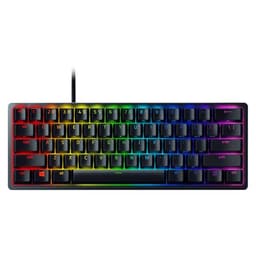
Sixty percent keyboards are a bit of a marmite thing. Half the gaming community swears by them for desk space and portability. The other half can't get past losing the numpad, the function row, and half the keys they actually use. The Razer Huntsman Mini sits right in the middle of that argument, waving its optical switches and PBT keycaps at anyone who'll listen. And with over 2,000 owner reviews averaging 4.6 stars, it's clearly convincing a lot of people.
The Purple Switch variant is the clicky option in Razer's Huntsman Mini lineup, which also comes with Red (linear) switches. Optical switches are still a bit of a talking point in keyboard circles, partly because Razer was one of the first big names to push them into mainstream gaming boards. The idea is simple: instead of a physical metal contact closing a circuit, a light beam gets interrupted by the switch stem. No contact bounce, faster actuation, longer lifespan. Whether that matters in practice is something we'll get into properly below.
What I want to figure out here is whether this board is genuinely worth the money, or whether you're paying a Razer premium for a product that's been outpaced by cheaper competition. The spec sheet is interesting. The owner feedback is largely positive but not without caveats. So here's what the research actually says.
Core Specifications
The Huntsman Mini is a 60% layout board, which means you're getting around 61 keys. The alphanumeric block, modifiers, and a small cluster of function-layer keys accessed via the Fn key. No dedicated arrow keys, no F-row, no numpad. That's the deal with 60% boards. Razer has built this one around their own Razer Optical Purple switches, which are a clicky tactile optical switch with a 1.5mm actuation point and 45g actuation force. The total travel is 4.0mm.
The board connects via USB-C (detachable cable included), runs at a 1000Hz polling rate, and supports N-key rollover with full anti-ghosting. The case is aluminium, which is notable at this price point and size. Keycaps are doubleshot PBT. RGB lighting is per-key. On-board memory stores up to five profiles. It weighs around 498g, which is solid for a 60% board and a direct result of that aluminium construction.
One thing worth flagging upfront: this is a US layout board (ANSI). That matters if you're in the UK and you're used to the ISO layout with its taller Enter key and the extra key between Z and left Shift. The US layout has a wider Shift key and a horizontal Enter. Not a dealbreaker, but if you're coming from a standard UK keyboard, there's an adjustment period. Razer does sell an ISO version separately, so make sure you're buying the right one.
| Specification | Detail |
|---|---|
| Layout | 60% (ANSI US) |
| Switch Type | Razer Optical Purple (Clicky) |
| Actuation Force | 45g |
| Actuation Point | 1.5mm |
| Total Travel | 4.0mm |
| Polling Rate | 1000Hz |
| N-Key Rollover | Yes (full) |
| Keycaps | Doubleshot PBT |
| RGB | Per-key Razer Chroma |
| Connectivity | USB-C (detachable cable) |
| Case Material | Aluminium top plate and case |
| On-Board Memory | 5 profiles |
| Weight | ~498g |
| Dimensions | 293.6 x 103.3 x 35.1mm |
| Software | Razer Synapse 3 |
| Current Price | £107.99 |

Switch Type and Feel
The Razer Optical Purple switch is a clicky tactile switch, which puts it in the same broad category as Cherry MX Blues or Gateron Blues. But the mechanism is fundamentally different. Traditional mechanical switches use a physical metal leaf contact, which creates the click and registers the keypress. Optical switches use an infrared light beam instead. When the switch stem drops into the actuation point, it interrupts the beam, and that's your keypress. The click mechanism is still physical (there's a click jacket inside the switch housing), but the electrical registration is optical. This is how Razer gets to claim a faster actuation response and a rated 100 million keystroke lifespan, which is double what most Cherry MX switches are rated for.
In terms of feel, the Purple switch sits at 1.5mm actuation with 45g of force. For comparison, Cherry MX Blues actuate at 2.0mm with 60g. So the Razer Purple is noticeably lighter and actuates earlier in the travel. That shorter pre-travel means keystrokes register faster, which is genuinely useful in gaming where rapid repeated presses matter. The downside is that a lighter, earlier-actuating clicky switch can feel slightly less satisfying to type on than something with more resistance, because you don't get that same deliberate "thunk" before the click. Owners consistently report that the Purple switches feel crisp and responsive, but some note they're a touch lighter than expected if you're used to Blues.
Hot-swap support is absent here. The switches are soldered to the PCB, so if a switch fails or you want to try something different, you're looking at desoldering work. That's a legitimate criticism at this price point, especially when boards like the Keychron Q60 offer hot-swap as standard. Whether it matters to you depends on how fussy you are about switch experimentation. For most buyers who've decided they want a clicky optical switch and are happy with it, it's a non-issue. But it's worth knowing before you buy.
Keycap Quality and Layout
Doubleshot PBT keycaps on a gaming keyboard at this price range are genuinely good news. PBT (polybutylene terephthalate) is a harder, denser plastic than the ABS (acrylonitrile butadiene styrene) you find on most budget and mid-range gaming boards. The practical difference is that PBT resists the greasy shine that develops on ABS keycaps after a few months of regular use. You know the look: keys that start matte and end up looking like they've been polished with a chip wrapper. PBT doesn't do that, or at least it takes much longer to show wear.
Doubleshot refers to the manufacturing process, where the legend (the letter or symbol on the key) is moulded from a separate piece of plastic and injected into the keycap body. The legend is literally part of the keycap structure, not printed on top. This means it cannot fade, ever. Compare that to laser-etched or pad-printed legends on cheaper boards, where the legends wear off after heavy use. Owner reviews on the Huntsman Mini consistently praise the keycap quality, with multiple buyers specifically calling out how good the legends look and how the texture feels compared to previous keyboards they've owned.
The 60% layout itself is worth thinking about carefully. You lose the function row, the navigation cluster, and the numpad. Everything is accessed through Fn key combinations. Arrow keys on the Huntsman Mini are mapped to the bottom-right cluster via Fn, which some owners find natural and others find annoying depending on how often they use arrow keys in their workflow. For pure gaming use, most players rarely need these keys mid-game, so the compact layout works well. For productivity work alongside gaming, it's a more significant trade-off. The US ANSI layout means a wide spacebar and a single-row Enter key, which is the standard for the American market but not what UK buyers are used to.
Build Quality
This is where the Huntsman Mini genuinely stands out from a lot of the competition at similar prices. The case is aluminium, full stop. Not "aluminium-look plastic" or "aluminium top plate with plastic base." The construction is notably solid, and the 498g weight reflects that. Pick this board up and it doesn't feel like a toy. It doesn't flex when you push on it. The plate is also aluminium, which gives the typing feel a firm, high-pitched sound profile (more on that in the gaming section).
The feet on the bottom give you two height positions, and the board ships with a low-profile typing angle that suits most desk setups. There's no wrist rest included, which is standard for 60% boards given their compact footprint, but the low height means wrist strain is less of an issue than on taller full-size boards. The USB-C connector is on the top-left of the board, which is a slightly unusual placement but not a problem in practice. The detachable cable is a proper braided cable, and the USB-C connection means you can swap it for any standard USB-C cable if you want a longer run or a coiled aesthetic cable.
Stabilisers are a point of discussion in owner reviews. The large keys (spacebar, Shift, Enter, Backspace) use Razer's own stabilisers, and the consensus from owners is that they're decent out of the box but not exceptional. Some rattle is reported on the spacebar by a minority of reviewers, which is a fairly common complaint across gaming keyboards in this price bracket. It's not a widespread issue judging by the review data, but it's worth knowing. The stabilisers are not hot-swappable or easily user-serviceable without some disassembly. If you're the type who lubes your stabs as a matter of course, it's doable but not plug-and-play.
RGB and Lighting
Per-key RGB is standard on the Huntsman Mini, controlled through Razer's Chroma ecosystem. The aluminium case and PBT keycaps affect how the lighting looks compared to a plastic-case board with ABS keycaps. PBT is slightly less translucent than ABS, so the legends don't glow quite as brilliantly as on something like a Corsair K65 with ABS caps. The light still comes through clearly, but it's a slightly more muted, even glow rather than the high-contrast neon look some people chase. Whether that's a pro or a con is entirely personal.
The Chroma RGB system supports a huge range of effects, from static colours and breathing patterns to reactive typing effects and game-integrated lighting through Razer's Chroma SDK. A significant number of games support Chroma integration natively, meaning the keyboard lighting can react to in-game events. It's a genuinely well-developed ecosystem compared to some competitors' more basic RGB implementations. On-board memory stores lighting profiles, so your preferred setup persists even when Synapse isn't running, which is useful if you use the board on multiple machines.
Brightness is good. Multiple owners comment positively on how vivid the RGB looks, particularly with the lighter coloured profiles. The south-facing LEDs (positioned at the bottom of each switch) mean the light shines through the legend and down onto the desk, creating a nice underglow effect on lighter surfaces. If RGB is a priority for you, this board delivers it properly rather than as an afterthought.
Software and Customisation
Razer Synapse 3 is the software side of this board, and it's a mixed bag depending on who you ask. On the positive side, it's genuinely feature-rich. You get full key remapping, macro recording, lighting customisation, profile management, and game-specific configuration. The interface is reasonably well-designed and the Chroma Studio for lighting effects is one of the more capable RGB editors in the gaming peripheral space. If you're already in the Razer ecosystem with a mouse or headset, Synapse ties everything together in one place.
The criticisms are real though. Synapse requires an account to unlock all features, which annoys a lot of people on principle. It can be resource-heavy in the background, and some users report it being slow to load or occasionally buggy after Windows updates. These aren't unique problems to Razer; most gaming peripheral software has similar complaints. But it's worth knowing that Synapse is not the lightest or most reliable software in this category. iCUE from Corsair and Logitech G Hub have similar reputations, so it's more of an industry-wide issue than a Razer-specific failing.
On-board memory for five profiles is genuinely useful. You can configure everything in Synapse, save it to the board, and then use the keyboard on a machine without Synapse installed and your profiles will still be there. Macro support is full and flexible, with the ability to assign macros to any key through remapping. For a 60% board where you're already relying on Fn layers for a lot of functions, having well-configured macros can significantly improve the usability for productivity tasks. The Fn layer customisation is handled through Synapse, and owners generally find the process straightforward once they've spent a bit of time with it.
Connectivity
The Huntsman Mini is a wired-only board. USB-C on the keyboard end, USB-A on the PC end. The cable is detachable and braided, which is a proper quality-of-life feature. Detachable cables mean you can coil it away for transport without worrying about the cable connection at the board end wearing out over time. The USB-C standard also means the cable is easy to replace or upgrade to a longer or coiled version from any USB-C cable source.
There's no wireless option on this board. No 2.4GHz dongle, no Bluetooth. If you want a wireless Razer 60% board, you'd be looking at something like the Razer BlackWidow V3 Mini HyperSpeed, which is a different product at a different price. For most desktop gaming setups, wired is actually preferable anyway. Zero latency, no battery management, no wireless interference to worry about. The 1000Hz polling rate (1ms report rate) is the standard for gaming keyboards and means the board is reporting its state to the PC 1,000 times per second, which is more than fast enough for any gaming application.
N-key rollover means every key on the board is independently registered, regardless of how many other keys are held simultaneously. This is the proper standard for gaming keyboards and means you'll never have ghosting issues in games that require holding multiple keys at once. Anti-ghosting is also confirmed, which is the companion feature that prevents false keypresses being registered when multiple keys are held. Both features are standard on any gaming keyboard worth buying in this price range, but it's good to confirm they're present rather than assume.
Battery Life
The Huntsman Mini is a wired keyboard. There is no battery. There is no battery life to discuss. This is worth saying clearly because some buyers coming from wireless boards occasionally wonder whether they need to charge it.
The USB-C connection provides both power and data, and the board draws power from the PC (or USB hub) it's connected to. You plug it in, it works. You unplug it, it doesn't. That's the entirety of the power management story here. No charging cables to keep track of, no low-battery warnings mid-game, no top-up required before a long session. For a desk-based gaming keyboard, this is genuinely the simpler and more reliable option.
If you specifically need wireless for your setup, this board isn't for you and that's fine. The Razer ecosystem does include wireless options, and there are wireless 60% boards from other brands worth considering. But if you're happy with wired, the Huntsman Mini's USB-C cable setup is clean and practical.
Typing and Gaming Experience
Owner reviews on the typing experience are consistently positive, with the PBT keycaps and optical switches getting particular praise. The sound profile is on the louder side, as you'd expect from a clicky switch on an aluminium plate. Aluminium plates tend to produce a higher-pitched, more resonant sound compared to polycarbonate or brass plates, which can dampen the sound slightly. If you're in a shared office or gaming next to someone who's trying to sleep, the Purple switches on this board will make your presence known. Multiple owners specifically flag the noise level as something to be aware of, though most report enjoying the sound themselves.
For gaming, the 1.5mm actuation point is a genuine advantage over traditional clicky switches. The shorter pre-travel means keystrokes register earlier, which translates to marginally faster response in games where rapid key presses matter, like fighting games or fast-paced FPS titles. The 45g actuation force is light enough that rapid repeated presses don't fatigue your fingers, but not so light that you're accidentally triggering keys. The optical mechanism also means there's no debounce delay added by the firmware to compensate for contact bounce (a hardware characteristic of traditional mechanical switches), which Razer claims contributes to faster response times.
The 60% layout takes adjustment if you're coming from a larger board. Arrow keys being on the Fn layer is the main thing people struggle with, particularly in games or applications where you navigate with arrows. Most FPS and MOBA players find this a non-issue because they're using WASD anyway. But if you play games that use arrow keys, or you switch between gaming and text editing frequently, you'll notice the missing keys more than you'd like. That said, this is a 60% board trade-off, not a Huntsman Mini-specific problem. Every 60% board has this compromise, and it's why the format suits some users perfectly and drives others mad.

Compatibility
Windows compatibility is full and native. Razer Synapse 3 runs on Windows 10 and Windows 11, and the board functions as a standard HID keyboard without Synapse installed. macOS support is present but with caveats. The board works plug-and-play on Mac, but Synapse 3 is Windows-only software. Razer does provide a separate macOS configuration tool, but it has fewer features than the full Synapse 3 experience. Key remapping and basic lighting control work, but some of the more advanced macro and profile features are Windows-only. This is a consistent owner complaint from Mac users, and it's worth knowing if you're primarily on macOS.
Linux users will find the board works as a standard USB HID keyboard without any driver installation, which covers basic functionality. Community-developed tools like OpenRazer provide Linux-compatible Synapse-like control for Razer peripherals, including lighting and some macro functionality. It's not an official Razer solution, but it's actively maintained and widely used. If you're on Linux and want full control over the board, OpenRazer is the practical answer.
Console compatibility is limited. The board will work as a USB keyboard on PS4, PS5, and Xbox consoles for text input, but game-specific key remapping and lighting effects won't function without Synapse. For console gaming, a keyboard is mainly useful for chat and browser functionality anyway, and the Huntsman Mini handles that fine. Mobile use via a USB-C OTG adapter is possible for text input on Android devices, though again without software support for customisation.
How It Compares
The two obvious competitors for the Huntsman Mini are the Anne Pro 2 and the Ducky One 2 Mini. Both are well-regarded 60% boards that sit in a similar price range and attract the same type of buyer. The Anne Pro 2 is interesting because it offers wireless (Bluetooth and wired) as well as hot-swappable switches on some versions, which addresses two of the Huntsman Mini's main limitations. The Ducky One 2 Mini is the traditional mechanical option with Cherry or Kailh switches, a strong build reputation, and a slightly more enthusiast-focused positioning.
The Huntsman Mini's advantages over both are the optical switch technology, the aluminium build quality, and the Chroma RGB ecosystem integration. The optical switches genuinely offer a different feel and the shorter actuation point is a real differentiator for gaming. The aluminium construction gives the Huntsman Mini a premium solidity that neither the Anne Pro 2 nor the Ducky One 2 Mini quite matches in terms of raw feel. And if you're already using Razer peripherals, the Chroma integration is a practical bonus.
Where the competitors push back: the Anne Pro 2's wireless option is a significant practical advantage for some setups, and hot-swap support means you can experiment with switches without voiding anything or reaching for a soldering iron. The Ducky One 2 Mini has a strong reputation for consistent build quality and uses standard Cherry or Kailh switches, which means a huge aftermarket of replacement switches and a well-understood feel profile. Both competitors also tend to be slightly more affordable, which matters when you're comparing similar form factors.
| Feature | Razer Huntsman Mini (Purple) | Anne Pro 2 | Ducky One 2 Mini |
|---|---|---|---|
| Layout | 60% ANSI | 60% ANSI | 60% ANSI |
| Switch Type | Razer Optical Purple (Clicky) | Cherry/Gateron/Kailh (choice) | Cherry/Kailh (choice) |
| Actuation Point | 1.5mm | 2.0mm (Cherry Blue) | 2.0mm (Cherry Blue) |
| Hot-Swap | No | Some versions yes | No |
| Wireless | No | Yes (Bluetooth) | No |
| Keycaps | Doubleshot PBT | ABS (most versions) | Doubleshot PBT |
| Case Material | Aluminium | Plastic | Plastic |
| RGB | Per-key Chroma | Per-key | Per-key |
| Software | Razer Synapse 3 | Obinslab | No dedicated software |
| On-Board Memory | 5 profiles | 4 profiles | Limited |
What Buyers Actually Say
With averaging 4.6 stars, the overall picture is clearly positive. The most consistent praise themes are the build quality, the keycap quality, and the switch feel. Buyers coming from ABS-keycap gaming boards repeatedly comment on how much better the PBT keycaps feel under their fingers, and how the legends still look fresh after months of use. The aluminium case gets mentioned frequently as a reason the board feels worth the money. Several owners specifically compare it favourably to more expensive boards they've used.
The complaints cluster around a few specific areas. Razer Synapse is the most common frustration, with the account requirement and occasional software instability drawing repeated criticism. Stabiliser rattle on the spacebar is mentioned by a minority of owners, though not enough to suggest it's a widespread manufacturing issue. The lack of wireless and hot-swap support comes up from buyers who discovered they wanted those features after purchase, which is more a case of not checking the spec sheet than a product failing. And a handful of Mac users flag the limited macOS software support as a disappointment.
Gaming-specific feedback is almost uniformly positive. Owners using the board for FPS games, MOBAs, and competitive titles consistently report satisfaction with the switch responsiveness and the compact layout's benefit to mouse movement space. A few productivity users note the adjustment period with the 60% layout, particularly around the arrow keys and function row, but most report adapting within a week or two. The overall owner satisfaction rate implied by a 4.6 average across is genuinely high for a gaming peripheral, where expectations tend to be demanding and buyers are not shy about leaving negative feedback.
Value Analysis
The Huntsman Mini sits in the upper-mid range of gaming keyboards rather than the budget tier. You're paying for the aluminium construction, the optical switches, and the Chroma ecosystem integration. Whether that's good value depends on what you're comparing it to. Against budget plastic-case boards with ABS keycaps, it's a clear step up in build and keycap quality. Against the Anne Pro 2 or Ducky One 2 Mini, it's a closer call that comes down to whether you value the optical switch and aluminium build over wireless capability or hot-swap flexibility.
The doubleshot PBT keycaps are a genuine value-add. Boards in this price range that ship with ABS keycaps are giving you something that will look worse within months. PBT keycaps on their own as an aftermarket upgrade can cost a significant chunk of what you'd pay for this whole board, so having them included from the factory is meaningful. The aluminium case is similarly a premium material choice that you don't always see at this price point.
For the target buyer, a gamer who wants a compact, well-built board with a quality clicky switch and no interest in wireless, the value proposition is solid. You're not paying for features you don't need, and the core spec (switches, keycaps, build) is genuinely good. The Razer premium is real, but it's not as egregious here as it can be on some of their other products. The 4.6 average from a large owner base suggests most buyers feel they got what they paid for.
Pros and Cons
- Aluminium case and plate give this a solidity that plastic-case competitors can't match at the price
- Doubleshot PBT keycaps included as standard, no shine, no legend fade
- Optical Purple switches offer a shorter 1.5mm actuation point compared to traditional clicky switches
- Per-key Chroma RGB with full Synapse 3 customisation and game integration
- Detachable USB-C cable means easy replacement and clean cable management
- N-key rollover and full anti-ghosting for competitive gaming
- Five on-board profiles persist without software
- No wireless option at all, wired only
- No hot-swap support, switches are soldered
- Razer Synapse 3 requires an account and has a history of stability issues
- macOS software support is significantly reduced compared to Windows
- US ANSI layout only on this variant, ISO version sold separately
- Clicky switch noise is substantial, not suitable for shared quiet spaces
- 60% layout requires adjustment and Fn layers for many functions
Specifications
Full specification breakdown for the Razer Huntsman Mini Purple Switch in US ANSI Black. Current pricing is live below.
| Specification | Detail |
|---|---|
| Model | Razer Huntsman Mini (Purple Switch) |
| ASIN | B089QP4QNB |
| Layout | 60% (ANSI US) |
| Switch | Razer Optical Purple |
| Switch Type | Clicky optical-mechanical |
| Actuation Force | 45g |
| Actuation Point | 1.5mm |
| Total Travel | 4.0mm |
| Switch Lifespan | 100 million keystrokes |
| Keycap Material | Doubleshot PBT |
| Keycap Profile | OEM |
| Plate Material | Aluminium |
| Case Material | Aluminium |
| Connection | USB-C (detachable braided cable) |
| Polling Rate | 1000Hz |
| N-Key Rollover | Full |
| Anti-Ghosting | Yes |
| RGB | Per-key Razer Chroma |
| On-Board Memory | 5 profiles |
| Software | Razer Synapse 3 (Windows 10/11) |
| Dimensions | 293.6 x 103.3 x 35.1mm |
| Weight | ~498g |
| Wireless | No |
| Current Price | £107.99 |
| Owner Rating | ( reviews) |
Final Verdict
The Razer Huntsman Mini Purple Switch is a genuinely good 60% gaming keyboard. Not perfect, but good in the ways that matter most. The aluminium construction sets it apart from most plastic-case competitors at this price. The doubleshot PBT keycaps mean it'll still look decent in two years rather than developing that greasy shine. And the optical Purple switches offer a clicky tactile experience with a shorter actuation point than you'd get from traditional Cherry Blues, which is a real advantage for competitive gaming.
The caveats are real too. No wireless, no hot-swap, Synapse needs an account, and if you're on macOS you're getting a noticeably reduced experience. The 60% layout is a deliberate choice that suits some people perfectly and frustrates others, and that's not something Razer can fix because it's the whole point of the form factor. If you need wireless, the Anne Pro 2 is the more practical choice. If you want switch flexibility, look at hot-swap options. But if you're a Windows gamer who wants a compact, well-built, clicky board and you're happy with wired, this is a very solid buy.
The 4.6 average across over 2,000 real owner reviews is the most honest endorsement you can get. That's not a product with hidden problems that only emerge after extended use. That's a board that does what it promises, built to a standard that justifies the price. For competitive gaming in particular, the compact layout, optical switches, and solid build make a strong case. Recommended, with the clear caveat that you know what a 60% board means before you order it.

Not Right For You?
If the Huntsman Mini doesn't quite fit what you need, here are the most logical alternatives to consider based on the specific gap.
If you want wireless in a 60% layout, the Anne Pro 2 is the standard recommendation. It offers Bluetooth connectivity, a choice of switch types including Gateron and Kailh options, and hot-swap support on some versions. The build quality doesn't match the Huntsman Mini's aluminium construction and the keycaps are ABS on most variants, but the wireless flexibility and hot-swap support address the two main criticisms of the Huntsman Mini directly.
If you want a 60% board with more traditional mechanical switches and a strong enthusiast reputation, the Ducky One 2 Mini is the go-to. Ducky's build quality is consistently praised in the enthusiast community, the doubleshot PBT keycaps are excellent, and the Cherry or Kailh switch options give you a well-understood, widely-reviewed feel profile. It doesn't have Synapse or Chroma integration, but some people consider that a feature rather than a limitation.
If you want to stay in the Razer ecosystem but need a larger layout, the Razer Huntsman Tournament Edition is a TKL (tenkeyless) version of essentially the same board. You get the function row and arrow keys back, the same optical switch options, and the same build quality approach, at the cost of a larger footprint. For anyone who's uncertain about going full 60%, the TKL is a sensible middle ground that keeps most of the desk-space benefit while giving back the keys people miss most.
Razer's full keyboard lineup, including the Huntsman range, is listed on the Razer official keyboards page if you want to compare options directly from the source. For understanding the technical background on optical switch technology versus traditional mechanical contacts, the Wikipedia article on keyboard technology is a decent starting point. The USB Implementers Forum has the USB-C specification documentation if you're curious about the connector standard. And if you want to understand the PBT versus ABS keycap material difference in more depth, the PBT material Wikipedia page covers the chemistry behind why it resists shine better than ABS. For Linux users looking at OpenRazer compatibility, the OpenRazer project page lists supported devices and installation instructions.
Pricing correct at time of publication. Check current price above before purchasing. Vivid Repairs participates in affiliate programmes and may earn a commission on qualifying purchases at no extra cost to you.
What works. What doesn’t.
6 + 6What we liked6 reasons
- Aluminium case and plate give the board a solidity that plastic-case competitors at this price cannot match
- Doubleshot PBT keycaps resist shine and legend fade, a genuine step up from ABS-capped rivals
- Razer Optical Purple switches offer a 1.5mm actuation point, shorter than traditional Cherry Blues at 2.0mm, which is a real advantage for competitive gaming
- Per-key Chroma RGB is well-implemented with on-board memory so profiles persist without Synapse running
- Detachable braided USB-C cable makes replacement straightforward and supports clean cable management
- Full N-key rollover and anti-ghosting ensure no missed or false inputs during intense gaming sessions
Where it falls6 reasons
- No wireless option whatsoever; the board is wired only, which will disappoint buyers who want Bluetooth or 2.4GHz flexibility
- Switches are soldered to the PCB with no hot-swap support, limiting switch experimentation without desoldering
- Razer Synapse 3 requires an account to unlock all features and has a documented history of occasional instability after Windows updates
- macOS users receive a noticeably reduced software experience compared to the full Windows Synapse 3 feature set
- This variant is US ANSI layout only; UK buyers expecting ISO layout must purchase the separately sold ISO version
- Clicky switch noise on an aluminium plate is substantial and is not appropriate for shared quiet workspaces
Full specifications
8 attributes| Switch type | Razer Optical Purple |
|---|---|
| Layout | 60% |
| Connectivity | USB-C wired |
| Backlighting | Per-key RGB |
| HOT swappable | false |
| Keycaps | PBT double-shot |
| Polling rate HZ | 1000 |
| Switch actuation | clicky |
If this isn’t right for you
1 options
Frequently asked
7 questions01Does the Razer Huntsman Mini Purple Switch support hot-swappable switches?+
No. The switches on the Huntsman Mini are soldered directly to the PCB. Replacing or changing switches requires desoldering, which is possible but not straightforward for most users. If switch flexibility is important to you, consider a board with built-in hot-swap support such as certain versions of the Anne Pro 2.
02Is the Razer Huntsman Mini available in a UK ISO layout?+
The ASIN B089QP4QNB is the US ANSI layout variant, which features a wide Shift key and a single-row horizontal Enter key. Razer does sell an ISO version separately with the taller Enter key familiar to UK buyers. Make sure you select the correct layout before purchasing, as returning a keyboard due to layout preference is an avoidable inconvenience.
03Can the Razer Huntsman Mini be used without installing Razer Synapse?+
Yes. The board functions as a standard USB HID keyboard on any computer without Synapse installed. On-board memory stores up to five profiles including lighting and macro settings, so your configured preferences will be active even on machines without the software. However, creating or editing profiles, remapping keys, and adjusting lighting effects do require Synapse 3 on a Windows machine.
04How loud are the Razer Optical Purple switches?+
The Purple switches are a clicky tactile switch, and on the Huntsman Mini's aluminium plate they produce a high-pitched, resonant sound that is louder than linear or silent switches. Multiple owners flag the noise level as significant. The board is not well-suited to shared offices, libraries, or situations where you need to type quietly. If noise is a concern, the Red switch version of the Huntsman Mini uses a linear optical switch that is noticeably quieter.
05Does the Razer Huntsman Mini work on macOS?+
The board works plug-and-play on macOS for basic typing and gaming input. However, Razer Synapse 3 is Windows-only software. Razer provides a separate macOS configuration utility with more limited functionality, covering basic lighting control and some remapping but without the full macro and profile management available on Windows. Mac users should be aware of this limitation before purchasing.
06How does the optical Purple switch compare to Cherry MX Blue switches?+
Both are clicky tactile switches, but the Razer Optical Purple actuates at 1.5mm with 45g of force, whereas Cherry MX Blues actuate at 2.0mm with 60g. The Razer Purple is lighter to press and registers earlier in the keystroke travel, which can benefit rapid repeated presses in gaming. The electrical registration is also optical rather than contact-based, meaning no debounce delay is added by the firmware. The trade-off is that the lighter, earlier actuation can feel slightly less deliberate than Blues for some typists.
07Does the Razer Huntsman Mini have arrow keys?+
There are no dedicated arrow keys on the board. Arrow key functionality is accessed through an Fn layer combination, typically mapped to the bottom-right cluster of keys. Most FPS and MOBA gamers find this a non-issue since they navigate with WASD during gameplay. Users who frequently switch between gaming and text editing or who use arrow keys regularly in their applications will need an adjustment period and may find the omission a persistent inconvenience.