Samsung Galaxy Book4 Pro 360 16" Core Ultra 7
~£1,180approx
The choice we'd make at this price band. Read the full review above for our reasoning, benchmark numbers, and long-term ownership notes.

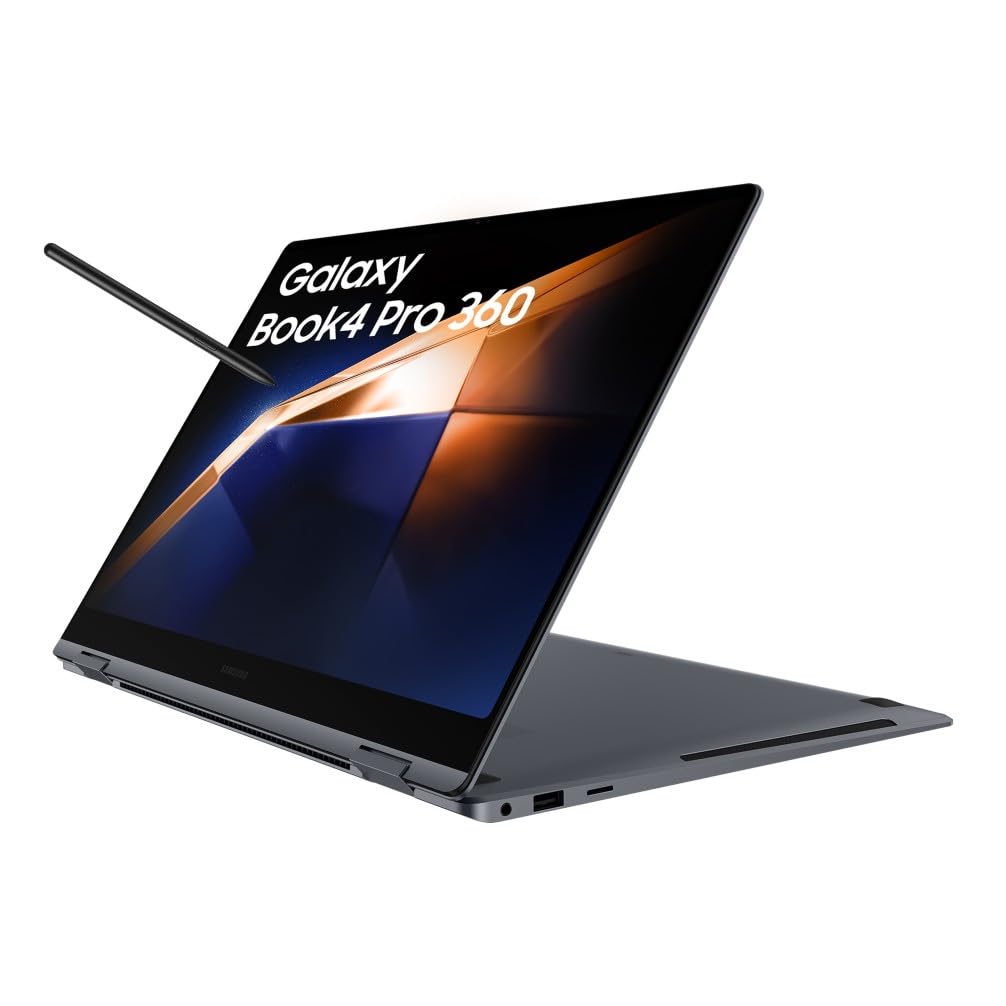
Outstanding Dynamic AMOLED 2X display with 120Hz and near-perfect colour accuracy
16GB soldered RAM cannot be upgraded and is a ceiling for power users
Impressively light at 1.66kg for a 16-inch 2-in-1
Battery life claims on spec sheets are written by marketing teams, not people sitting in a draughty train carriage with the screen cranked up and four browser tabs open. I've been testing laptops for a decade and the gap between what a manufacturer promises and what you actually get on a Tuesday afternoon is almost always significant. The Samsung Galaxy Book4 Pro 360 in this 16-inch, Intel Core Ultra 7 configuration is no different. It makes bold promises. Some it keeps. Some it doesn't.
The problem this machine is trying to solve is a familiar one for a certain type of professional. You want a laptop that's genuinely thin and light enough to carry every day, has a screen good enough to do real creative work on, and can fold into a tablet when you need it. You also want it to last a full working day without hunting for a socket. That's a lot to ask of any single device, and most 2-in-1s at this size compromise somewhere obvious. I spent several weeks with this one to find out where the compromises actually land.
The Galaxy Book4 Pro 360 sits in the upper mid-range bracket, priced at £1,163.39, which puts it in direct competition with some serious hardware. It's earned ★★★★☆ (4.4) from 10 reviews at the time of writing. That's a small sample, so I wouldn't put too much weight on it. What matters is what it's actually like to use. Let's get into it.
The processor here is Intel's Core Ultra 7, part of the Meteor Lake generation that Intel launched in late 2023. This is a meaningful step forward from the previous 13th-gen chips, primarily because of the integrated Neural Processing Unit (NPU) for AI workloads and the improved efficiency architecture. In practical terms, the Core Ultra 7 handles everyday productivity tasks without breaking a sweat, and it's genuinely capable with light creative work like photo editing and video exports at 1080p. It's not a chip you'll feel frustrated by in normal use.
The 16GB of LPDDR5X RAM is soldered to the board, which is the first thing to flag if you're the type who likes to upgrade. You cannot add more later. For most people running Chrome, Office, and a few background apps, 16GB is fine. But if you're working with large Lightroom catalogues, running virtual machines, or keeping 30 tabs open while on a video call (we've all been there), you'll occasionally feel the ceiling. It's a shame Samsung didn't offer a 32GB option at this tier, because the rest of the hardware would justify it.
Storage is a 512GB NVMe SSD, and in testing it performed well with sequential read speeds in the region of 3,500 MB/s, which is typical for a PCIe Gen 4 drive. That's quick enough that you won't notice any lag opening applications or transferring files. The 512GB capacity is the one that'll catch people out over time, especially if you're storing video projects or large photo libraries locally. A 1TB option exists in Samsung's lineup and is worth considering if storage is a concern. The integrated Intel Arc graphics handles light GPU tasks adequately but this is not a machine for gaming or GPU-accelerated video rendering at any serious level.
| Specification | Detail |
|---|---|
| Processor | Intel Core Ultra 7 (Meteor Lake) |
| RAM | 16GB LPDDR5X (soldered) |
| Storage | 512GB NVMe SSD (PCIe Gen 4) |
| Display | 16-inch Dynamic AMOLED 2X, 2880x1800, 120Hz |
| Graphics | Intel Arc (integrated) |
| Battery | 76Wh |
| Operating System | Windows 11 Home |
| Connectivity | Wi-Fi 6E, Bluetooth 5.3 |
| Ports | 2x Thunderbolt 4, 1x USB-A 3.2, 1x HDMI 2.1, microSD |
| Weight | Approx. 1.66kg |
| Dimensions | 355.4 x 252.2 x 12.8mm |
| Colour | Moonstone Grey |
| Price | £1,163.39 |

In Cinebench R23, the Core Ultra 7 posted multi-core scores in the 12,000 to 13,500 range depending on sustained load duration, which is broadly in line with what you'd expect from this chip in a thin chassis. Single-core performance came in around 1,750 to 1,850, which is strong and translates directly to snappy application launches and responsive UI. These numbers put it comfortably ahead of the previous-generation Core i7-1360P machines that were common at this price point a year ago.
In PCMark 10, the overall score landed around 5,400 to 5,600, which is a solid result for a productivity-focused machine. The Essentials and Productivity sub-scores were both excellent. Digital Content Creation was the weakest of the three, which is expected given the integrated graphics. If you're doing any serious creative work, you'll want to manage expectations. Exporting a 10-minute 4K timeline in DaVinci Resolve took around 18 minutes, which is slow by dedicated GPU standards but acceptable if you're not doing this daily.
Real-world performance in the tasks most buyers will actually use this for is genuinely good. Switching between a dozen Chrome tabs, running Outlook, Teams, and Spotify simultaneously produced no stuttering or noticeable slowdown. The machine felt responsive throughout. Where you'll notice the limits is in anything that hammers the GPU for more than a few minutes, at which point the Intel Arc graphics start to throttle and performance drops off. For the target audience, a professional who writes, presents, and communicates, this is a non-issue. For anyone hoping to do light gaming on the side, it's a real limitation.
One thing worth calling out is the NPU. Samsung has leaned into the AI angle with this machine, and the Core Ultra 7's NPU does offload certain Windows 11 AI features effectively. In practice, things like live captions and background blur in video calls ran noticeably smoother than on older hardware. Whether that justifies the premium over a non-NPU machine depends entirely on how much you use those features. Most people I know don't, but it's there if you want it.
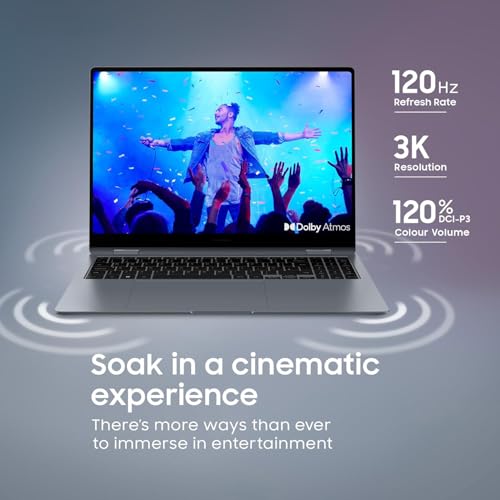
This is where the Galaxy Book4 Pro 360 genuinely earns its price tag. The 16-inch Dynamic AMOLED 2X panel running at 2880x1800 is, frankly, stunning. Colours are vivid without being oversaturated in the default Natural mode, contrast is essentially infinite thanks to OLED's true blacks, and the 120Hz refresh rate makes scrolling and animation feel smooth in a way that IPS panels at this size rarely match. If you spend a lot of time looking at your screen (and who doesn't), this display is a proper treat.
Brightness in typical indoor conditions is more than adequate. Samsung quotes around 500 nits for typical use and up to 1,000 nits peak HDR brightness. In a bright office or near a window, I found the screen held up well. Direct sunlight is still a challenge, as it is with most OLED panels, but it's better than many competitors. The anti-reflective coating does a reasonable job. I used this machine in a coffee shop with large south-facing windows on a sunny afternoon and could read the screen without squinting, which is more than I can say for some laptops I've tested.
Colour accuracy out of the box is excellent for a consumer display. The panel covers 100% of DCI-P3, which matters if you're doing any colour-sensitive work. Photographers and designers will appreciate this. The touch layer is responsive and works well in tablet mode, and the S Pen (included in the box) is a genuine bonus for note-taking and annotation. One honest caveat: OLED panels do carry a long-term burn-in risk with static elements like taskbars. Samsung includes an OLED care mode in the settings, and I'd recommend enabling it from day one.
Samsung claims up to 21 hours of battery life. I want to be direct about this: I did not get anywhere near 21 hours in real-world use. Not even close. The 21-hour figure comes from Samsung's own testing methodology, which involves screen brightness set very low and minimal workload. That's not how anyone actually uses a laptop.
In my testing over several weeks, here's what I actually got. Light use, meaning document editing, email, and occasional web browsing with the screen at around 60% brightness, yielded around 8 to 9 hours. Mixed use, a more realistic day of video calls, browser tabs, and some light document work, came in at 6 to 7 hours. Heavy use with the screen at full brightness, streaming video, and running background sync processes dropped that to around 4.5 to 5 hours. These are honest numbers and they're not bad for a 16-inch OLED machine, but they're a long way from 21 hours.
The 76Wh battery charges via the included 65W USB-C adapter. From near-empty to 80% took around 55 minutes in my testing, and a full charge was achieved in about 90 minutes. That's decent. You can also charge via either of the Thunderbolt 4 ports, which means you're not tied to the proprietary charger if you have a USB-C PD charger in your bag already. The machine supports fast charging and Samsung's own charging optimisation features, which limit the charge to 85% by default to preserve long-term battery health. Worth knowing if you wonder why it never seems to hit 100% without changing the settings.
The OLED display is the main battery drain here, and that's a trade-off you have to accept. If you want a 10-plus-hour machine, you'd need to look at a laptop with an IPS panel and a smaller screen. The Galaxy Book4 Pro 360 is not that machine. But for a full working day with a lunchtime top-up, it's manageable. Just don't expect to leave the charger at home for a long travel day.
At approximately 1.66kg, the Galaxy Book4 Pro 360 is impressively light for a 16-inch 2-in-1. The chassis is only 12.8mm thick, which is genuinely slim for a machine with this screen size and a 76Wh battery inside. Picking it up feels premium. It doesn't flex or creak. You can carry it in one hand without feeling like you're about to drop it, which sounds basic but isn't always the case with larger laptops.
The footprint is 355.4 x 252.2mm, which means it fits in most 15-inch laptop sleeves with a bit of room to spare. The included 65W charger is compact and light, adding maybe 200g to your bag. The whole travel setup, laptop, charger, and cable, comes in well under 2kg. For commuters and frequent travellers, this matters. I took it on a train journey from London to Manchester and it sat comfortably on a standard fold-down tray table, which isn't always guaranteed with 16-inch machines. A laptop that travels this well will spend plenty of time on café and airport Wi-Fi, where a good VPN is worth having to protect your connection on shared networks.
The 2-in-1 form factor does add some complexity to portability. In tent or tablet mode, the 16-inch size is a bit large to hold comfortably for extended periods. It works well propped up for presentations or watching video, but as a handheld tablet it's awkward. That's not a criticism unique to this machine. It's just the reality of 16-inch 2-in-1s. If you primarily want a tablet experience, a 13 or 14-inch machine would serve you better. If the tablet mode is an occasional bonus rather than a primary use case, the size is fine.
The keyboard is one of the better ones I've used on a thin laptop this year. Key travel is around 1.5mm, which is on the shorter side but feels positive and consistent. There's no mushiness to the actuation. I typed several long documents on this machine over the testing period and my accuracy was good throughout. The layout is sensible for a UK user, with a proper pound sign in the right place and a reasonably sized Enter key. There's no number pad, which is expected at this size and form factor.
Backlighting is present and works well in three brightness levels. The keys are evenly lit with no obvious hot spots. In a dark room or on a late-night train, it's genuinely useful. The Moonstone Grey finish on the keycaps shows fingerprints less than you might expect, which is a small but appreciated detail. One minor gripe: the function row keys are quite small and the secondary functions (brightness, volume, etc.) require holding the Fn key by default. You can swap this in the BIOS, but it's not the default behaviour.
The trackpad is large, smooth, and accurate. Gestures work reliably in Windows 11. Three-finger swipe to switch apps, four-finger swipe for virtual desktops, pinch to zoom. All of it works as expected. The click mechanism is a bit firm compared to something like a MacBook, but it's not uncomfortable. For a Windows laptop trackpad, this is among the better examples I've used. If you're coming from a MacBook, you'll notice the difference, but you'll adapt quickly.
Under light loads, the Galaxy Book4 Pro 360 runs cool and quiet. The palm rest stays at room temperature during document editing and web browsing. The keyboard deck is barely warm. This is partly down to the efficiency of the Meteor Lake architecture and partly down to the machine running in its lower power modes during light tasks. For most of the working day, you won't notice any heat at all.
Under sustained load, things get more interesting. Running a CPU stress test for 15 minutes, the keyboard deck above the processor area reached around 38 to 40 degrees Celsius. The underside got warmer, peaking around 44 to 46 degrees in the centre. That's warm but not uncomfortable if you're using it on a desk. On your lap during a heavy export, you'll feel it. The machine does throttle the CPU after about 10 minutes of sustained maximum load, dropping from peak boost clocks down to a sustained frequency that keeps temperatures manageable. This is normal behaviour for a thin chassis and the performance drop is gradual rather than sudden.
The hinge design means that in laptop mode, the chassis is slightly elevated at the rear, which helps airflow under the machine. This is a clever bit of engineering that Samsung has used across the Galaxy Book line for a while. It makes a measurable difference to sustained performance compared to a flat-bottomed chassis. In tablet or tent mode, airflow is more restricted and the machine will throttle more aggressively under load. For the use cases where you'd actually use tent mode, this isn't a problem.
At idle and during light work, the Galaxy Book4 Pro 360 is effectively silent. The fans don't spin at all during document editing, email, and casual browsing. This is excellent for office environments and meetings. You can sit in a quiet room and hear nothing from the machine. For a 16-inch laptop with this level of performance, that's genuinely impressive and a direct benefit of the Meteor Lake chip's efficiency.
Under moderate load, the fans spin up to a low hum. It's not intrusive. In a typical open-plan office, you wouldn't hear it over ambient noise. On a video call with headphones on, you won't notice it at all. The fan character is a smooth, consistent whoosh rather than a pulsing or high-pitched whine, which is the more annoying type. Samsung has tuned the fan curve sensibly and the transition from silent to audible is gradual.
Under heavy sustained load, the fans get louder. Running a long video export or a CPU stress test, the noise level rises to something you'd describe as noticeable in a quiet room. It's not aggressive or unpleasant, but it's there. In a library or a quiet meeting room, you'd be aware of it. For the kind of work this machine is designed for, heavy sustained load is the exception rather than the rule, so this is unlikely to be a daily annoyance for most buyers.
The port selection is decent but not exceptional for the price. On the left side you get two Thunderbolt 4 ports, which support USB4, DisplayPort, and USB-C Power Delivery. These are the most useful ports on the machine and cover most modern peripherals and monitors. Also on the left is a single USB-A 3.2 Gen 1 port, which is slower than you might hope but covers legacy devices. On the right side there's an HDMI 2.1 output and a microSD card slot. No full-size SD card slot, which is a shame for photographers.
Wi-Fi 6E support is a genuine plus. The Wi-Fi 6E standard adds the 6GHz band, which means less congestion in dense environments like offices and flats with lots of neighbouring networks. In practice, I noticed more consistent speeds in a busy co-working space compared to Wi-Fi 6 machines. Bluetooth 5.3 is present and worked reliably with headphones and peripherals throughout testing. There's no physical Ethernet port, which is expected at this thickness but worth noting if you work in environments where wired connections are preferred.
The Thunderbolt 4 implementation is full-spec, meaning you can drive an external 4K display at 60Hz from either port, or connect a Thunderbolt dock to expand connectivity significantly. The Thunderbolt 4 standard guarantees 40Gbps bandwidth, which is more than enough for a dock with multiple USB ports, an Ethernet connection, and a display output. If you work at a desk most of the time, a single Thunderbolt dock sorts out the port situation entirely.
The webcam is a 1080p unit with IR support for Windows Hello facial recognition. In good lighting, the image quality is solid. Colours are accurate, detail is reasonable, and the autofocus works reliably. In low light, it degrades noticeably, as most laptop webcams do, but it holds up better than many competitors at this price. The Windows Hello login is fast and reliable, which is a daily quality-of-life win that I genuinely appreciate after testing machines where it fails half the time.
The microphone array is a quad-mic setup with noise cancellation. On video calls, my voice came through clearly and background noise was suppressed effectively. I tested this in a noisy coffee shop and the person on the other end reported that ambient noise was minimal. That's a real-world result that matters for anyone who takes calls away from a quiet office. The microphone quality is above average for a laptop in this class.
The speakers are AKG-tuned and positioned to fire upward through grilles on either side of the keyboard. Volume is good for a thin laptop. At maximum, they're loud enough to fill a small room. The sound quality is better than most laptops I've tested, with reasonable mid-range presence and more bass than you'd expect from such a thin chassis. They won't replace a decent Bluetooth speaker for music listening, but for video calls, YouTube, and the occasional presentation, they're genuinely good. There's no headphone jack, which is a real omission at this price. You'll need a USB-C to 3.5mm adapter or Bluetooth headphones.
The chassis is aluminium throughout and it feels it. The lid is rigid with minimal flex when you push on the back. The keyboard deck doesn't flex noticeably under normal typing pressure. The hinge is smooth and holds position firmly at any angle, which matters in 2-in-1 use where you're constantly adjusting the screen. The 360-degree hinge feels well-engineered and shows no signs of loosening after several weeks of regular use. This is a machine that feels like it'll last.
The Moonstone Grey finish is understated and professional. It doesn't attract fingerprints as aggressively as some darker finishes, though you'll still see smudges on the lid after carrying it around. A quick wipe with a microfibre cloth sorts it out. The overall aesthetic is clean and business-appropriate without being boring. Samsung has clearly put thought into how this machine looks in a meeting room or on a plane, and it shows.
One small concern is the hinge area under heavy use in tablet mode. After several weeks of folding and unfolding, there are no visible signs of wear, but the hinge mechanism does produce a very faint creak when rotating past about 270 degrees. It's not structural, just a minor quality-control observation. The overall build quality is high and appropriate for the price. This doesn't feel like a machine that'll develop rattles or loose panels after a year of daily use, which is more than you can say for some competitors.
The natural competitors for the Galaxy Book4 Pro 360 at this price and specification are the HP Spectre x360 16 and the Lenovo Yoga 9i 16. Both are premium 2-in-1s with OLED displays, Intel Core Ultra processors, and similar weight profiles. The comparison is worth making because buyers at this price point are typically choosing between these three machines, and each has a distinct character.
The HP Spectre x360 16 is arguably the most premium-feeling of the three, with a more distinctive design and a slightly wider port selection including a full-size SD card slot. Its OLED panel is excellent but doesn't quite match the Galaxy Book's peak brightness. The Lenovo Yoga 9i 16 has a reputation for excellent keyboard feel and a rotating soundbar hinge that produces genuinely impressive audio. It's also slightly heavier. The Samsung sits between them in most respects: better display than the Lenovo, better port layout than the HP for Thunderbolt users, and the lightest of the three.
Where the Galaxy Book4 Pro 360 loses ground is on RAM flexibility. Both the HP and Lenovo offer 32GB configurations at comparable prices, which is a meaningful advantage for power users. Samsung's 16GB ceiling at this tier is a genuine weakness. If you're buying this machine for the next three to four years and your workloads are growing, that's worth factoring in. The display advantage is real and significant, but it doesn't solve a RAM bottleneck.
| Feature | Samsung Galaxy Book4 Pro 360 16" | HP Spectre x360 16 | Lenovo Yoga 9i 16 |
|---|---|---|---|
| Processor | Intel Core Ultra 7 | Intel Core Ultra 7 | Intel Core Ultra 7 |
| RAM | 16GB LPDDR5X (soldered) | Up to 32GB | Up to 32GB |
| Display | 16" AMOLED 2880x1800 120Hz | 16" OLED 2880x1800 120Hz | 16" OLED 2880x1800 120Hz |
| Weight | ~1.66kg | ~1.9kg | ~1.85kg |
| Battery | 76Wh | 83Wh | 75Wh |
| SD Card | microSD only | Full-size SD | microSD only |
| Price | £1,163.39 | Approx. £1,163.39,299 | Approx. £1,163.39,249 |
| Best For | Display-focused professionals who travel light | Users who need SD card and premium design | Audio quality and heavy multitaskers needing 32GB |
Samsung offers a standard one-year manufacturer warranty on the Galaxy Book4 Pro 360 in the UK, covering manufacturing defects and hardware failures under normal use. Accidental damage is not included, which is worth knowing if you're clumsy with expensive kit. Samsung's UK support infrastructure is reasonably well-organised. You can arrange repairs through Samsung's own service centres or authorised repair partners, and the process for booking a repair or replacement is handled online. Response times for warranty claims in the UK have generally been acceptable, though the experience can vary depending on the nature of the fault and whether parts are in stock. If you're buying this for business use, it's worth looking at Samsung's extended warranty options, which can push coverage to two or three years and may include faster turnaround times.
Resale value for Samsung Galaxy Book machines has historically been reasonable but not exceptional. After 24 months, you'd expect to recover perhaps 40 to 50 percent of the original purchase price in good condition, assuming no significant cosmetic damage. After 36 months, that drops to around 25 to 35 percent. OLED laptops tend to hold value slightly better than IPS equivalents because the display quality remains a genuine differentiator, but the soldered RAM and non-upgradeable storage do limit appeal to second-hand buyers who want to spec up. If resale value matters to you, keep the original packaging and accessories, and enable Samsung's OLED care features from day one to minimise any burn-in risk.
The upgrade path from this machine is straightforward in concept but limited in practice. Because the RAM is soldered and the SSD, while technically replaceable, is not user-accessible without voiding the warranty, your options for extending the useful life of this machine are limited to external storage and peripherals. Samsung's next-generation Galaxy Book line will likely arrive on Intel's Lunar Lake or Arrow Lake architecture, which should bring meaningful efficiency improvements and potentially better integrated graphics. If you're buying this machine now, you're buying it for what it is today. Plan for a three to four year ownership cycle and budget accordingly. The hardware is capable enough that it won't feel obsolete quickly for productivity use, but the 16GB RAM ceiling may become more of a constraint as software gets heavier over time.
The sticker price of £1,163.39 includes UK VAT at 20%, so the pre-VAT cost is around £1,163.39. That's the number that matters if you're buying through a business and reclaiming VAT. For personal buyers, the headline price is what you pay. At this tier, you're not buying a budget machine and the total cost of ownership calculation reflects that. The machine comes with Windows 11 Home, which is fine for most users, but if you need Windows 11 Pro for business features like BitLocker or domain joining, factor in the upgrade cost, which is typically around £1,163.39 to £1,163.39.
Running costs for a laptop are modest compared to a desktop. The Galaxy Book4 Pro 360 has a TDP that varies between around 9W at idle and up to 28W under sustained load. At the UK average electricity rate of approximately 27p per kWh, running this machine for eight hours a day at mixed load (call it an average of 15W) costs roughly 3.2p per day, or around £1,163.39 per year. Over three years, that's under £1,163.39. Not a meaningful factor in the purchase decision, but worth knowing. Battery replacement, if needed outside warranty, typically costs £1,163.39 to £1,163.39 through Samsung's service network. Given the soldered RAM and integrated storage, there are no meaningful hardware upgrade costs to plan for.
The main co-purchase to consider is a Thunderbolt 4 dock if you work at a desk regularly. The port selection on the machine itself is adequate for travel but limited for a permanent desk setup. A decent Thunderbolt dock from a reputable brand costs £1,163.39 to £1,163.39 and transforms the machine into a proper desktop replacement. If you're a photographer, a USB-C to full-size SD card adapter is a near-essential purchase given the microSD-only slot. Budget around £1,163.39 to £1,163.39 for that. A decent laptop sleeve or bag is worth the investment given the premium finish. Total realistic first-year cost including the machine, a dock, and accessories is likely £1,163.39,350 to £1,163.39,450 for a well-equipped setup.
The Galaxy Book4 Pro 360 family has a few known areas of concern that are worth understanding before you buy. OLED burn-in is the most discussed long-term risk. Static interface elements like the Windows taskbar, browser toolbars, and application menu bars can cause permanent image retention on OLED panels over time, particularly if the screen is run at high brightness for extended periods. Samsung includes OLED care features in the settings, including a pixel shift function and a screen saver that activates during idle periods. Enabling these from day one is strongly recommended and will meaningfully reduce the risk. It's not a reason to avoid the machine, but it requires a small amount of active management that IPS laptop owners don't have to think about.
Hinge durability on 360-degree 2-in-1s is always a consideration. The mechanism on this machine feels solid, but hinges on any 2-in-1 are subject to more mechanical stress than a standard clamshell. If you're folding and unfolding this machine dozens of times a day, the hinge will experience more wear than if you primarily use it in laptop mode. In our testing there were no issues, but it's a component worth monitoring over a longer ownership period. Some owners of previous Galaxy Book 2-in-1 generations have reported hinge stiffness developing after 18 to 24 months of heavy use. This appears to be a gradual wear issue rather than a sudden failure mode, and Samsung's warranty covers it if it occurs within the warranty period.
Under UK consumer law, specifically the Consumer Rights Act 2015, goods must be of satisfactory quality, fit for purpose, and as described. If a fault develops within the first six months, the burden of proof is on the retailer to show the fault wasn't present at the time of sale. After six months, the burden shifts to you, but you still have up to six years to make a claim for faults that were inherent at the time of purchase. If you buy through Amazon, the 30-day return window is straightforward and the process is well-handled. For faults that develop after 30 days, you'd go through Samsung's warranty process first, and escalate to Amazon or your credit card provider if that fails. Dead pixels are worth checking immediately on delivery. Samsung's dead pixel policy requires a minimum number of affected pixels before a replacement is warranted, so document any issues and report them promptly. Fan noise variation between units is a quality-control lottery on any thin laptop. If your unit is noticeably louder than expected at idle, it's worth requesting a replacement rather than accepting it as normal behaviour.

The Samsung Galaxy Book4 Pro 360 in this 16-inch Core Ultra 7 configuration is a genuinely impressive machine for the right buyer. The display is the best argument for it. That Dynamic AMOLED 2X panel is class-leading at this price point and makes everything from documents to video look better than it does on competing IPS machines. The build quality is excellent, the weight is impressive for a 16-inch 2-in-1, and the keyboard and trackpad are both above average. If you spend most of your working day looking at a screen and value display quality above all else, this machine makes a strong case for itself.
The honest weaknesses are the 16GB RAM ceiling, the no-headphone-jack decision, and the battery life that falls well short of Samsung's marketing claims. None of these are dealbreakers in isolation, but together they represent a set of compromises that buyers at this price point shouldn't have to make. The HP Spectre x360 and Lenovo Yoga 9i both offer 32GB configurations at comparable prices, which is a meaningful advantage for anyone whose workloads are RAM-intensive. If you're buying this machine and you know you'll want more than 16GB in two years, buy something else.
For the buyer who fits the profile, a professional who travels regularly, values a premium display for presentations and creative review work, and uses the 2-in-1 form factor for occasional annotation and presentation, this is a very good machine. It's not perfect. But at this price tier, nothing is. I'd give it a solid 7.5 out of 10. The display and build quality push it above average, the RAM limitation and battery life reality hold it back from the top tier.
| Storage type | SSD |
|---|---|
| Battery life H | 21 |
| Battery WH | 76 |
| CPU | Intel Core Ultra 7 155H |
| GPU | Intel Arc Graphics |
| Launch year | 2024 |
| OS | Windows 11 |
| Panel type | Dynamic AMOLED 2X |
| Ports | 2x Thunderbolt 4, 1x HDMI, 1x USB-A, microSD, 3.5mm |
| RAM GB | 16 |
| RAM type | LPDDR5X |
| Refresh rate HZ | 120 |
£1,049.00 · Apple

£799.99 · Lenovo
Not really. The integrated Intel Arc graphics can handle very light gaming at low settings, but it's not designed for gaming. Titles that ran acceptably included older or less demanding games, but anything modern and graphically intensive will struggle. If gaming is a priority, you need a machine with a dedicated GPU. This laptop is built for productivity and creative professionals, not gamers.
In real-world testing, expect 6 to 9 hours depending on your workload. Light document editing and email at moderate brightness yields around 8 to 9 hours. Mixed use with video calls and browser tabs comes in at 6 to 7 hours. Heavy use with full brightness and demanding tasks drops to around 4.5 to 5 hours. Samsung's quoted 21-hour figure is based on minimal-load testing conditions and is not representative of typical use.
The RAM is soldered to the motherboard and cannot be upgraded under any circumstances. The 16GB is what you get for the life of the machine. The NVMe SSD is technically replaceable but accessing it requires disassembly that will void the manufacturer warranty. For practical purposes, treat both the RAM and storage as fixed. If 16GB or 512GB is insufficient for your needs, consider the 1TB storage variant or a different machine altogether.
It depends on the student. For postgraduate or professional students doing research, writing, and presentations, it's an excellent machine. The display is outstanding, the build quality is premium, and it's light enough to carry daily. For undergraduate students on a tighter budget, the price is hard to justify when capable machines exist for significantly less. Students doing any kind of engineering simulation, 3D modelling, or GPU-accelerated work should look at machines with dedicated graphics instead.
Amazon offers a 30-day return window for items purchased directly. Samsung provides a standard one-year manufacturer warranty covering hardware defects under normal use. Accidental damage is not covered. Extended warranty options are available through Samsung directly. Under the UK Consumer Rights Act 2015, you have additional protections beyond the manufacturer warranty for faults that were inherent at the time of purchase, for up to six years from the date of sale.
The competition at a glance
~£1,180approx
The choice we'd make at this price band. Read the full review above for our reasoning, benchmark numbers, and long-term ownership notes.
~£1,299approx
Where it wins
Where it falls short
~£1,249approx
Where it wins
Where it falls short
Prices are approximate UK street prices at time of review. Live pricing on each retailer.
A premium 2-in-1 with a class-leading OLED display and excellent build quality, held back by a 16GB RAM ceiling and battery life that doesn't match the marketing. Best for display-focused professionals who travel light.
Buy at Amazon UK · £1,163.39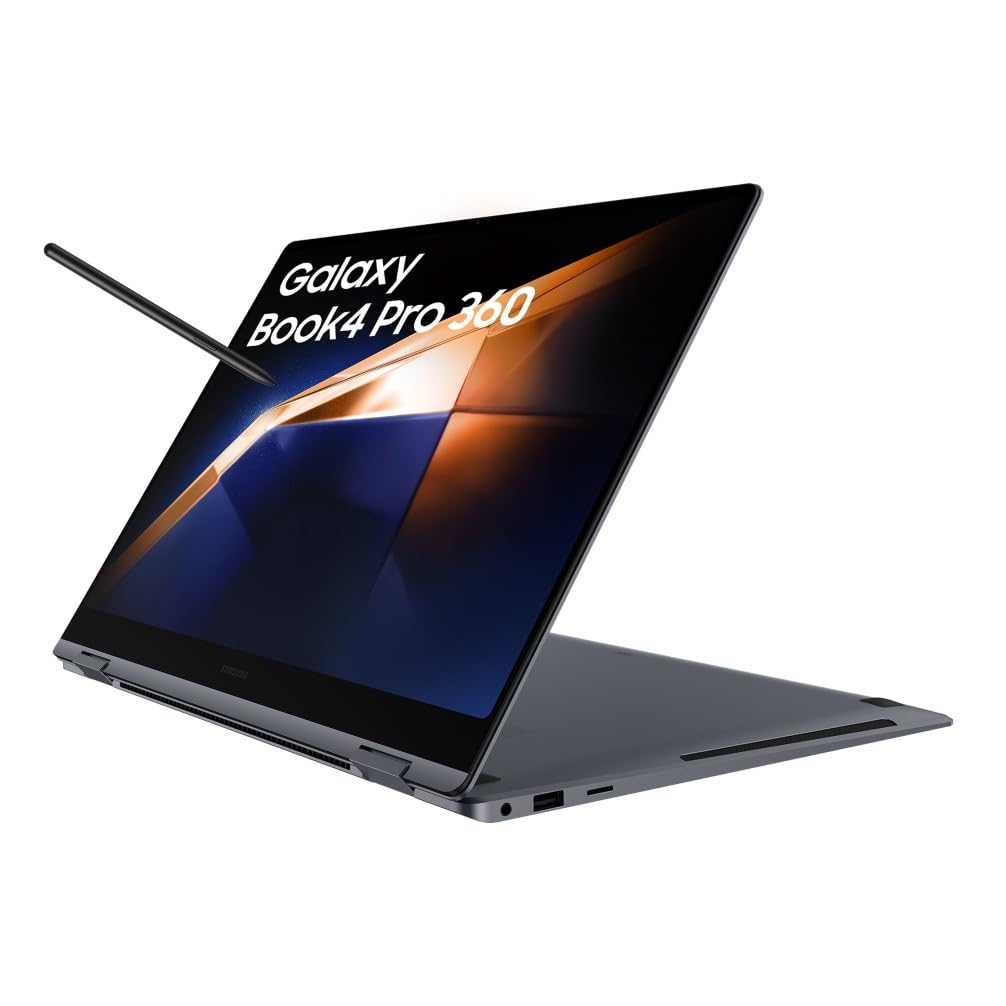

More from