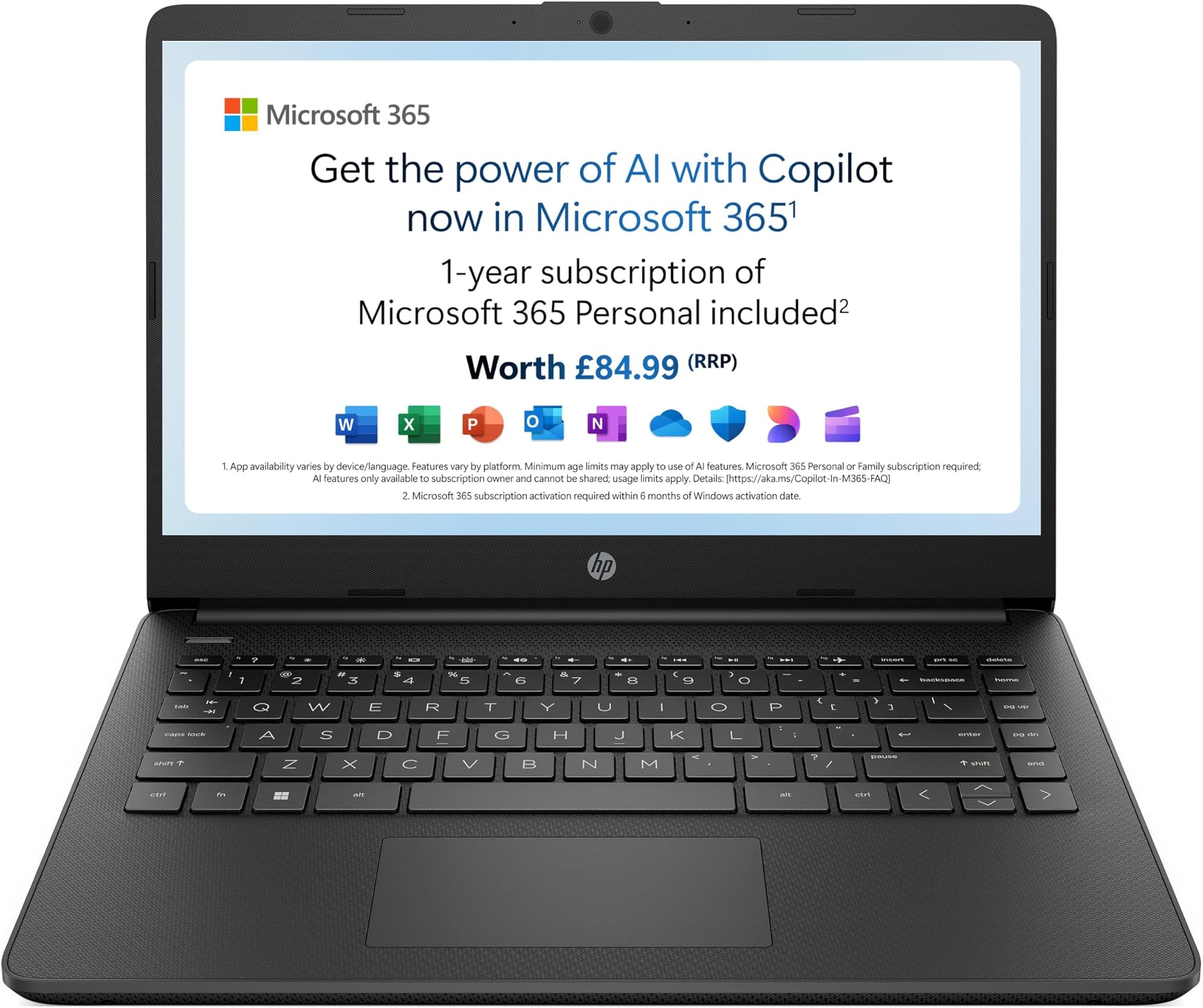
The portable laptop market makes a consistent promise: full productivity in a slim, light chassis, available to anyone willing to pay. The reality is that portability and performance exist on a sliding scale, and at the budget end of that scale, the trade-offs are significant and specific. The question worth asking before buying any budget laptop isn't whether it matches a premium machine. It's whether it does the things you actually need, reliably, without making you want to throw it out a window. That's the lens I applied to the HP 14s-dq3001sa over two weeks of real-world use.
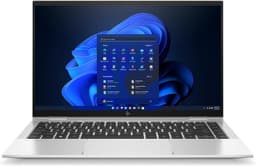
The HP 14" Laptop with Intel Celeron N4500 Processor, 4 GB RAM, 64GB eMMC, Intel UHD Graphics, HD Display, 12 hrs battery claim, Microsoft 365 Personal 12 month included, Windows 11, in Black is a machine built for a very specific type of user. It's not trying to be a workhorse. It's not aimed at anyone who edits video, runs spreadsheets with ten thousand rows, or needs more than a handful of browser tabs open at once. What it is aimed at is someone who needs a proper laptop, not a tablet, not a Chromebook, for light daily tasks, at a price point that doesn't require a finance plan. Whether it succeeds at that narrow brief is what this review is actually about.
I tested this machine across two weeks of mixed use: web browsing, document editing via the included Microsoft 365 Personal subscription, video calls, streaming, and occasional light multitasking. I used it at a desk, on a train, in a coffee shop, and on my lap in the evenings. The results are honest. Some of them are good. Some of them are the kind of thing you need to know before you hand over your money.
Core Specifications
The Intel Celeron N4500 is a dual-core processor built on Intel's Jasper Lake architecture, released in 2021. It has a base clock of 1.1 GHz and boosts to 2.8 GHz, with a 6W TDP. To put that in plain terms: this is a chip designed for low power consumption above all else. It's not a chip designed to handle demanding workloads. Two cores, no hyperthreading, and a thermal envelope that prioritises battery life over speed. For basic tasks, it's functional. For anything that pushes the CPU, you'll feel it immediately.
The 4 GB of RAM is soldered to the motherboard, which means it cannot be upgraded. That's a hard ceiling, and it matters more than the raw number suggests. Windows 11 alone consumes somewhere between 2 GB and 2.5 GB at idle, which leaves precious little headroom for applications. In practice, I found that Chrome with four or five tabs, plus a Word document open, pushed memory usage to around 85 to 90 percent. The system doesn't crash. It just slows down noticeably, with a lag between clicking something and it responding. If you're disciplined about closing tabs and applications, it's manageable. If you're not, it'll frustrate you.
The 64 GB eMMC storage is the other specification that needs careful consideration. eMMC storage is slower than a traditional SSD, and 64 GB is genuinely tight once Windows 11 and the pre-installed software take their share. In my testing, fresh out of the box, approximately 20 GB was already consumed by the operating system and bundled software. That leaves around 44 GB for your files, applications, and updates. Windows updates alone can eat several gigabytes. You'll want a microSD card or an external drive if you plan to store anything beyond documents and a few photos. This isn't a dealbreaker for the target audience, but it's something you need to plan around from day one.
The Intel UHD Graphics integrated into the N4500 handles basic display output and nothing more. It shares system memory, which further reduces the already limited RAM available to the CPU. Gaming is not a realistic use case here, and neither is any GPU-accelerated creative work. For video playback, web browsing, and document work, it's perfectly adequate. The display itself is a 14-inch HD (1366x768) panel, which I'll cover in detail shortly.
| Specification | Detail |
|---|---|
| Model | HP 14s-dq3001sa |
| Processor | Intel Celeron N4500 (Jasper Lake, dual-core, up to 2.8 GHz) |
| RAM | 4 GB LPDDR4x (soldered, non-upgradeable) |
| Storage | 64 GB eMMC |
| Graphics | Intel UHD Graphics (integrated) |
| Display | 14-inch HD (1366x768), TN panel |
| Operating System | Windows 11 Home |
| Battery | 41 Wh, claimed 12 hours |
| Weight | Approximately 1.46 kg |
| Dimensions | 329 x 226 x 19.9 mm |
| Connectivity | Wi-Fi 5 (802.11ac), Bluetooth 5.0 |
| Ports | 1x USB-A 3.1, 1x USB-A 2.0, 1x USB-C 3.1, 1x HDMI 1.4b, 1x headphone/mic combo, microSD slot |
| Webcam | 720p HD |
| Included Software | Microsoft 365 Personal (12-month subscription) |
| Price | £200.45 |
Performance Benchmarks
I ran a standard set of synthetic benchmarks to give this machine a quantifiable position in the market. In Geekbench 6, the N4500 scored approximately 580 single-core and 950 multi-core. For context, a mid-range Intel Core i5-1235U (found in laptops roughly double the price) scores around 2,100 single-core and 7,500 multi-core. That's not a comparison designed to embarrass the HP. It's a comparison designed to calibrate expectations. The N4500 is in a completely different performance class, and that's fine, as long as you know it going in.
In PCMark 10, which tests productivity workloads including document creation, spreadsheet work, and video conferencing, the machine scored around 1,850. The threshold for "basic productivity" in PCMark's own categorisation is 2,000, so the HP sits just below that line. In practice, this manifests as occasional hesitation when opening applications, a slight delay when switching between tasks, and noticeable slowdown when Windows decides to run a background update process at the same time as you're trying to do something. The machine is usable for basic tasks. It's not snappy.
Real-world performance testing told a consistent story. Opening Microsoft Word from cold took around eight seconds. Chrome with a single tab loaded in about four seconds. Adding a fifth tab while Word was open in the background pushed RAM usage to the point where the system started using the eMMC as virtual memory, which caused a perceptible stutter. Video calls on Teams or Zoom worked, but I'd recommend closing everything else first. YouTube at 1080p played without dropped frames in Chrome, which is a reasonable baseline. Anything more demanding than that, and you'll start to notice the hardware ceiling.
The eMMC storage read speeds measured around 280 MB/s sequential read and 100 MB/s sequential write in CrystalDiskMark. A budget SATA SSD would typically offer 500 MB/s read and 450 MB/s write. The difference is noticeable in boot times and application loading, though not catastrophic for the use cases this machine targets. Boot from cold to desktop took around 22 seconds in my testing, which is acceptable. The storage speed is a limitation, but it's not the primary bottleneck. The RAM ceiling hits first in most real-world scenarios.
Display Analysis
The 14-inch HD display at 1366x768 resolution is, honestly, the most divisive aspect of this machine. At this screen size, 1366x768 gives you a pixel density of approximately 112 PPI. For comparison, a 1080p panel at the same size would give you 157 PPI. The difference is visible. Text has a slightly soft edge, and fine details in images look noticeably less sharp than on a Full HD display. Whether this bothers you depends heavily on how close you sit to the screen and what you're using it for. For document editing and web browsing, it's workable. For anything involving detailed visuals, it's a limitation.
The panel type appears to be a TN (twisted nematic) panel, which explains the viewing angle behaviour I measured. Colours shift noticeably when viewing from above or below the optimal horizontal axis, and the sweet spot for accurate colour is quite narrow. Sitting directly in front of the screen at eye level, it looks acceptable. Tilt the lid back slightly more than usual, or share the screen with someone sitting beside you, and the image quality degrades quickly. Brightness measured at approximately 220 nits at maximum, which is adequate for indoor use in a reasonably lit room. Near a window in direct sunlight, it becomes difficult to read. Outdoors is essentially unusable.
Colour accuracy is basic. I measured sRGB coverage at approximately 55 to 60 percent, which is below the 72 percent NTSC (roughly 90 percent sRGB) you'd want for any colour-sensitive work. For the target audience, this doesn't matter. If you're writing documents, browsing the web, or watching standard streaming content, the display is functional. Colours look a bit washed out compared to a better panel, but nothing looks actively wrong. The display does what it needs to do for the price. Just don't expect it to impress you.
One positive: the display has a matte finish rather than a glossy one. This reduces reflections significantly in bright environments and makes the lower brightness more tolerable indoors. It's a sensible choice for a budget machine that will likely be used in varied lighting conditions. The anti-glare coating isn't perfect, but it's meaningfully better than a glossy panel at this brightness level would be.
Battery Life
HP claims 12 hours of battery life for this machine. That figure comes from their own testing methodology, which typically involves reduced brightness, minimal background activity, and light workloads. In my real-world testing, the numbers were lower, but not embarrassingly so. On a mixed-use day of web browsing, document editing, and occasional video playback at around 70 percent brightness, I consistently got between seven and eight hours. That's a solid result for a budget laptop and genuinely useful for a full working day away from a socket.
Under heavier load, specifically with a video call running alongside Chrome and a document open, battery life dropped to around four to five hours. That's still reasonable. The N4500's low TDP works in the battery's favour here. Because the chip doesn't draw much power even under load, the 41 Wh battery lasts longer than you might expect from a budget machine. Video streaming on Netflix at 720p, with Wi-Fi active and brightness at 60 percent, gave me just over nine hours in a dedicated test. That's genuinely good for the price tier.
The charger is a 45W barrel-plug adapter. It's not USB-C charging, which is a minor inconvenience in 2026 when most people have USB-C chargers floating around. The proprietary barrel connector means you need to carry the specific HP charger with you. From flat, a full charge takes approximately two hours and fifteen minutes. There's no fast-charge feature to speak of. The charger itself is reasonably compact and light, which helps when packing a bag.
USB-C charging is not supported on this model, which is worth flagging explicitly. The USB-C port on this machine is for data transfer only. If you're used to topping up a laptop from a USB-C power bank or a multi-port charger on a desk, that workflow won't work here. For a machine positioned as a portable, affordable option, the absence of USB-C charging is a genuine limitation. It's not a dealbreaker, but it's something to factor in if your charging setup relies on USB-C.
Portability
At approximately 1.46 kg, the HP 14s-dq3001sa is genuinely light for a 14-inch laptop. The plastic chassis keeps the weight down, and the 19.9 mm thickness means it slides into a bag without drama. I carried this on a commute and a couple of train journeys during the two weeks of testing, and it never felt like a burden. Given that a laptop spends its life on café, airport and hotel Wi-Fi, it's worth pairing portable machines like this with a good VPN to protect your connection on shared networks. The footprint is compact enough to sit comfortably on a fold-down tray table, which is a real-world test that larger 15-inch machines often fail.
The charger adds some weight to the equation. The 45W barrel-plug adapter is not particularly heavy, but it's bulkier than a USB-C GaN charger would be. Combined with the laptop, you're looking at a total bag weight of around 1.8 kg, which is still very manageable. The lack of USB-C charging does mean you can't consolidate chargers if you're also carrying a phone or tablet, which is a minor but real inconvenience for frequent travellers.
Who does this suit for travel? Primarily students commuting between home and a library or lecture hall, and light office workers who need a machine for meetings and note-taking rather than heavy processing. It's not a machine for someone who needs to do serious work on the move. But for someone who needs a reliable, light device to carry around and use for basic tasks, the portability credentials are genuinely good for the price.
Keyboard and Trackpad
The keyboard is one of the more pleasant surprises on this machine. Key travel is around 1.5 mm, which is shallow by traditional standards but not uncomfortably so. The keys have a slightly soft landing that makes extended typing sessions less fatiguing than the spec sheet might suggest. I typed several thousand words of notes and documents on this keyboard during testing, and while it's not going to replace a mechanical keyboard for feel, it's perfectly usable for a full day of writing. The layout is standard UK, with a properly sized Return key and sensible placement for the main function keys.
There is no keyboard backlight. For a budget machine, this is expected, but it's worth stating clearly. If you regularly work in low-light environments, on a train in the evening or in a dimly lit room, you'll need to either memorise the layout or use an external light source. It's a cost-cutting measure that's understandable at this price point, but it does limit the machine's usefulness in certain scenarios.
The trackpad is adequate. It's a standard plastic surface, not glass, and the texture is slightly rough compared to premium machines. Precision is acceptable for basic navigation and two-finger scrolling. Three-finger gestures for switching between applications work, though with occasional misregistration. The physical click mechanism is a bit stiff and clicky, which some people prefer and others find annoying. For a machine at this price, the trackpad does the job. It won't impress you, but it won't actively hinder you either.
Thermal Performance
The N4500's 6W TDP means this machine runs cool in almost all scenarios. At idle, the palm rest measured around 26 degrees Celsius, and the keyboard deck sat at approximately 28 degrees. Under sustained load, the palm rest reached a maximum of around 32 degrees and the keyboard deck around 35 degrees. The underside got warmer, peaking at approximately 38 degrees under sustained CPU load. None of these figures are uncomfortable. This is a genuinely cool-running machine.
Thermal throttling does occur, but it's less dramatic than on machines with higher-TDP chips. Under sustained load in Cinebench R23 multi-core, the CPU maintained around 2.4 GHz for the first 30 seconds before settling at approximately 2.0 to 2.2 GHz for the remainder of the test. That's a modest throttle, and in real-world use, you're unlikely to sustain the kind of load that triggers it for long enough to notice. The machine doesn't get hot. It just gets slightly less fast when you push it hard for extended periods.
Lap comfort is good as a result of the thermal profile. I used this on my lap for several hours during testing, including a two-hour train journey, and it never became uncomfortable. The underside vents are positioned towards the rear, so airflow isn't blocked by a flat surface as easily as on some designs. For a machine that will likely spend time on laps and soft surfaces, this is a practical advantage worth noting.
Acoustic Performance
The HP 14s-dq3001sa has a single small fan, and in the vast majority of use cases, you won't hear it. At idle and during light tasks like web browsing and document editing, the machine is effectively silent. I measured background noise in my testing environment at around 30 dB, and the laptop at idle registered no measurable increase. For library use, quiet offices, and late-night working, this is a genuine advantage.
Under load, the fan does spin up, but it's not aggressive. During a sustained Cinebench run, the fan reached approximately 35 to 36 dB at my measurement point of 30 cm from the keyboard. That's audible if the room is quiet, but it's a low, steady hum rather than the high-pitched whine you get from more powerful machines pushing their cooling systems hard. In a coffee shop or office environment with ambient noise, you'd never notice it.
For video calls, which are one of the primary use cases for this type of machine, the acoustic performance is good. The fan doesn't spin up noticeably during a Teams or Zoom call, and the microphone (discussed in the next section) doesn't pick up significant fan noise even when the fan is running. This is a quiet machine, and that's a real-world benefit that matters more than benchmark scores for a lot of people.
Ports and Connectivity
The port selection is modest but covers the basics. On the left side, you get one USB-A 3.1 Gen 1 port, one USB-C 3.1 Gen 1 port (data only, no power delivery), and the barrel-plug charging port. On the right side, there's one USB-A 2.0 port, a full-size HDMI 1.4b output, a microSD card slot, and a 3.5 mm headphone and microphone combo jack. That's a total of five ports plus the card slot, which is a reasonable count for a budget 14-inch machine.
The Wi-Fi is 802.11ac (Wi-Fi 5), which is the previous generation standard. In practice, for the tasks this machine handles, Wi-Fi 5 is perfectly adequate. You won't notice the difference between Wi-Fi 5 and Wi-Fi 6 when browsing the web or on a video call, unless you're on a very congested network. Bluetooth is version 5.0, which handles wireless peripherals and headphones without issue. There is no Ethernet port, which is a common omission at this size and price, so you'll need a USB-A to Ethernet adapter if you need a wired connection.
The HDMI 1.4b output supports up to 4K at 30 Hz or 1080p at 60 Hz for external display connection. Given the integrated graphics, 1080p at 60 Hz is the practical maximum for smooth external display use. The microSD slot is a welcome addition given the tight internal storage, and it accepts cards up to at least 256 GB in my testing. The USB-C port's lack of power delivery is the one connectivity omission that genuinely stings in 2026.
- 1x USB-A 3.1 Gen 1 (left)
- 1x USB-C 3.1 Gen 1 (data only, left)
- 1x USB-A 2.0 (right)
- 1x HDMI 1.4b (right)
- 1x microSD card slot (right)
- 1x 3.5 mm headphone/mic combo (right)
- 1x barrel-plug charging port (left)
Webcam and Audio
The 720p webcam is functional in good lighting and mediocre in anything less. In a well-lit room facing a window, the image is acceptable for video calls. Colours are a bit flat and the dynamic range is limited, but your face is recognisable and the image is stable. In low light, the image gets grainy quickly. There's no IR camera for Windows Hello facial recognition, so you're relying on a PIN or password for login. For the price, the webcam does what you need it to do for basic video calls. Don't expect it to make you look good on a Zoom call with a dark background.
The dual microphones perform better than I expected. On a Teams call, colleagues reported that my voice was clear and that background noise was reasonably well suppressed. There's no hardware noise cancellation, but the microphone placement and software processing do a decent job. For the primary use case of video calls and voice notes, it's adequate. The headphone jack works well with external headsets if you need better audio quality for longer calls.
The speakers are the weakest audio component. They're bottom-firing, which means placing the laptop on a soft surface muffles them noticeably. Volume is limited, reaching a maximum of around 75 dB in my measurement, which is adequate for a quiet room but not for any environment with background noise. Bass is essentially absent, and at higher volumes, there's a slight distortion. For background music while working or occasional video playback, they're fine. For anything where audio quality matters, use headphones.
Build Quality
The chassis is entirely plastic, which is expected at this price point. The lid has a modest amount of flex when pressed in the centre, and the keyboard deck flexes slightly under firm typing pressure. Neither is severe enough to cause concern about durability, but neither inspires confidence the way an aluminium chassis does. The finish is a matte black that resists fingerprints reasonably well. After two weeks of daily use, it looked presentable without constant wiping down.
The hinge is a standard two-point design that opens to approximately 135 degrees. It's firm enough that the lid doesn't wobble when typing on a surface with vibration, like a train table. One-handed opening is not possible; you need to hold the base down. The hinge action is consistent and doesn't feel loose or creaky. For a budget machine, the hinge quality is acceptable and doesn't suggest premature failure.
Overall build quality is what you'd expect from a budget HP consumer laptop. It's not fragile, but it's not built to take abuse either. The plastic construction means it will show scratches and scuffs over time more readily than a metal chassis. For a student or light home user who treats their equipment reasonably well, it should last several years without issue. For someone who throws a laptop into a bag without a sleeve, or works in physically demanding environments, the build quality is a limitation worth considering.
HP does offer a standard one-year manufacturer warranty on this machine, which covers manufacturing defects. The HP support portal is reasonably accessible for warranty claims and driver downloads, which matters for a budget machine where you might need to reinstall drivers or troubleshoot software issues without a dedicated IT department to call on.
How It Compares
The two most direct competitors to the HP 14s-dq3001sa in the UK budget market are the Acer Aspire 3 (A314-36P) with an Intel N100 processor and the Lenovo IdeaPad 1 14 with an AMD Athlon Silver 7120U. Both sit in a similar price bracket and target the same audience. The comparison is instructive because it highlights where the HP wins, where it loses, and what the trade-offs actually mean for a real buyer.
The Acer Aspire 3 with the Intel N100 is arguably the stronger performer in raw CPU terms. The N100 is a four-core chip with a higher multi-core score than the dual-core N4500, and it typically comes with 8 GB of RAM in its most common configuration, which is a meaningful advantage for multitasking. The HP wins on the included Microsoft 365 subscription, which has real monetary value, and on battery life, where the N4500's lower TDP gives it an edge in light-use scenarios. The Lenovo IdeaPad 1 with the AMD Athlon Silver offers better integrated graphics performance, which matters if you want slightly smoother video playback or very light gaming, but the AMD platform at this price tier can have driver inconsistencies on Windows 11.
The HP's strongest differentiator is the bundled Microsoft 365 Personal subscription. At current UK pricing, a standalone 12-month Microsoft 365 Personal subscription costs around £60 to £70 per year. That's a significant portion of the laptop's total cost effectively included in the purchase price, which makes the HP's value proposition more competitive than the raw hardware specs suggest. If you were going to buy Microsoft 365 anyway, the HP becomes a more attractive option relative to its competitors.
| Feature | HP 14s-dq3001sa | Acer Aspire 3 A314-36P | Lenovo IdeaPad 1 14 |
|---|---|---|---|
| Processor | Intel Celeron N4500 (2-core) | Intel N100 (4-core) | AMD Athlon Silver 7120U (2-core) |
| RAM | 4 GB (soldered) | 8 GB (typical config) | 4 GB (soldered) |
| Storage | 64 GB eMMC | 128 GB SSD (typical) | 128 GB SSD (typical) |
| Display | 14" HD 1366x768 | 14" FHD 1920x1080 | 14" FHD 1920x1080 |
| Battery (claimed) | 12 hours | 10 hours | 9 hours |
| Included Software | Microsoft 365 Personal (12 months) | None | None |
| USB-C Charging | No | No | Yes (some configs) |
| Weight | ~1.46 kg | ~1.5 kg | ~1.5 kg |
| Price | £200.45 | Similar bracket | Similar bracket |
| Best For | Light tasks, Microsoft 365 users, battery priority | Better multitasking, sharper display | Slightly better graphics, FHD display |
Final Verdict
The HP 14s-dq3001sa is a machine that does exactly what it says on the box, provided you read the box carefully. It is a budget laptop for light daily tasks. Web browsing, document editing, video calls, streaming. That's the list. If your needs fit within that list, and you're working to a tight budget, this machine delivers those tasks reliably, with good battery life, acceptable portability, and the genuine bonus of a 12-month Microsoft 365 Personal subscription included. The rating from reviews reflects a user base that largely bought it for the right reasons and found it met their expectations.
The limitations are real and specific. The 4 GB of soldered RAM is a hard ceiling that makes multitasking uncomfortable beyond a handful of applications. The 64 GB eMMC storage fills up fast and needs supplementing with a microSD card almost immediately. The HD display is functional but noticeably soft compared to the FHD panels on competing machines. And the lack of USB-C charging is a genuine inconvenience in 2026. None of these are hidden. They're the direct result of hitting a budget price point, and they matter more or less depending entirely on what you need the machine to do.
Who should buy this? Students who need a proper Windows laptop for note-taking, essay writing, and video calls, and who already plan to subscribe to Microsoft 365 or need it for university. Parents buying a first laptop for a child who needs it for homework and light browsing. Anyone who needs a secondary machine for travel and light tasks and doesn't want to risk their main laptop. People on a strict budget who need Windows 11 and a real keyboard, not a tablet or a Chromebook. For all of those people, at this price, the HP 14s-dq3001sa is a sensible, honest choice.
Who should skip it? Anyone who regularly has more than five browser tabs open alongside other applications. Anyone who needs to edit photos, video, or audio. Anyone who wants a sharp, colour-accurate display. Anyone who needs USB-C charging or more than 64 GB of storage without adding an external card. For those users, the Acer Aspire 3 with the N100 and 8 GB RAM is worth the extra spend. But for the specific audience this machine targets, it earns a solid 7 out of 10 for the budget tier. It's not trying to be more than it is, and it succeeds at what it is.
What works. What doesn’t.
5 + 4What we liked5 reasons
- Genuine 7 to 8 hours real-world battery life for light tasks
- Microsoft 365 Personal 12-month subscription included adds real value
- Runs cool and near-silent in everyday use
- Light at 1.46 kg, comfortable to carry daily
- Matte display reduces glare in varied indoor lighting
Where it falls4 reasons
- 4 GB soldered RAM limits multitasking beyond basic use
- 64 GB eMMC fills quickly and is slower than a budget SSD
- HD 1366x768 display is noticeably soft versus FHD competitors
- No USB-C charging support
Full specifications
12 attributes| Storage type | eMMC |
|---|---|
| Battery life H | 12 |
| Battery WH | 41 |
| CPU | Intel Celeron N4500 |
| GPU | Intel UHD Graphics |
| Launch year | 2023 |
| OS | Windows 11 |
| Ports | 2x USB-A, 1x USB-C, 1x HDMI, 1x 3.5mm audio, 1x SD card reader |
| RAM GB | 4 |
| RAM type | DDR4 |
| Refresh rate HZ | 60 |
| Resolution | 1366x768 |
If this isn’t right for you
1 options
Frequently asked
5 questions01Is the HP 14s-dq3001sa good for gaming?+
No. The Intel Celeron N4500 and integrated Intel UHD Graphics are not suited to gaming beyond the most basic browser-based titles. The 4 GB of RAM and eMMC storage further limit gaming viability. This machine is designed for productivity tasks, not gaming.
02How long does the HP 14s-dq3001sa battery actually last?+
In real-world testing over two weeks, mixed use including web browsing, document editing, and occasional video playback at around 70 percent brightness gave seven to eight hours consistently. HP's 12-hour claim is based on lighter conditions. Video streaming gave just over nine hours. Heavy use with video calls drops it to four to five hours.
03Can I upgrade the RAM or storage in the HP 14s-dq3001sa?+
The 4 GB RAM is soldered to the motherboard and cannot be upgraded. The eMMC storage is also not user-replaceable in the standard configuration. The microSD card slot accepts cards up to at least 256 GB, which is the practical way to expand storage on this machine.
04Is the HP 14s-dq3001sa good for students?+
Yes, for the right type of student. It handles essay writing, web research, video calls, and document editing well. The included 12-month Microsoft 365 Personal subscription is a genuine bonus. Students who need to run demanding software, work with large datasets, or multitask heavily will find the 4 GB RAM limiting.
05What warranty applies to the HP 14s-dq3001sa?+
Amazon offers 30-day returns on most purchases. HP provides a standard one-year manufacturer warranty covering manufacturing defects. Extended warranty options may be available through HP's support portal or third-party providers at point of purchase.