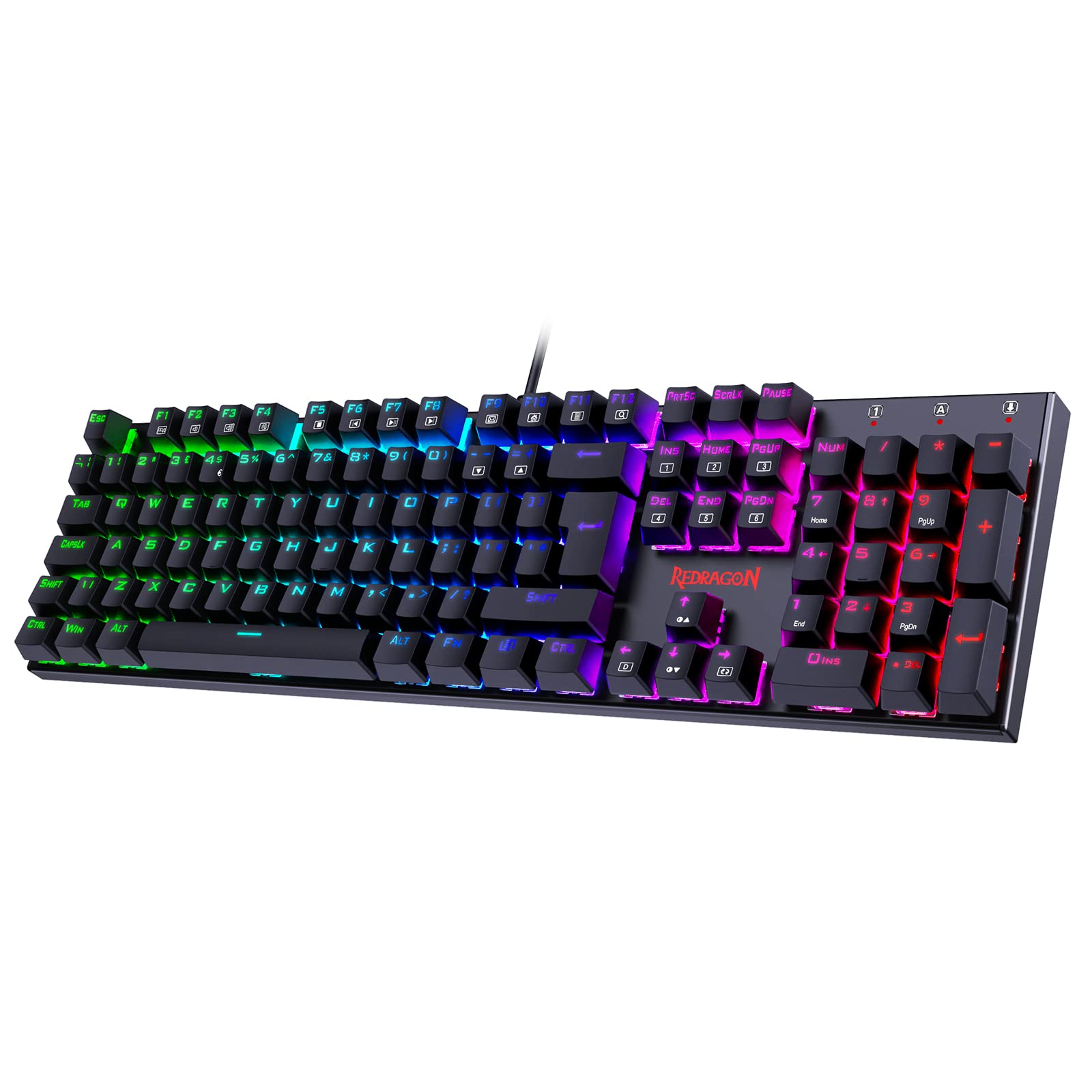
Quick keyboard reviews are useless. You can't judge switches, keycap shine, or stabilizer rattle in a day. I've been typing and gaming on this Redragon for about a month now, through work deadlines and ranked matches. The initial impressions? Gone. What's left is what actually matters.
What You're Actually Getting: Switch Performance
Let's talk about what matters. The budget mechanical keyboard market in the UK is crowded with membrane boards pretending to be mechanical and actual mechanicals with rubbish switches. Under £50, you're typically looking at Corsair K55 (membrane), Logitech K120 (also membrane), or sketchy Amazon brands with mystery switches.
This Redragon sits in a different category. These are proper mechanical switches, not membrane domes with extra click noise.
Linear switches with no tactile bump. Smooth travel until bottoming out, though there's slight scratchiness compared to Gateron or Cherry. Gaming-focused with quick actuation. Not the quietest option for shared spaces.
After about a month of daily use, the switches remain consistent. No stuck keys, no chattering. I've tested them in Valorant, Apex Legends, and CS2. The light actuation force works brilliantly for counter-strafing and quick peeks. But there's a learning curve if you're coming from membrane boards - you'll accidentally trigger keys for the first few days.
The hot-swap sockets are the real winner here. Pull a switch, swap it out. No soldering iron needed. Redragon includes four spare switches, which is proper sensible. When the spacebar switch started feeling scratchy around week three, I swapped it out in 30 seconds.

Keycaps and Build: Where Corners Get Cut
Standard ABS keycaps with laser-etched legends. They feel slightly textured out of the box but will develop shine on WASD and spacebar within 2-3 months of regular gaming. The legends are sharp initially but expect some fade after a year. Budget £20-30 for PBT replacements if you want longevity.
Right. The keycaps are rubbish long-term. But that's expected at this price point. After about a month, my WASD cluster shows early signs of shine. The spacebar's already getting that greasy look. This is standard ABS behaviour - Cherry's own ABS caps do the same thing, just slower.
The good news? Standard MX-style stems mean any aftermarket keycap set will fit. I've tested a cheap PBT set from Amazon and they transformed the typing feel completely. Less hollow-sounding, better texture, no shine. If you're serious about this keyboard, factor in keycap replacement costs.
- Case Material: ABS plastic - Minimal flex on the main deck, slight give on the edgesDeck rigidity under pressure
- Plate Material: Steel - Provides solid typing feedback but amplifies noiseAffects acoustics & typing feel
- Stabilizers: Plate-mount - Slight rattle on spacebar and right shift, but better than expected. Not factory-lubedLubed from factory?
- Weight: 850g - Stays put during gaming, doesn't slide aroundHeavier = more stable
- Feet/Angle: Two-position flip-out legs (3° and 7°), decent rubber that doesn't slipTyping ergonomics
The build quality punches above its weight class. There's no aluminium here - it's all plastic - but the construction is solid. I've transported this keyboard in a backpack three times for LAN sessions. No creaking, no loose bits. The USB cable is permanently attached (not detachable), which is annoying for transport but one less thing to break.
Stabilizers deserve special mention. At this price, I expected rattly spacebar hell. What I got was... acceptable. There's some rattle on the spacebar if you hit it off-centre, but it's not the wire-pinging nightmare you get on cheap boards. The right shift has minimal wobble. Left shift is perfect. If you know how to lube stabilizers (it takes 20 minutes and for supplies), you can eliminate most of the rattle.
Layout and Features: Full-Size With Compromises
Standard UK ISO layout available. Media controls require Fn + F-keys (no dedicated wheel or buttons). Macro recording available through software. No wrist rest included, but the 7° tilt angle is comfortable for most users.
It's a full-size board. You get the numpad, which I actually use for spreadsheets and accounting software. If you don't need the numpad, there are TKL (tenkeyless) options from Redragon that save desk space. But for office work mixed with gaming, full-size makes sense.
Media controls are hidden behind Fn combinations. Fn + F9/F10/F11 for volume, Fn + F12 for mute. It works, but I miss dedicated media keys after using boards with volume wheels. You adapt after a few days, but it's less convenient when you're mid-game and need to adjust Discord volume.
The suspended key design (keys floating above the plate) makes cleaning easier. Crumbs and dust don't get trapped under the keycaps as easily. I've given it a quick vacuum twice - takes 30 seconds instead of pulling every keycap.
Gaming Performance: Where This Board Shines
Tested in Valorant, CS2, and Apex Legends. No missed inputs during rapid WASD movement or crouch-spam. The 1000Hz polling rate is standard for wired gaming keyboards - you won't notice a difference from more expensive boards. Full N-key rollover means every keypress registers, even when mashing multiple keys simultaneously.
Gaming performance is where this keyboard justifies its existence. I've put it through proper testing - not just typing tests, but actual ranked matches where milliseconds matter.
Valorant: Counter-strafing feels responsive. The light linear switches let you quickly alternate A-D for accurate shots. I tested this against my main board (Ducky One 3 with Cherry MX Reds) and honestly couldn't feel a performance difference. The Redragon's 2mm actuation point is identical to Cherry's spec.
CS2: Bunny-hopping and crouch-spamming work perfectly. No missed inputs during rapid crouch-jump combinations. The full N-key rollover means you can press as many keys as needed simultaneously - important for complex movement tech.
Apex Legends: Movement-heavy gameplay (tap-strafing, wall-bouncing) works fine. The light switches reduce finger fatigue during extended sessions. After a 4-hour ranked grind, my fingers felt less tired compared to heavier switches like Cherry MX Blacks.
Input lag is imperceptible. The 1000Hz polling rate (1ms response time) is standard for wired gaming keyboards. Some expensive boards now offer 8000Hz polling, but blind testing shows most people can't tell the difference. Unless you're playing at semi-pro level, 1000Hz is plenty.

Connectivity and RGB: Wired With Excessive Lighting
It's wired. The cable is braided (feels decent quality) and permanently attached. That's a negative for me - I prefer psu" class="vae-glossary-link" data-term="modular-psu">detachable cables for easier transport and future upgrades. But detachable cables add cost, and something had to give at this price point.
The cable is 1.8 metres long, which reaches my PC under the desk without issues. No USB passthrough port on the keyboard itself, so you can't plug your mouse into it.
- Software: Redragon Software - Required for per-key customisationDownload size & bloat level
- Software Quality: Basic but functional. Occasionally crashes on Windows 11
- Profile Storage: Onboard memory stores one custom profileWorks on other PCs?
The RGB is excessive. Properly bright, visible even in daylight. You get 18 preset lighting modes accessible without software - breathing, wave, reactive typing, static colours, and various rainbow effects. Brightness adjustable in four levels.
I don't care about RGB. But if you do, this delivers. The per-key lighting means you can customise individual key colours through the software. Want WASD in red and everything else blue? You can do that. Want your ability keys highlighted in different colours for MOBAs? Also possible.
The lighting doesn't interfere with gaming performance. No flickering, no lag when effects change. You can turn it off completely (Fn + brightness down repeatedly), but there's still a faint glow from the PCB LEDs. Proper off would require unplugging it.
- Software Name: Redragon Software SuitePlug & play without software?
- Required: No for basic use, yes for macros and per-key RGBPlug & play without software?
- Key Remapping: Yes, full remapping availableAny restrictions?
- Macro Recording: Yes, both on-the-fly (Fn + F4) and through softwareOn-the-fly or software only?
- Profile Storage: 1 onboard profilePortable between PCs
- Software Quality: Functional but dated UI. Crashes occasionally on Windows 11. Gets the job done if you don't expect polish
The software is available from Redragon's official website. It's not mandatory - the keyboard works fine without it. But you'll need it for macros, per-key RGB customisation, and remapping keys.
I've had it crash twice during about a month of testing, both times when trying to save complex RGB profiles. It's not elegant software. The UI looks like it's from 2015. But it does what it claims - you can record macros, remap any key, adjust lighting, and save one profile to the keyboard's onboard memory.
Macro recording works both ways: on-the-fly (Fn + F4, then record your keystrokes) or through the software for more complex sequences with delays. I've set up building macros for Fortnite (floor-wall-ramp combinations) and they fire consistently.
How It Compares: Budget Mechanical Landscape
At the budget end of mechanical keyboards, you're comparing against membrane boards pretending to be mechanical (Corsair K55, Logitech G213) and actual entry-level mechanicals (Razer Cynosa, HyperX Alloy Core). The Redragon sits firmly in the "proper mechanical switches" category, which immediately separates it from membrane competitors.
| Feature | Redragon (This Review) | Corsair K55 RGB Pro | Razer Cynosa V2 |
|---|---|---|---|
| Price | £34.84 | ~£45 | ~£55 |
| Switches | Mechanical (Linear Red) | Membrane | Membrane |
| Keycaps | ABS (laser-etched) | ABS | ABS |
| Hot-Swap | Yes | No | No |
| Connectivity | Wired USB | Wired USB | Wired USB |
| Build Quality | Solid plastic, steel plate | Plastic, soft feel | Plastic, soft feel |
| Best For | Gaming + switch customisation | Quiet office use | Razer ecosystem users |
Against true mechanical competitors, the Redragon holds up well. The Tecware Phantom (around £45-50 when available) offers similar switches but worse stabilizers. The RK Royal Kludge RK61 (£50-55) is a 60% layout with Bluetooth, but you lose the numpad and arrow keys.
What you're not getting at this price: aluminium case, PBT keycaps, pre-lubed stabilizers, wireless connectivity, or premium switches like Cherry MX. Those features start appearing around £80-100 with boards like the Keychron C1 or Ducky One 3.
According to RTings' mechanical keyboard testing, budget boards under £50 rarely offer hot-swap sockets. That's where this Redragon provides unusual value - you can experiment with different switch types (Gateron, Akko, even Cherry MX) without buying a new board.

Value Analysis: What You're Actually Paying For
In the budget tier, you typically choose between membrane boards with gaming branding or basic mechanical keyboards with soldered switches. This Redragon offers genuine mechanicals with hot-swap capability, which normally appears in the £80-100 mid-range category. The trade-offs are ABS keycaps, plastic construction, and basic software - acceptable compromises for the price.
Breaking down the value: You're getting mechanical switches (normally £30-40 worth), hot-swap sockets (adds £15-20 to manufacturing cost), full RGB (£10-15 value), and macro functionality. That's £55-75 worth of features at roughly half the price. The savings come from ABS keycaps instead of PBT (saves £8-10), plastic case instead of aluminium (saves £20-30), and no-frills software. If you're exploring options, our guide to gaming keyboards gift ideas under £100 covers other solid alternatives in this price bracket.
The hot-swap capability is the value multiplier. Buy a pack of Gateron Yellow switches (£15 for 110) and you've transformed the typing feel. Add PBT keycaps (£20-30) and you've essentially built a £80-90 keyboard total. Or keep it stock and accept that you'll replace keycaps when they shine.
What works. What doesn’t.
6 + 5What we liked6 reasons
- Genuine mechanical switches with smooth linear action for gaming
- Hot-swap sockets let you experiment with different switch types without soldering
- Solid build quality with minimal flex and good desktop stability
- Exceptional value - mechanical features that usually cost £80-100
- Full N-key rollover and 1000Hz polling for competitive gaming
- Bright, customisable RGB with onboard profile storage
Where it falls5 reasons
- ABS keycaps develop shine within 2-3 months of regular use
- Software is buggy on Windows 11, occasionally crashes when saving profiles
- Spacebar stabilizer has noticeable rattle when pressed off-centre
- Permanently attached cable makes transport and future upgrades awkward
- No dedicated media controls - everything requires Fn combinations
Full specifications
8 attributes| Switch type | Redragon Red |
|---|---|
| Layout | Full-size |
| Connectivity | USB wired |
| Backlight | RGB |
| Backlighting | RGB |
| HOT swappable | false |
| Switch actuation | linear |
| Type | mechanical |
If this isn’t right for you
2 options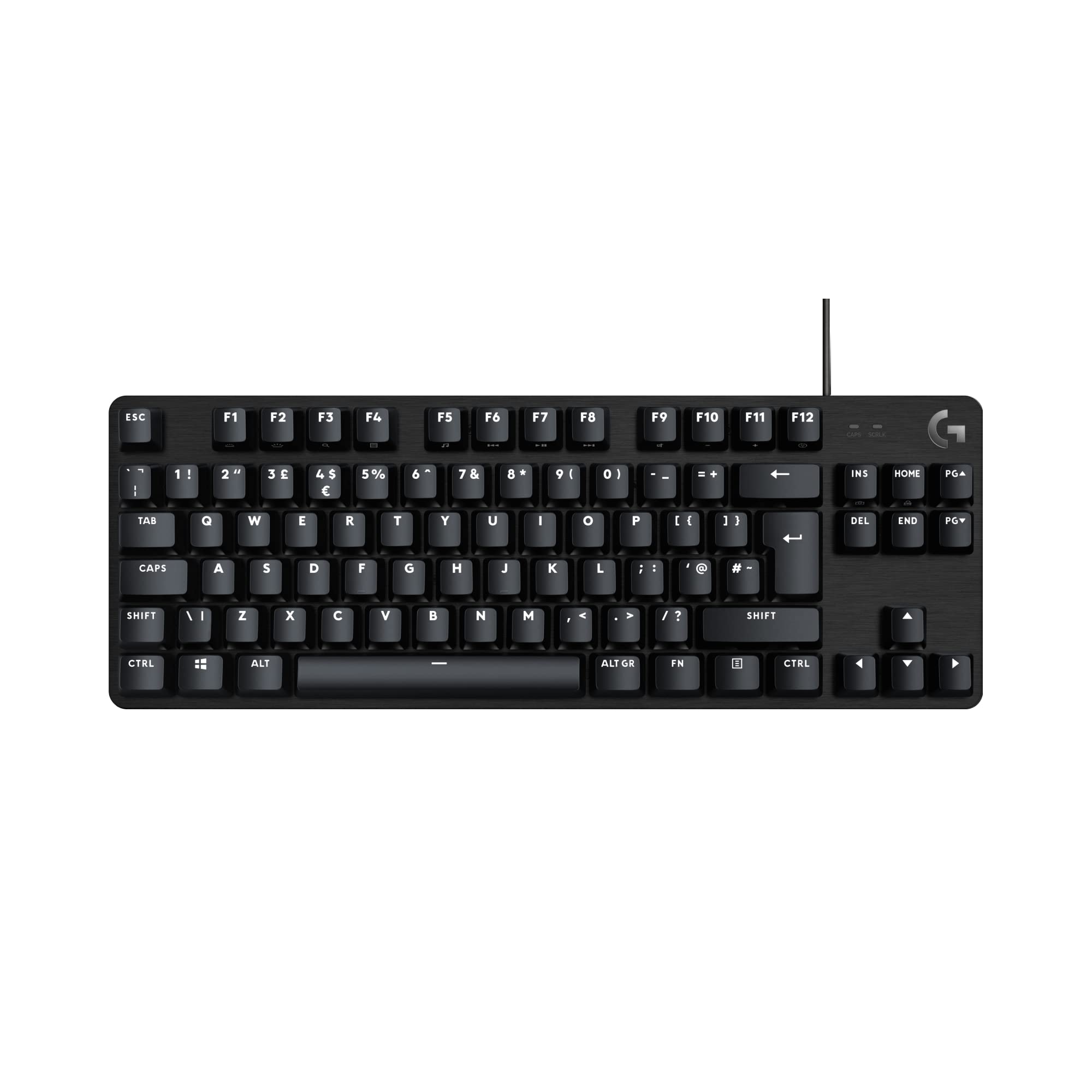 8.5 / 10
Logitech G413 TKL SE Gaming Keyboard Review UK (2026) - Tested & Rated
£43.99 · Logitech G
 7.5 / 10
Razer BlackShark V2 X Xbox Gaming Headset, 50mm Drivers, Cardioid Mic, Lightweight, Comfortable, Noise Isolating Earcups, for Xbox Series X, Series S, PS5, PC, Switch via 3.5mm Audio Jack - Black
£37.89 · Razer
Frequently asked
5 questions01What switches does the Redragon mechanical keyboard use?+
The Redragon uses proprietary red linear switches similar to Outemu reds. They have a 45g actuation force, 2.0mm actuation point, and 4.0mm total travel. They're smooth linear switches designed for gaming, with no tactile bump. There's slight scratchiness compared to premium switches like Cherry MX or Gateron, but performance is solid for the price. The keyboard is hot-swappable, so you can replace them with any MX-compatible switch.
02Is the Redragon Gaming Keyboards UK good for gaming?+
Yes, it's excellent for gaming at this price point. The linear switches provide quick 2mm actuation for fast response, full N-key rollover ensures every keypress registers, and the 1000Hz polling rate delivers standard gaming performance. Tested in Valorant, CS2, and Apex Legends with no missed inputs during rapid movement or ability spam. The light 45g springs reduce finger fatigue during extended sessions.
03Is the Redragon keyboard good for typing?+
It's decent for typing but not ideal for professional use. The linear switches lack tactile feedback, which can increase typos initially. The light actuation force reduces finger fatigue during 2-3 hour sessions. However, the ABS keycaps will develop shine within 2-3 months of regular use. For serious typing work, budget an extra £20-30 for PBT keycap replacements. The OEM profile is comfortable for most users.
04Is the Redragon mechanical keyboard loud?+
It's moderately loud, especially compared to membrane keyboards. The linear switches are quieter than clicky switches, but the steel plate and plastic case amplify bottom-out noise. Not suitable for quiet office environments without O-ring dampeners. Fine for home use or gaming setups. The noise level is typical for budget mechanical keyboards with unlubed switches and stabilizers.
05What warranty and returns apply to the Redragon keyboard?+
Amazon offers 30-day returns on most items. Redragon typically provides a 2-year warranty on keyboards. You're also covered by Amazon's A-to-Z guarantee for purchase protection. If the switches aren't right for you or you experience any defects, you can return it hassle-free within the first month.